I’m doing some tests of my MPCNC as a pen plotter. I’m using a rollerball paint pen since that’s the only way to get silver or white ink. The nature of this pen is that if it’s touching a surface, it’s letting paint flow.
Estlcam seems to pause for a moment or two after it plunges a tool. Since the pen is in contact with the paper over these few moments, I have a big blob of ink from where the pen landed. You can see it in action in this video: https://i.imgur.com/z0XxKZa.mp4
It occurs regardless of feed speed - this run was done at 400 mm/sec, a previous run was around 200 mm/sec. It also occurs whether I’ve got the plunge feedrate at 1 mm/sec or 10 mm/sec, and I’ve tried 0.8 mm and 0.6mm plunge depth. It seems like there’s some kind of setting where Estlcam will just pause for a moment or two before going on to move.
Does anyone know what might be going on or some way to get it to just move as quickly as possible once it’s completed the plunge?
Estlcam differentiates between travel moves and plunge moves. For instance, my travel moves are 8000mm/min, my plunge moves 1200mm/min on most tools nowadays. So it travels at 8000mm/min until it’s 0.5mm above the material (or 1, I am not sure, never bothered to check), then it switches to the feedrate for the tool. So maybe set your pen’s cutting depth to 1mm and put zero 0.8mm above the sheet, then it will travel down to 0.8mm above quickly and then slow down for the last 1mm for the actual stroke.
I upped the Z feed rate but that doesn’t seem to change anything. It still waits a second or two after completing the Z feed and before moving into X/Y. It lifts off and moves down at the Z feed speed for sure but it’s almost like there’s some other pause between those.
Is the Rapid Z setting where Estlcam switches from Fz to final distance? Is that what I should be editing instead of Fz?
I’m using the FluidNC controller that’s defaulted on the Jackpot board - I’m away from my machine at present but it’s the Z number that can be changed during jogs.
I tried changing that as well, and even at high Z speeds set either there or in Estlcam, there’s still a few seconds after a plunge where the pen sits in contact with the paper and causes plunging. Unfortunately nothing changed even at REALLY high speeds. It almost seems like there’s some kind of pause or halt when it waits for a cue to start. This sort of thing isn’t a problem if it’s a router waiting to move, or a laser not yet powered on, but it’s almost an instant disqualifier for paint pens.
Is there some other setting elsewhere in the Jackpot or Estlcam to control how long it waits after a plunge before moving?
This rather sounds like a Jackpot problem then, because Estlcam does not change anything about those settings on your JP. But as Jason said: Gcode helps.
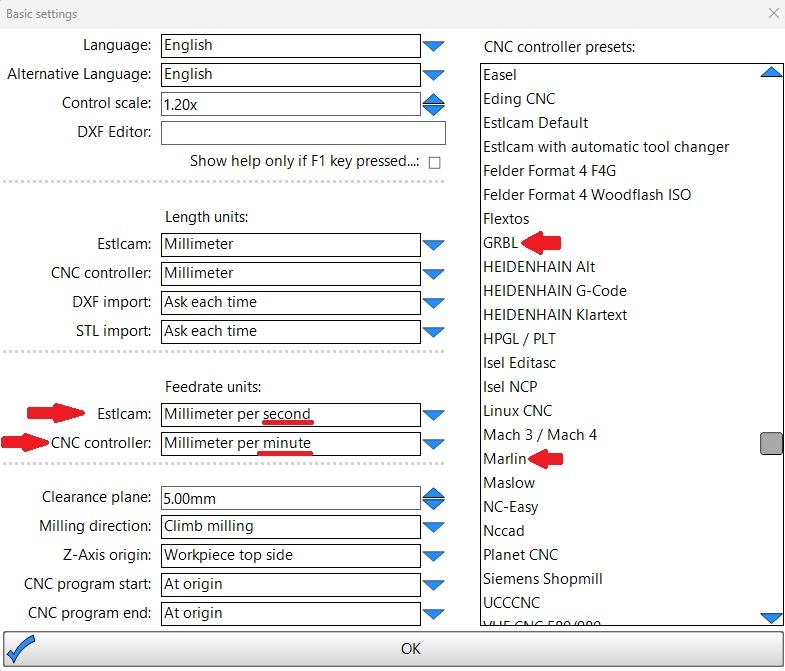
Yikes, that’s slow indeed. I’ve got Fz set at 10 mm/sec, should I boost it to some drastically higher speed or is that 10 mm/min speed coming from somewhere else?
Can confirm it moves REAL fast indeed. Changing to mm/min did the trick - I have no clue why I put it to mm/sec, but it comes rapidly off the paper. My only current issues deal elsewhere with the MPCNC - thank you all so very much for your help!