After creating and exporting a .gcode file from ESTLCam I attempt to run it via FluidNC. I receive: Alarm: 17 Improper Gcode in Line 1. If I open the same gcode file in a text editor, press Enter, delete the new line, and save, the gcode file will work. I am using UTF8 encoding within ESTLCam and I have setup ESTLCam using the settings recommended in ESTLCam basics on the docs section. It’s worth noting I am on a new machine and previously had ESTLCam setup and running properly. Any help is appreciated! My LR4 is setup per the assembly instructions with the Jackpot control board. No modifications at all. Thanks!
Open that file, copy that line, paste it here in the forums.
Use the preformatted text link from the text editor toolbar when you do.

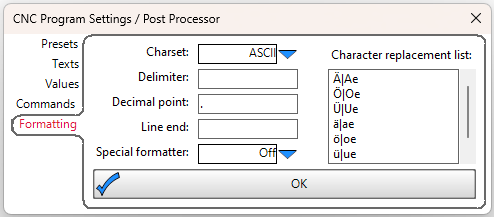
I was having the same issue the other day on the plasma actually - EstlCAM seemed to be spitting out UTF-8 BOM rather than plain UTF-8. Unfortunately don’t have the laptop to hand presently to check if I’ve simply set the charset wrong in that settings menu - which I didn’t know existed! (the formatting bit specifically, that is)
(Funny that I’ve had more issues with estlcam native than estlcam in bottles  )
)
Thank you! This fixed the issue. I don’t believe I made this modification on the other machine. It seemed to work directly out of the box. For what it’s worth I moved from Mac (Intel) using Wine to Mac (Apple Silicon) using Wine. Maybe I did something different during installation that prompted a need to make this change.