Hey everyone. I just finished building and dialing in my LowRider V4. I am trying to run the crown file i exported from EstlCAM and put in the Jackpot 3 board with the micro SD card. Everytime i hit run/play on the file in FluidNC I get an Error 17 and nothing moves. It says gcode error. Anyone know what Error 17 means and what i might be doing wrong?
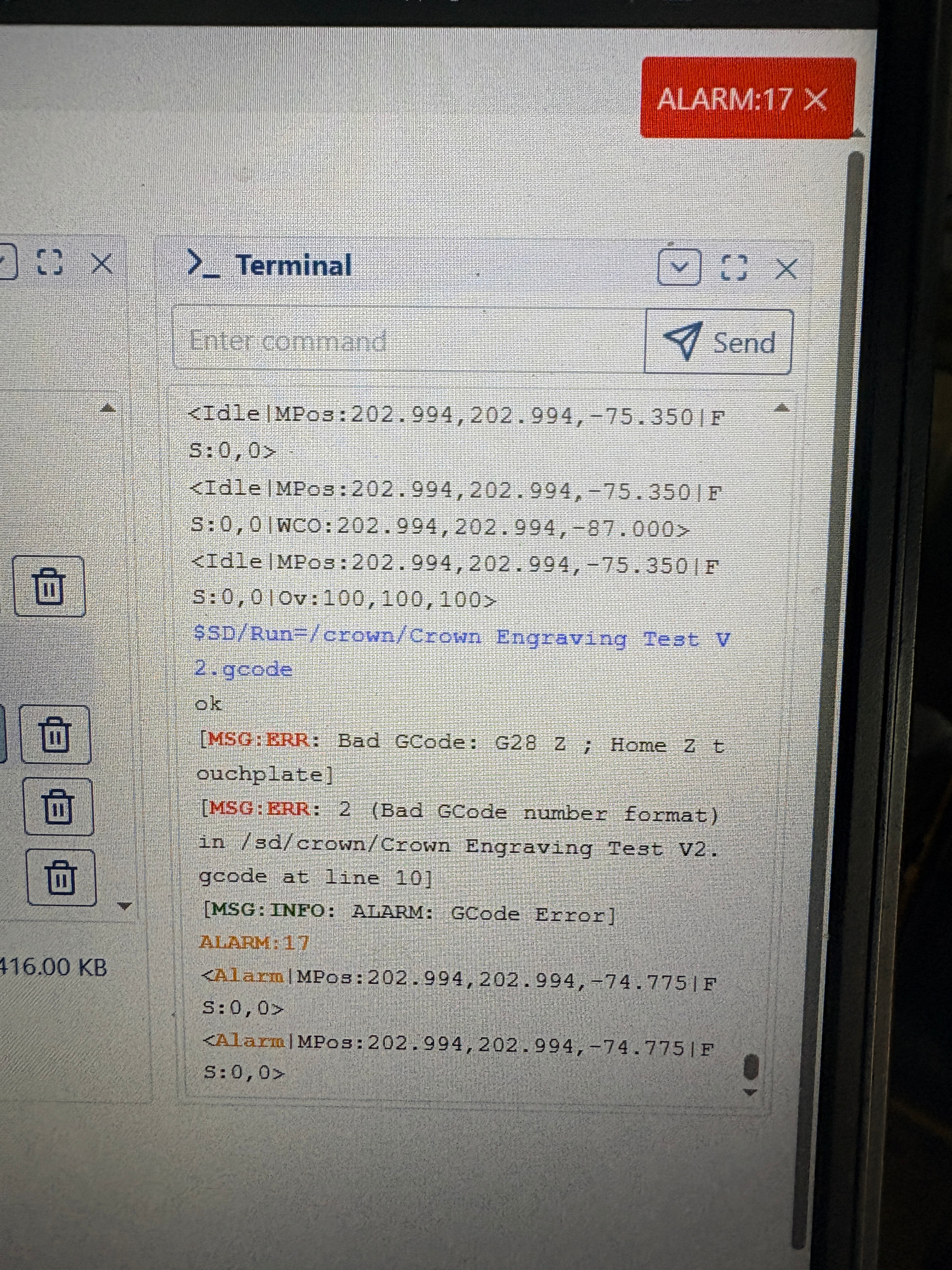
G28 is not the right gcode for FluidNC for homing. It should be G38.2 as shown in the Estlcam setup in milling basics.
1 Like
AFAIK, G38.2 is for probing (not for homing), both in Marlin and in GRBL/FluidNC
G28 is a Homing command in Marlin and GRBL, but appears to be a move to a predetermined position in FluidNC
From Supported Gcodes | Wiki.js
G38 Probing
G38.n axes Pnn.nnn
- Standards compliant
- G38.2 Probe towards the workpiece. Stop on contact. Error on failure.
* G38.3 Same G38.2, but no error on failure.
* G38.4 Probe away from the workpiece. Stop on loss of contact. Error on failure.
*G38.5 Same as G38.4, but no error on failure.
(since v3.7.6) FluidNC Only (same as above except always incremental and in millimeters) this does not change the current G20/G21 or G90/G91 state
* G38.6 like G38.2
* G38.7 like G38.3
* G38.8 like G38.4
*G38.9 like G38.5
The move will use the existing feed rate and distance mode (for G38.2-G38.5) if none is provided
The P parameter is optional. It is used to set the work location of the Z with the P parameter being the offset from a plate etc. Use this to set your touch plate thickness (ideally measured with a micrometer). The G43 tool length offsets and G92 system coordinate offsets are accounted for when using the P parameter.
You will get an error if the probe is touching before the probe command on G38.2 and G38.3. You will get an error if the probe is not touching before the command on G38.4 and G38.5
G28 Predefined Position
G28 is a machine coordinate location stored in non volatile memory. It will go to the same location regardless of the coordinate system or G92 offsets. You can view the current setting via the $# command.
G28This does a rapid move to the location.G28 axesIf you specify axis values it will first do a rapid move to that location in your current work coordinate system. Then it will do a rapid to the stored G28 location. It will only move on axes specified.G28 Z10will move to work Z10 then move to the Z location stored in G28. No motion on X or Y.G28 X10 Y20will move to work X10 Y20 then to the G28 location for X and Y. There will be no motion on Z or any other axes you have defined.G28 G91 X0This is a way to move only to the X stored in G28. G91 X0 is a relative move of 0 so there will be no move before the G28 move. Again, only the X axis will move. Note: You will remain in G91 after the move. If you were in G90 before the move, you may want to send a G90 to return to that mode.
G28.1Use this to set the G28 offset to the current location in machine coordinates.
Sorry, you are correct. For FluidNC, homing Z is $HZ.
1 Like
Did you run the premade crown already to see whether it’s working otherwise?
1 Like
are you using the default marlin basic machine setup in estlcam or GRBL? If unsure, just go to the basic settings and select GRBL and then regenerate the gcode file.
Can you check what encoding the gcode was saved in? On one of my laptops Estlcam saves UTF-8 BOM not plain UTF-8 for some reason, which causes that error