For folks not comfortable with network stuff, please ignore my post. Please follow the doc’s https://docs.v1e.com/electronics/jackpot3/#initial-setup network-related instructions. That path is the yellow brick road for most probable success.
SYN… Question for networking folks lurking here, and other folks with Devices able to connect to multiple networks simultaneously…
Question:
What’s a recommended alternative private IP address for FluidNC AP when 192.168.0.1 and 10.0.0.1 are already used by other home routers, modems, or network gear?
Topology:
My main Dev/CAD/CAM Windows 11 PC machine :
Has a wired ethernet connection to a 192.168.0.1 router.
Also has a wifi adapter card that I use to connect to other wifi networks, like FluidNC’s AP.
This setup lets me do regular internet stuff, while also communication with the FluidNC AP.
10.0.0.1 requests go to Xfinity cable modem.
Recent Config (partially works):
Until today, I’ve been successfully configuring FluidNC IP AP with 1.2.3.4, I chose that because it’s easy to remember, and something I saw WLED doing.
Problem:
But… 1.2.3.4 is NOT a valid private address space per RFC1918. Since 1.2.3.4 is public/routable, Chrome and other RFC abiding browsers will prevent SSL served sites from using javascript to fetch/websocket requests from insecure endpoints.
Fix (works, but is it ok?):
So, I need to pick another IP for my FluidNC that’s a private address space. For now, I’m using…
10.42.42.1
Because:
10.x.x.x is valid private IP, so browsers will allow insecure websocket (after User confirms Allow access).
10.42.42.1 less likely to conflict with existing devices?
42 has galaxy vibes, so easier to remember, for me, and hopefully others too.
Request for feedback/suggestions:
If someone has a strong opinion about using something different, then, I’d appreciate learning some stuff. Couldn’t see any convention beyond 192.168.0.1 which for my situation doesn’t work well.
You as a user get to choose how to lay out your internal networks.
Most folks will use the /16 of the 192.168 network and subnet that into /8s.
So, for example you could have networks of 192.168.0.xx, 192.168.1.xx, 192.168.2.xx etc.
You have to define each of those when you use them with distinct gateways and have them masked as a /8 (e.g. net mask 255.255.255.0).
All sides (your PC, your target device(s), and the router(s) / Firewall(s) in your network) need to agree.
Where to go next depends on how you’ve got your network laid out. Do you have firewall(s), a DMZ, an IOT network, a guest network, etc. ?
I don’t think it matters as long as it’s in a private IP range. I mean you can go from 192.168.0.0 to 192.168.255.255 so unless you’ve got 10s of thousands of devices, I don’t see a problem?
You could just use 192.168.1.1, 192.168.2.1, etc.
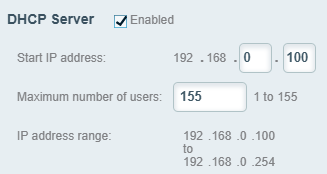
I have my router’s DHCP starting at 192.168.0.100 so I’ve got 155 IPs I can use and can use static IPs below that.
I agree with Jason and Jim, I use 192.16.x.x as my architecture simply because it’s the same network that has been evolving for over 20 years. Here is mine as an example:
192.168.1.1 - Primary access
192.168.2.1 - VLAN - IOT devices that are only accessible to Home Assistant on 1.1 (Jackpot3 is on this one in STA mode)
192.168.3.1 - VLAN - DVR network.
My primary computer and iPad have access to all 3 of these networks with privileges to the different VLAN’s.
I may be wrong, but it sounds like you are hosting 3 entirely different networks which sounds less than ideal. I recommend setting up different VLAN’s on your router, then you can give granular control of what has access locally to what and to the wider internet. Then put your CNC in STA mode and hide it in a VLAN.
What networking equipment do you have, TP-Link, Unifi, open source?