Guitar bodies and pickguards hasn’t been too challenging with 2D CNC in EstlCAM. I now have the necessary 3D STL files and want to try 3D CNC guitar necks, but doing so in EstlCAM looks a bit more intimidating than 2D. If anybody has made guitar necks with EstlCAM/Lowrider (I have V4), I would appreciate some pointers and advice.
I haven’t done it yet but I’m considering using kiri:moto for the 3d parts of guitar building. Here is a video showing how they set up cam for a guitar neck and do 2 sided 3d milling. https://youtu.be/Kq0kh8yvI6k?si=wD1KT4OAxiMcRPp4
If you use onshape you can add kirimoto as a plugin and run it through the browser. Otherwise you can just install it on your computer like normal.
1 Like
Thanks for the link. It looks like a much more usable and flexible program for 3D. I’ll have to watch the video a few more time and see if I can replicate all the steps with my 3D files. Definitely a lot more complicated than 2D CNC.
It looks like they done some pretty good improvements since the last time I played with it. I need to revisit it as well.
Have you noticed that the cutting time estimates are correct? I was getting some really long times when I was first looking at it but that could have been user error.
One challenge I’ve seen with kiri:moto too is the layout changes with the versions more than other software I’ve seen. So it’s probably best to match the version he’s using in that video and follow along. That is one nice thing about the onshape in browser option, you can select versions from a drop down and reload rather than reinstalling on your machine.
As for the time estimates I’ve wondered the same thing. I haven’t actually done a real job from kiri:moto yet. I had planned to start a cnc assisted acoustic guitar build last may but one thing lead to another and as soon as I finish a bathroom vanity for my wife I can start haha
The first thing I’ll cut is a radius dish which is basically carving a small bit of a 20 foot sphere into some mdf. Kirimoto has given me some crazy time estimates on that. Maybe I’ll try to run that job this week and report back.
1 Like
I downloaded the latest version and noticed the UI being quit different. I couldn’t find earlier version, but at the moment I’m running it as a stand aloe app. I’ll play around a bit and see if I can find the new buttons and tab to replicate his steps. Microsoft’s Azure is down so I can’t look into OnShape for now.
Hi @LarryC
I have been working with 3D-milling (EstlCAM) the last 15 months. It was a real challenge … and I had to try a lot of different ways till I found a possibility to get quite exciting solutions.
My challenge was:
- 2 side milling
- My parts are ca. between 80 to 105 cm but my milling bed supports only a max. of 55 cm
- EstlCam V11 (the version 1 use) has some special bugs. I don’t know if these bugs are solved in newer version. In my case, after creating the nc-file, I need to change the gcode manually to get the cnc running. Otherwise it will crash!
As mentioned I found some possibilities to get very nice results but …. running a long way.
So if you have some questions regarding I can try to give you some ideas how to solve.
In my opinion the guitar neck should be quite easy to mill.
Ciao
DJ
That is because you have the File Extension at the default setting of “nc”. Change this in Setup - CNC Program to “gcode” instead. (Same in both v11 and v12 - not a bug)
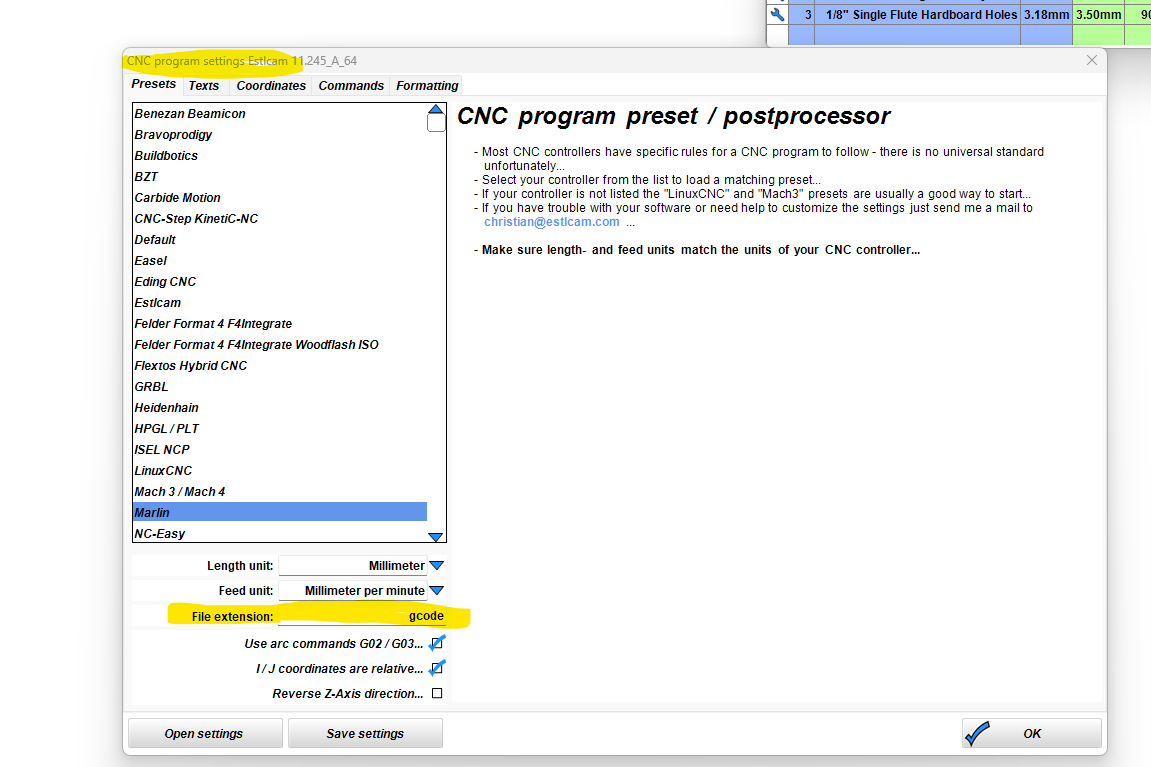
It is not the file extension, when I talk about a bug. 
I know where to change the extension.
The code in the file is wrong and it doesn’t matter having a “.nc-file” or a “.gcode-file”.
So creating the milling code in special situations, I have to edit the code and to change some stuff within the code manually. Otherwise the cnc crashes into the endpoints! This is the bug in Version 11.x
And based on the parts I create and my restrictions in the bed-dimensions I always run into these situations to change the milling code manually. But I got used to it and so it is an effort of 1-2 minutes.