To add, when machine lifted off z stub the linear rails glide nicely. When I say relieve weight, stop it from falling back down.
From what port? Or are you saying both parts are having the same issue?
What I am getting at is any binding is bad. If they are 100% smooth then it should be okay. With that said, if it gets significantly worse with weight, your Z stubs could be mounted to the xz plates slightly crooked and causing the brass nut to sort of pinch and get difficult to move.
The Z axis can lift a lot of weight, but it can not overcome binding.
We have a few more things to try but let’s wait until you confirm this posts first question.
2 Likes
How strong do X and Y feel?
What power supply are you using?
Turn the current up 50 more on each axis, save at the bottom of that screen and then use the save macro, then reboot and try again.
The video seems like your axis is moving pretty fast for homing.
What firmware version? If it is not 3.9.9 you should update.
1 Like
From port C, only steppers having issues are on port B/C. I swapped Y and Z on the jackpot. Y1 was now having issues on Port C. I really do believe there is an issue on Port B/C. But will keep exploring whatever you have to try.
I would like to confirm then that it is not crooked and binding.
Zero issues, amazing. I tested them extensively thinking I was overthinking the Z axis issue.
The one provided by the kit on V1E. Model: JJY240025
Up 50% it is. Everything is now on 1.4 & 1.6. I will say the issue is different… I had something odd happen. Z1 axis is more reliable. Not 100% reliable.
I had moved it down 25, Z1 lost power momentarily, dropped down from weight. Stopped. I had to refresh my fluidnc webui as it dropped my device. Then Z1 was able to jog and home again. A power cycle was not needed unlike before.
Tested again, same issue happened again. Moved down 50 this time. Lost power momentarily, dropped down from weight and then caught itself. Like the JP momentarily restarted, the webpage didnt register a press and was delayed 2-3 seconds then moved again.
When swapped z and Y axis on JP the z axis homed very slow in comparison to normal wiring configuration.
3.9.9
I appreciate all the assistance. The current made a big jump. The table is 50” x 98”, to fit a full sheet of MDF. Maybe a bit heavy for it on the Z. Hanging up the hat for the night. Happy to try whatever suggestions come in tomorrow!
2 Likes
not 50% just add 50, so 850-900
1 Like
Interesting. B and C are on the same chip, but issues would normally show up in $ss if there were issues.
Do the heatsinks on B or C feel the same temp as XYZ when it has been sitting idle for a while?
The steps per mm are different between those axes.
I have never heard of this, this is so odd. Any chance you have some wires pinched under your board? I noticed you have wires under your JP3. We used to run wires under the JP1, we don’t do that any longer as I added heatpipes to the bottom of the JP3.
What is heavy?
I have a few vidoes of 20+ lbs added to the Z axis that already has a router and vac on it, it can handle it no problem.
1 Like
Lmao, okay ya. I was like I know the 2209 are rated to 2a but I was like kinda high. Uped by .05. 75 & 85 now.
Ill check the $ss during boot and when the stepper disconnects and report back. To add is there a possibility the AHCT595 chip is defective, incorrectly soldered? When I get back home today, ill power it up and apply slight pressure on the chip and see if there are any issues.
I am not able to keep the machine idle for more than like 5-10 minutes. Connection b/c steppers will disconnect. But within this time, no with the colder garage nothing is warm. Temp is 0-15 degress Celsius.
For testing purposes, the board is not in its case, wiring is around the board for easy access.
Disregard, just the Z axis assembly itself. But there’s no reason 2209s can’t handle the weight. Two of them at that.
1 Like
Not if it is working and not reporting an error. Slight possibility of a poor solder joint but I highly doubt that.
Take a picture and zoom in on the last two control chips just to take a look for yourself for something out of the ordinary.
Try the added current. Let me know if anything changes, if not I will want to get my hands on it for testing here. We have had two bad ESP32’s in this batch and that is extremely high. So I am leaning towards that if the current does not help.
1 Like
Ya, showed nothing. As soon as I touched the board Z2 shut down. Tried again couldn’t replicate.
Here is the $SS after Z2 disconnected on Connector C. No limits are connected just fyi when $SS ran. I am going to meter out the C connector and see what voltages are showing during operation & holding.
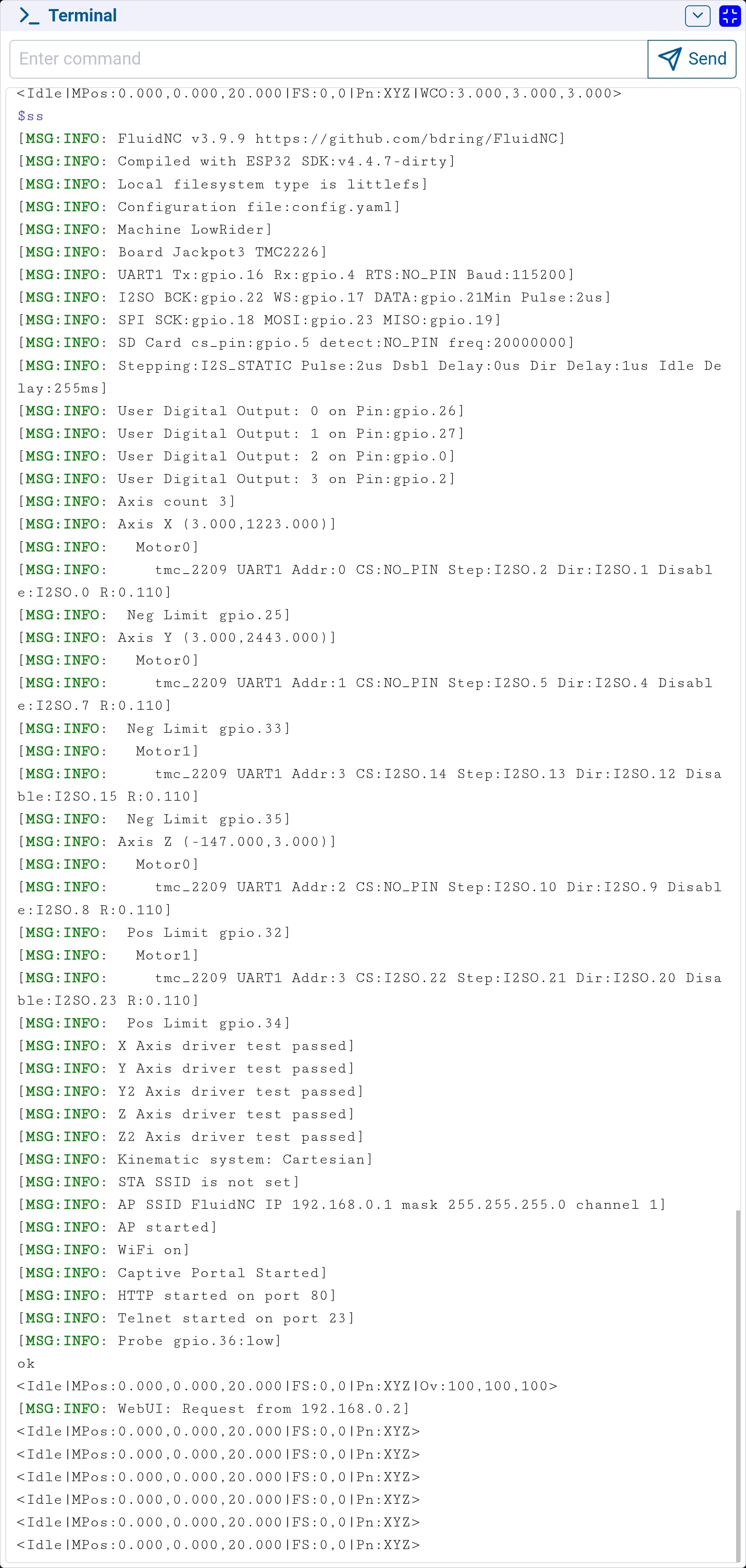
Nothing changed, failed just as quick
1 Like
Dir to gnd, showing ~12.65v every port. During jog Z & C are 60-70mV while others are 30-45mV When Z dies, C has no voltage. all others stay at 12.65v
Step to gnd close to ~10.5. During jog all goes to 0V then to 12.7 jog again goes to 0v, then to 10.5. Repeats. Although my equipment is not sensitive enough for this. Can’t measure pulses
En to gnd All @ ~23V.
Okay we need to swap it out. If you give me your order number I can email you a postage paid return label, USPS.
1 Like
Shouldn’t this be no more than 5V on any Strep, EN, or Dir pin?
Just following up on this one.
The board is here, I reflashed and plugged in some steppers. I have been running them back and forth all day, no issues.
Matt, you having any issues with the new board?