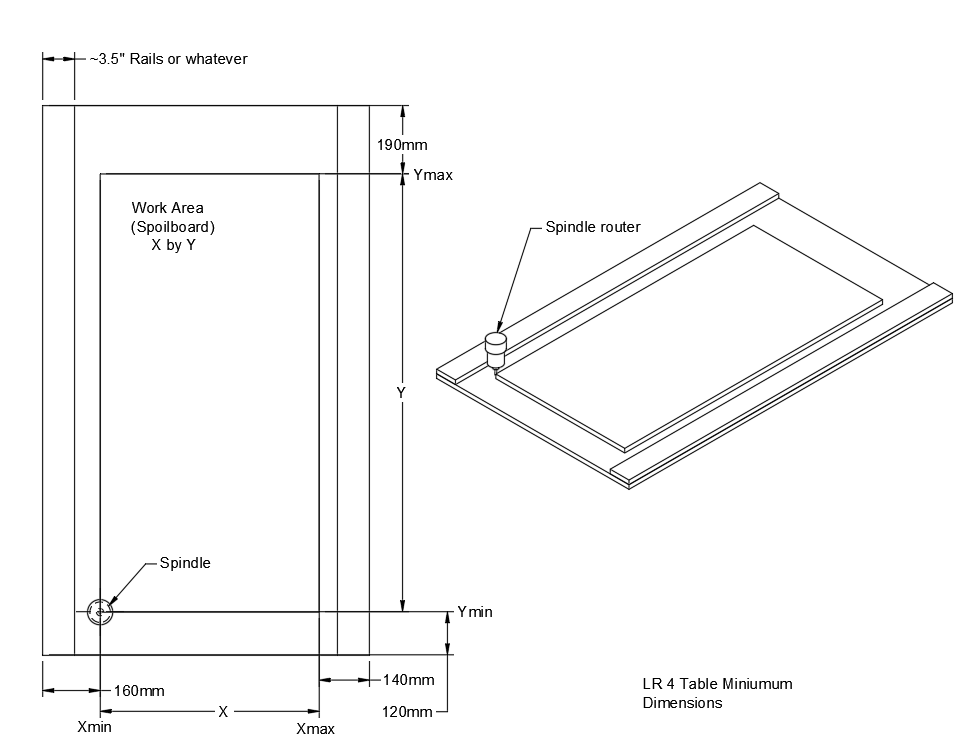
I’ve been planning a build for a LowRider for a while, but I’d like to confirm the working volume.
I want to be able to cut 4x8 sheet goods edge to edge. If I use the calculator to determine my rail lengths, do I need to add a couple inches to either dimension in order to get the cutter past the edges of the material? I’m not even sure working volume is the right term for this. Any help is appreciated!
If this helps at all. For my full built machines for 48" I build the beam at 1400mm. Which is about a half inch wider than what the calculator calls for. The calculator gives the EXACT beam length needed with zero extra room.
The build volume is what you especify in the calculator as a work area: 1220*2440 the suggestion for adding a little more is to compensate any pulloff you may need to add to get your build really square and have the final cutting area available. I have built my machines with an extra 50mm just in case