They need to match
At the HS now, of course my micro USB Data cable hasn’t arrived yet… But this is the results of my $SS
$SS
[MSG:INFO: FluidNC v3.8.0 https://github.com/bdring/FluidNC]
[MSG:INFO: Compiled with ESP32 SDK:v4.4.7-dirty]
[MSG:INFO: Local filesystem type is littlefs]
[MSG:INFO: Configuration file:config.yaml]
[MSG:INFO: Machine LowRider]
[MSG:INFO: Board Jackpot TMC2209]
[MSG:INFO: UART1 Tx:gpio.0 Rx:gpio.4 RTS:NO_PIN Baud:115200]
[MSG:INFO: UART2 Tx:gpio.14 Rx:gpio.13 RTS:NO_PIN Baud:1000000]
[MSG:INFO: uart_channel2 created at report interval: 75]
[MSG:INFO: I2SO BCK:gpio.22 WS:gpio.17 DATA:gpio.21]
[MSG:INFO: SPI SCK:gpio.18 MOSI:gpio.23 MISO:gpio.19]
[MSG:INFO: SD Card cs_pin:gpio.5 detect:NO_PIN freq:20000000]
[MSG:INFO: Stepping:I2S_static Pulse:4us Dsbl Delay:0us Dir Delay:1us Idle Delay:255ms]
[MSG:INFO: User Digital Output:0 on Pin:gpio.26]
[MSG:INFO: User Digital Output:1 on Pin:gpio.27]
[MSG:INFO: Axis count 3]
[MSG:INFO: Axis X (0.000,1220.000)]
[MSG:INFO:   Motor0]
[MSG:INFO:     tmc_2209 UART1 Addr:0 CS:NO_PIN Step:I2SO.2 Dir:I2SO.1 Disable:I2SO.0 R:0.110]
[MSG:INFO:  X Neg Limit gpio.25]
[MSG:INFO: Axis Y (0.000,2440.000)]
[MSG:INFO:   Motor0]
[MSG:INFO:     tmc_2209 UART1 Addr:1 CS:NO_PIN Step:I2SO.5 Dir:I2SO.4 Disable:I2SO.7 R:0.110]
[MSG:INFO:  Y Neg Limit gpio.33]
[MSG:INFO:   Motor1]
[MSG:INFO:     tmc_2209 UART1 Addr:3 CS:I2SO.14 Step:I2SO.13 Dir:I2SO.12 Disable:I2SO.15 R:0.110]
[MSG:INFO:  Y2 Neg Limit gpio.35]
[MSG:INFO: Axis Z (-300.000,0.000)]
[MSG:INFO:   Motor0]
[MSG:INFO:     tmc_2209 UART1 Addr:2 CS:NO_PIN Step:I2SO.10 Dir:I2SO.9 Disable:I2SO.8 R:0.110]
[MSG:INFO:  Z Pos Limit gpio.32]
[MSG:INFO:   Motor1]
[MSG:INFO:     tmc_2209 UART1 Addr:3 CS:I2SO.19 Step:I2SO.18 Dir:I2SO.17 Disable:I2SO.16 R:0.110]
[MSG:INFO:  Z2 Pos Limit gpio.34]
[MSG:INFO: X Axis driver test passed]
[MSG:INFO: Y Axis driver test passed]
[MSG:INFO: Y2 Axis driver test passed]
[MSG:INFO: Z Axis driver test passed]
[MSG:INFO: Z2 Axis driver test passed]
[MSG:INFO: Kinematic system: Cartesian]
[MSG:INFO: Using spindle NoSpindle]
[MSG:INFO: Flood coolant gpio.2]
[MSG:INFO: Mist coolant gpio.16]
[MSG:INFO: Probe gpio.36:low]
[MSG:INFO: STA SSID is not set]
[MSG:INFO: AP SSID FluidNC IP 192.168.0.1 mask 255.255.255.0 channel 1]
[MSG:INFO: AP started]
[MSG:INFO: WiFi on]
[MSG:INFO: Captive Portal Started]
[MSG:INFO: HTTP started on port 80]
[MSG:INFO: Telnet started on port 23]
ok
After reading all this, have you verified those 2 files do not try to move PAST your x or y? Just to clarify say your machine is 200 x and 200 y, but you zero at 5x5 and try to move 200, that would cause your 2 nd run to be off by 5 mm. Did i explain that good enough?
That is v3.8.0. I do suggest a full wipe, flash, and reload of the 3.9.1 and the V2 files.
actively attempting…Im in the fluidNC web Installer…How do I do a full wipe?
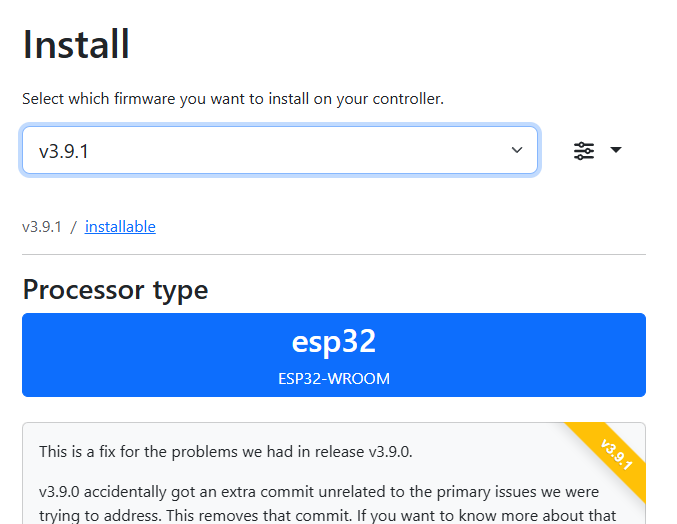
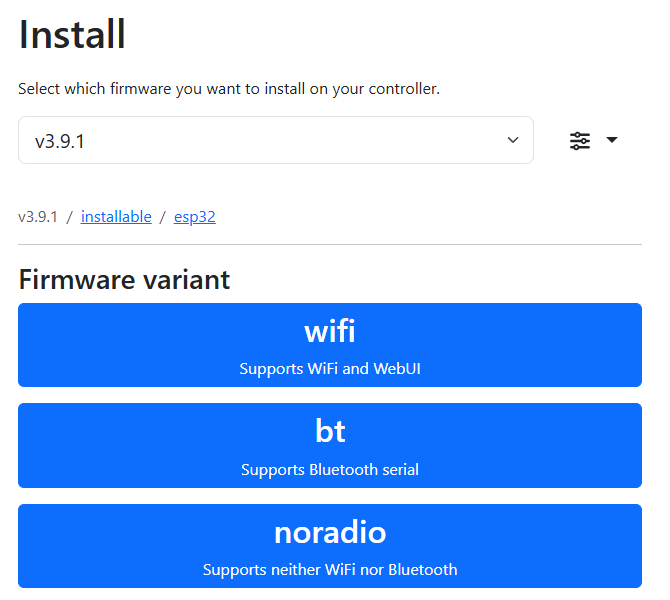
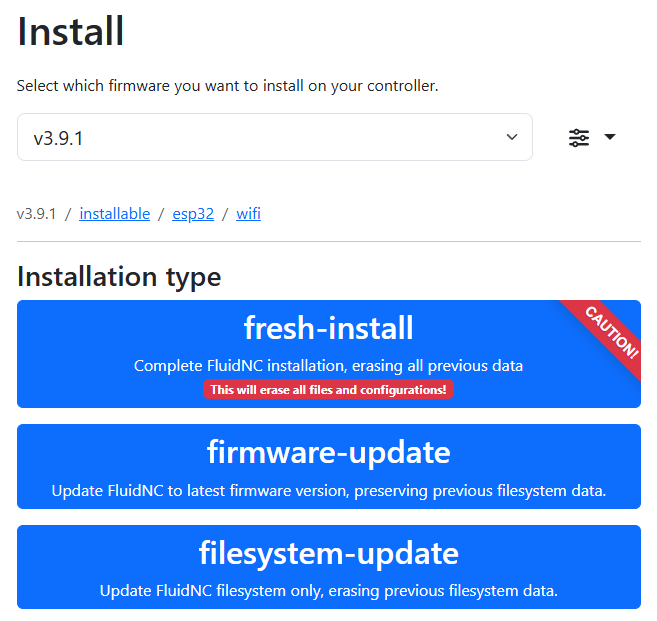
Lol, yes,  . I fluffed this up over the weekend, am backing up flash ‘files’ snapshot like config.yaml to GitHub now before I update firmware version, and/or incase the ESP32 dies…
But I don’t want him to use his config, I have a feeling it is the old one and will be missing the settings and possibly a different stepper current.
Or am I missing something?
That’s valid. I’m just not sure if he made any changes that he might need to migrate. Either way, I think it’s generally good practice to back things up if for nothing else than comparison.
update the v2 config file wouldn’t work. As a last ditch effort I tried the v3 config file and that worked. However, When I tried to add the lines of code (as I did to the original firmware’s config file per Doug Joseph’s post. which worked fine for pendant control) the config file returned a bunch of alarms.
Did you just add that from a fredh copy of Ryan’s config? It looks like what you added for the pendant wasn’t right. This file is very particular about spacing. It’s either perfect or it doesn’t work.
If you’re going to include the config.yaml, it’s better to attach it as a file.
the one i pasted did not have the additional lines for the pendant…I tried to load the stock file…no luck. wont upload the yaml file
just tried again and ran a $SS, this is the results
MSG:INFO: FluidNC v3.9.1 GitHub - bdring/FluidNC: The next generation of motion control firmware]
[MSG:INFO: Compiled with ESP32 SDK:v4.4.7-dirty]
[MSG:INFO: Local filesystem type is littlefs]
[MSG:ERR: Cannot open configuration file:config.yaml]
[MSG:INFO: Using default configuration]
[MSG:INFO: Axes: using defaults]
[MSG:INFO: Machine Default (Test Drive)]
[MSG:INFO: Board None]
[MSG:INFO: Stepping:RMT Pulse:4us Dsbl Delay:0us Dir Delay:0us Idle Delay:255ms]
[MSG:INFO: Axis count 3]
[MSG:INFO: Axis X (-1000.000,0.000)]
[MSG:INFO: Motor0]
[MSG:INFO: Axis Y (-1000.000,0.000)]
[MSG:INFO: Motor0]
[MSG:INFO: Axis Z (-1000.000,0.000)]
[MSG:INFO: Motor0]
[MSG:INFO: Kinematic system: Cartesian]
[MSG:INFO: STA SSID is not set]
[MSG:INFO: AP SSID FluidNC IP 192.168.0.1 mask 255.255.255.0 channel 1]
[MSG:INFO: AP started]
[MSG:INFO: WiFi on]
[MSG:INFO: Captive Portal Started]
[MSG:INFO: HTTP started on port 80]
[MSG:INFO: Telnet started on port 23]
What do you mean won’t upload?
That means either it doesnt have a config.yaml or the existing one isn’t valid.
the file type to the forums… here’s the v3 config file, which works…except I cant seem to add the lines for the pendant correctly. I had it working on the old firmware and config…
any help would updating the config to make the pendant show up would be great…
config.zip (1.6 KB)
The latest v3 config.yaml on Ryans github is
meta: 10-31-2024 RyanZ
That doesn’t match what you just uploaded?
The pendant definition is missing -although theres a gap with a load of spaces where it ought to be, I’m surprised that works given how sensitive YAML is to formatting.
uart2:
  txd_pin: gpio.14
  rxd_pin: gpio.13
  rts_pin: NO_PIN
  cts_pin: NO_PIN
  baud: 1000000
  mode: 8N1

uart_channel2:
  report_interval_ms: 75
  uart_num: 2
My config.yaml has some other differences but I’ll not confuse your issue with that (and its working so, if it aint broke…)
Shit…I have to double check the v3 file…what I have is still showing the March 2024 date. Ill try to get to it today and post back…thanks everyone for trying to get me back in business…running too crazy with too many school builds and corporate edits…need coffee!
Have a great day!!
Quick update the V3 config file on github is still dated 3-15-2024… Didn’t check the date last night, I just tried the file and it worked. Its the file that I uploaded the zip of in my above post. The N-config zip contains that file with the lines added for the fluidail pendant. can someone take a look and let me know if im missing something…(Please note that when i tried to load the v2 file I got nothing but errors on the 3.9.1 fresh clean wipe install…doesn’t make sense, since that’s the file Ryan suggested I load)
N-config.zip (1.6 KB)
Here you go Anthony. I added the FluidDial settings for you.
config.yaml.zip (2.1 KB)
@vicious1 The v3 config file is the old version. Shouldn’t it be updated also?
The differnce is webui v2 and V3.
You are having issues, I can only help if you use version 2 stock, no pendant. Otherwise I can only assume your pendant edits are causing the issue, I don’t have one so I can’t help with it.
I could only get the V3 (Stock) to work. not sure why the Stock V2 didn’t…any thoughts?
Also the v3 has a March 2024 date…? The v2 is dated Oct 2024
Thanks Britt!
I’m going to try and stop at that high school (on my way to another for lighting cue to cue) and see if it will solve the issue. I really need to run 2 jobs tomorrow early afternoon for the evenings’ build. (Cinderella’s carriage and house)