
I have three boards with a BC port issue here, one I just fixed it had a poorly soldered mulitplexer, the other two look good under the microscope.
Just make sure the heatsinks are not touching the big silver capacitors, can’t tell from that picture.
silly question. How do I do this
they are not touching.
this part is a bit over my head
I don’t have a mac, if it is not obvious like double click then I don’t know either.
The webinstaller does the same thing, https://installer.fluidnc.com/. Connect, upgrade fluidnc, full wipe, use 3.9.9, then upload all the files from the zip.
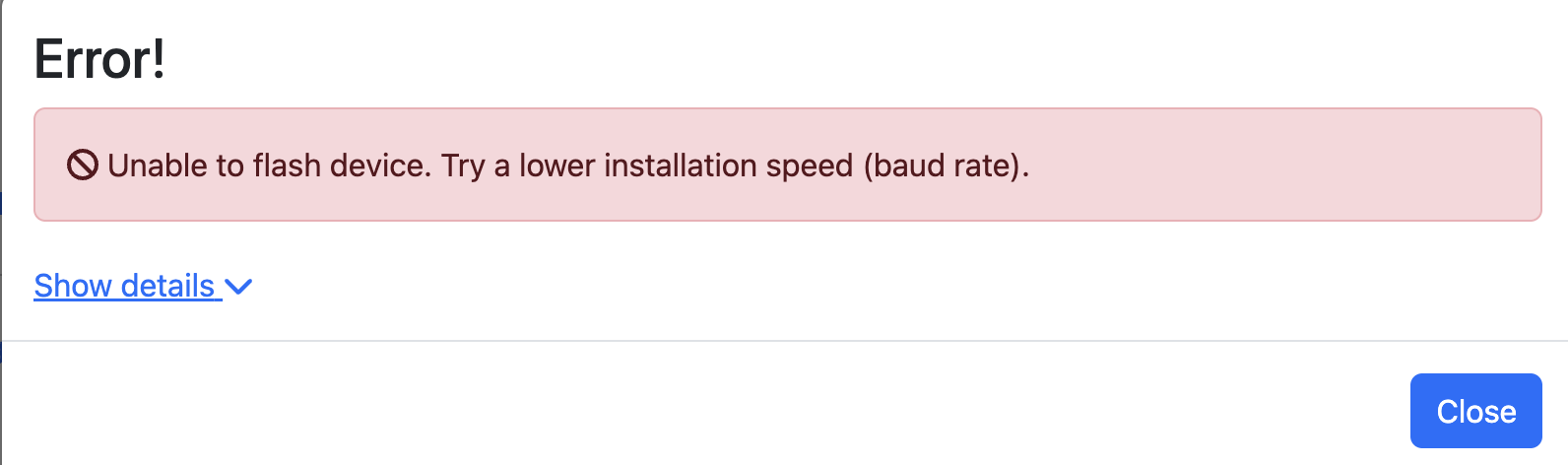
Make sure your USB cable is a data cable and not just a charge cable.
Also click the little blue drop down to show details, you might need to hit the boot button for three seconds.
For Mac, download the posix installer and extract it on your machine. To extract it, open the folder where you downloaded it and double-click it in finder and it will extract to a folder.
Direct link to the recommended 3.9.9: https://github.com/bdring/FluidNC/releases/download/v3.9.9/fluidnc-v3.9.9-posix.zip
Plug in a USB Data+power cable between your Mac and the Jackpot.
Open up a terminal, cd into the directory where you put it, then run the following commads:
./erase.sh
./install-wifi.sh
/install-fs.sh
That should wipe the device and reload everything.
After that, you can disconnect the Mac and power up the device.
You will still need to load you config.yaml and the other V1 files back onto the storage, but you will have wiped it.
Edit: Copy/Paste your terminal output here using the preformatted text icon if it doesn’t work, we can troublehoot further from that.
Have you installed the drivers from here?
Im going to try reply to all the messages systematically.
ive managed to do this part. Now I’m struggling on the webui to upload files. The previous webui was drag and drop. The upload button is non responsive.
Last login: Sat Mar  7 11:27:26 on ttys000

cloete@Joshuas-MacBook-Air ~ % cd /Users/cloete/Downloads/fluidnc-v3.9.9-posix\ 2

cloete@Joshuas-MacBook-Air fluidnc-v3.9.9-posix 2 % ./erase.sh

esptool.py --chip esp32 --baud 230400 dump_mem 0x3ff5a018 4 SecurityFuses.bin

esptool.py v3.1

Found 4 serial ports

Serial port /dev/cu.wlan-debug

Connecting........_____....._____....._____....._____....._____....._____....._____

/dev/cu.wlan-debug failed to connect: Failed to connect to ESP32: Timed out waiting for packet header

Serial port /dev/cu.usbserial-10

Connecting........_____..

Chip is ESP32-D0WD-V3 (revision 3)

Features: WiFi, BT, Dual Core, 240MHz, VRef calibration in efuse, Coding Scheme None

Crystal is 40MHz

MAC: c0:cd:d6:91:4a:70

Uploading stub...

Running stub...

Stub running...

Changing baud rate to 230400

Changed.

Read 4 bytes

Done!

Hard resetting via RTS pin...

esptool.py --chip esp32 --baud 230400 erase_flash

esptool.py v3.1

Found 4 serial ports

Serial port /dev/cu.wlan-debug

Connecting........_____....._____....._____....._____....._____....._____....._____

/dev/cu.wlan-debug failed to connect: Failed to connect to ESP32: Timed out waiting for packet header

Serial port /dev/cu.usbserial-10

Connecting........__

Chip is ESP32-D0WD-V3 (revision 3)

Features: WiFi, BT, Dual Core, 240MHz, VRef calibration in efuse, Coding Scheme None

Crystal is 40MHz

MAC: c0:cd:d6:91:4a:70

Uploading stub...

Running stub...

Stub running...

Changing baud rate to 230400

Changed.

Erasing flash (this may take a while)...

Chip erase completed successfully in 2.0s

Hard resetting via RTS pin...

cloete@Joshuas-MacBook-Air fluidnc-v3.9.9-posix 2 % ./install-wifi.sh

esptool.py --chip esp32 --baud 230400 dump_mem 0x3ff5a018 4 SecurityFuses.bin

esptool.py v3.1

Found 4 serial ports

Serial port /dev/cu.wlan-debug

Connecting........_____....._____....._____....._____....._____....._____....._____

/dev/cu.wlan-debug failed to connect: Failed to connect to ESP32: Timed out waiting for packet header

Serial port /dev/cu.usbserial-10

Connecting........_

Chip is ESP32-D0WD-V3 (revision 3)

Features: WiFi, BT, Dual Core, 240MHz, VRef calibration in efuse, Coding Scheme None

Crystal is 40MHz

MAC: c0:cd:d6:91:4a:70

Uploading stub...

Running stub...

Stub running...

Changing baud rate to 230400

Changed.

Read 4 bytes

Done!

Hard resetting via RTS pin...

esptool.py --chip esp32 --baud 230400 --before default_reset --after hard_reset write_flash -z --flash_mode dio --flash_freq 80m --flash_size detect 0x1000 wifi/bootloader.bin 0xe000 common/boot_app0.bin 0x10000 wifi/firmware.bin 0x8000 wifi/partitions.bin

esptool.py v3.1

Found 4 serial ports

Serial port /dev/cu.wlan-debug

Connecting........_____....._____....._____....._____....._____....._____....._____

/dev/cu.wlan-debug failed to connect: Failed to connect to ESP32: Timed out waiting for packet header

Serial port /dev/cu.usbserial-10

Connecting........___

Chip is ESP32-D0WD-V3 (revision 3)

Features: WiFi, BT, Dual Core, 240MHz, VRef calibration in efuse, Coding Scheme None

Crystal is 40MHz

MAC: c0:cd:d6:91:4a:70

Uploading stub...

Running stub...

Stub running...

Changing baud rate to 230400

Changed.

Configuring flash size...

Auto-detected Flash size: 4MB

Flash will be erased from 0x00001000 to 0x00005fff...

Flash will be erased from 0x0000e000 to 0x0000ffff...

Flash will be erased from 0x00010000 to 0x001d7fff...

Flash will be erased from 0x00008000 to 0x00008fff...

Warning: some reserved header fields have non-zero values. This image may be from a newer esptool.py?

Compressed 17568 bytes to 12205...

Wrote 17568 bytes (12205 compressed) at 0x00001000 in 0.6 seconds (effective 230.4 kbit/s)...

Hash of data verified.

Compressed 8192 bytes to 47...

Wrote 8192 bytes (47 compressed) at 0x0000e000 in 0.0 seconds (effective 2377.6 kbit/s)...

Hash of data verified.

Compressed 1867728 bytes to 1113097...

Wrote 1867728 bytes (1113097 compressed) at 0x00010000 in 49.3 seconds (effective 303.1 kbit/s)...

Hash of data verified.

Compressed 3072 bytes to 129...

Wrote 3072 bytes (129 compressed) at 0x00008000 in 0.0 seconds (effective 1214.7 kbit/s)...

Hash of data verified.


Leaving...

Hard resetting via RTS pin...

Starting fluidterm


--- Available ports:

---  1: /dev/cu.Bluetooth-Incoming-Port 'n/a'

---  2: /dev/cu.debug-console 'n/a'

---  3: /dev/cu.usbserial-10 'CP2102N USB to UART Bridge Controller'

---  4: /dev/cu.wlan-debug   'n/a'

--- Enter port index or full name: 3

--- FluidTerm v1.2.0 on /dev/cu.usbserial-10  115200,8,N,1 ---

--- Quit: Ctrl+] or Ctrl+Q | Upload: Ctrl+U | Reset: Ctrl+R | ClearScreen: Ctrl+W ---

.....

./install-fs.sh

error:9

[MSG:ERR: GCode cannot be executed in lock or alarm state]


--- exit ---

cloete@Joshuas-MacBook-Air fluidnc-v3.9.9-posix 2 % ./install-fs.sh

esptool.py --chip esp32 --baud 230400 dump_mem 0x3ff5a018 4 SecurityFuses.bin

esptool.py v3.1

Found 4 serial ports

Serial port /dev/cu.wlan-debug

Connecting........_____....._____....._____....._____....._____....._____....._____

/dev/cu.wlan-debug failed to connect: Failed to connect to ESP32: Timed out waiting for packet header

Serial port /dev/cu.usbserial-10

Connecting........_____..

Chip is ESP32-D0WD-V3 (revision 3)

Features: WiFi, BT, Dual Core, 240MHz, VRef calibration in efuse, Coding Scheme None

Crystal is 40MHz

MAC: c0:cd:d6:91:4a:70

Uploading stub...

Running stub...

Stub running...

Changing baud rate to 230400

Changed.

Read 4 bytes

Done!

Hard resetting via RTS pin...

esptool.py --chip esp32 --baud 230400 --before default_reset --after hard_reset write_flash -z --flash_mode dio --flash_freq 80m --flash_size detect 0x3d0000 wifi/littlefs.bin

esptool.py v3.1

Found 4 serial ports

Serial port /dev/cu.wlan-debug

Connecting........_____....._____....._____....._____....._____....._____....._____

/dev/cu.wlan-debug failed to connect: Failed to connect to ESP32: Timed out waiting for packet header

Serial port /dev/cu.usbserial-10

Connecting........_

Chip is ESP32-D0WD-V3 (revision 3)

Features: WiFi, BT, Dual Core, 240MHz, VRef calibration in efuse, Coding Scheme None

Crystal is 40MHz

MAC: c0:cd:d6:91:4a:70

Uploading stub...

Running stub...

Stub running...

Changing baud rate to 230400

Changed.

Configuring flash size...

Auto-detected Flash size: 4MB

Flash will be erased from 0x003d0000 to 0x003fffff...

Compressed 196608 bytes to 122509...

Wrote 196608 bytes (122509 compressed) at 0x003d0000 in 5.5 seconds (effective 286.5 kbit/s)...

Hash of data verified.


Leaving...

Hard resetting via RTS pin...

cloete@Joshuas-MacBook-Air fluidnc-v3.9.9-posix 2 %
Im not sure where this exactly fits in to the whole process. So I didn’t do anything here.
Hmmmm, that should have been the easy part.
The other way is you can connect directly, ssid “fluidnc”, use this connection as is, open a new tab to 192.168.0.1, up at the top you will see a folder icon you can upload from there.
It looks like this even though this is about updating, FluidNC Installation | Wiki.js
You need this USB driver to connect to the Jackpot.

You then want to connect to Port 2: -
-- 2: /dev/cu.SLAB_USBtoUART ‘CP2102N USB to UART Bridge Controller’
Okay here we go. Problem figured out. I’ve got all 5 motors working and running.
So it seems like the Zport is dead but all the other port are working. And with with factory reset and the z_c swop config the Z motors are running on port B and C.
I’m very stoked.
Only problem I have now is the Z max endstop is not triggering when I home the Z axis.
I ran a $Limits command and it is picking up the endstop when triggered.
But let me know, maybe I should start a new thread. But I thought to just ask here since we edited the software together.
So sorry about all the hassle. I have a couple of these boards and all the testing I have done it seems we just got a batch with a few bad driver chips. I have been testing every board since this one more rigorously and wouldn’t you know it…not a bad one since.
Make sure your Z endstops are mounted far enough down to hit before the hardstop.
That is great news.
I did that and swopped the cables around and all is working. (I think all the cable swopping got me a bit confused.)
I want to thank you for all your time and effort. What a cool project and I can’r wait to get some sawdust in the garage.