Hi, i just finished my mpcnc (which i’m vety proud of  ), but i have a problem with the speed of the cnc.
I used the speeds recommended in the build instruction for estlcam and repetier host but it seems it’s extremly slow.
I have a little project with 240x300mm and 8mm depth and repetier host says it will take 17 hours.
Is this normal?
Congratulations! A common cause for this is not using the correct units. Should be set for mm not inches.
I just checked and both programmes are set to mm
Have you run the test crown to verify that your machine is working correctly? That will help you determine if it’s a firmware or CAM issue.
Edit: make sure you run the pre-made test file first and not create your own version.
If you want to upload a g-code file to a post (or if you’re too new to upload a file, just post the first 50 lines or so) in a post, we can take a look to see what is going on. Maybe you are confusing mm/s and mm/min? I believe in EstlCAM, you want mm/s internally but mm/min in the generated g-code.

Yes the test file is much quicker
So i just need to switch in estlcam for the cnc programm from mm/s to mm/m?
I don’t know if that is your problem in particular, but the settings in the image posted are the ones that V1/Ryan recommends in his EstlCAM setup instructions, and getting it wrong in these settings would cause federate/speed issues.
That was the error
Now it’s running like a ferrari
Thank you very much
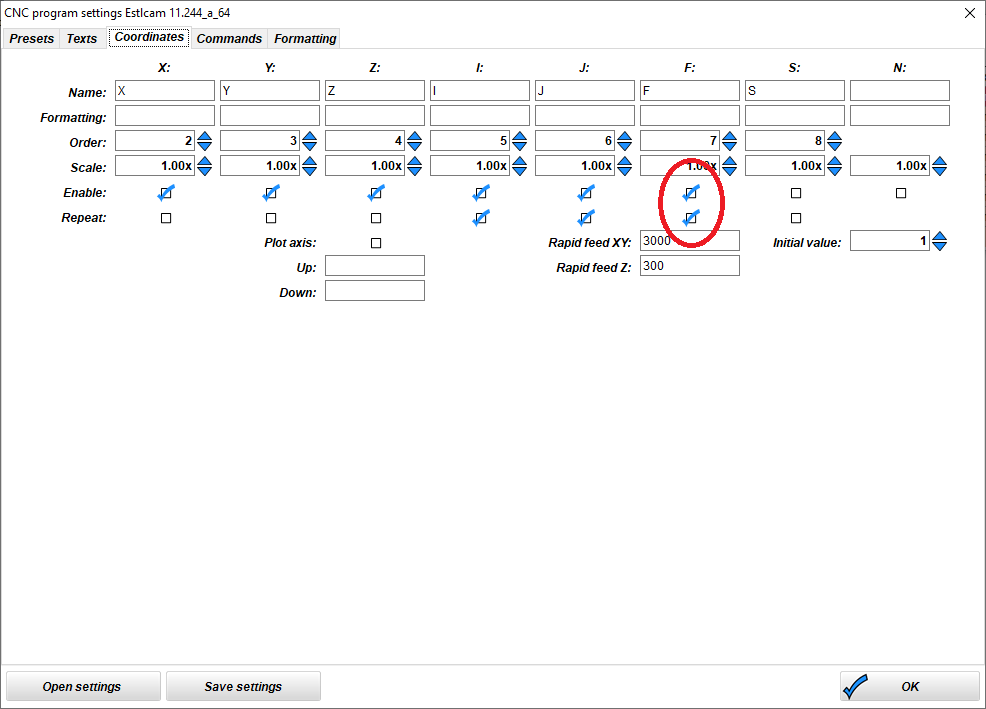
If you don’t have these checked, then Marlin will move very slowly between one cut and the next, typically, it will be the speed that you have configured for Z plunge, since that’s the last operation that the program probably did. This can make an operation like making a few small holes in the corners take a very long time.
Note here that I also have the rapid move speeds configured. 3000mm/min is maybe higher than I’d want with a 12V power supply, but I’m running 24V, so this doesn’t cause me problems. (Zero difference at actual cutting speeds, just the rapids are able to go faster.)
That might speed things up.
GRBL will always use rapid speeds for G0 move commands, but Marlin (And I think Repetier) treats G0 and G1 the same, and needs the feed rates defined, or else it will just use the last feed rate that it was actually given.
Yeah, I did the same thing  welcome to the club! My first crown drawn with a pen took almost an hour…
To be honest i skipped the drawing part
Therefor i’m my biggest enemie
Sorry to re-open an old post - but I am having the same issue after having checked all the settings posted here. The test crown prints well in about 2 mins, but if I try to create the toolpaths in estlcam for it myself then it takes 2 hours. Is there anything else that could have a bearing on this?
Be sure to check this part in the docs…
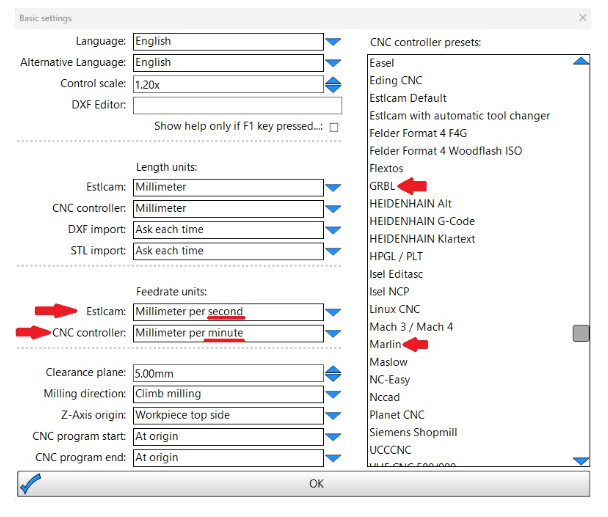
Yep - I have those set.
Looks like if I make the change, save the gcode file, close estlcam, re-open estlcam and open the gcode….then it seems to work at the correct speed. Does anyone else experience this?
If you make a change to the settings, any previously saved projects will use the previous settings. You will have to save the project (which will create new gcode), but I don’t think you will need to exit/restart EstlCAM for it to take effect.