So, I’m trying to get a leg up on my firmware, so when I get started with my upgrade, I’m good and ready to go.
My question is this, and I’ve yet to find any info on this.
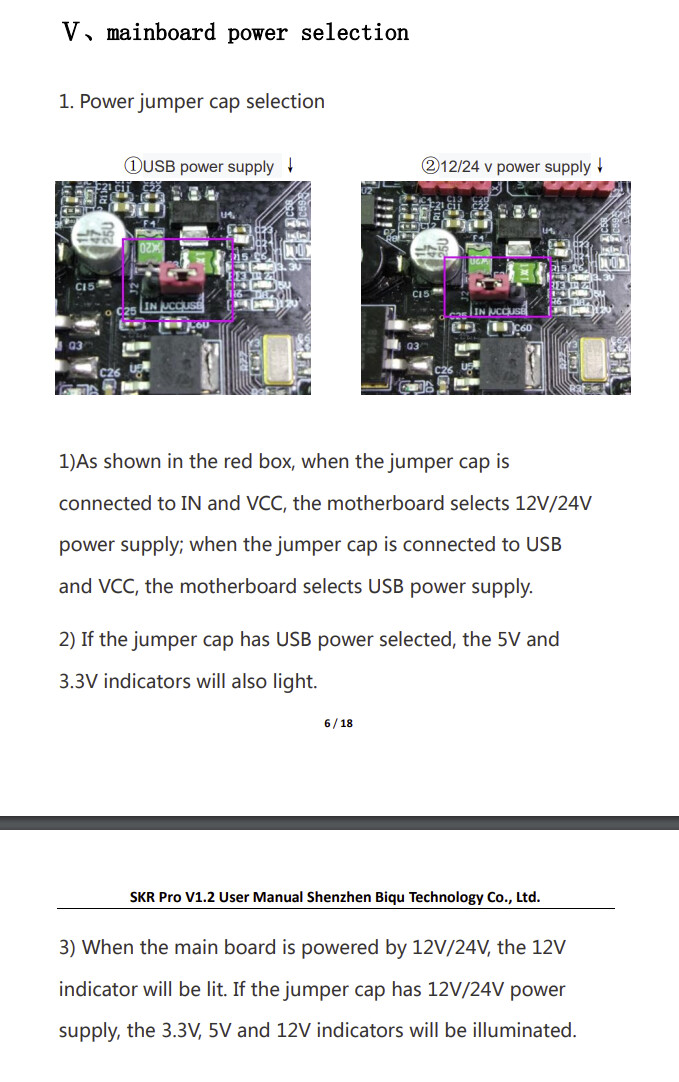
When I plug in my SKR Pro v1.2 to USB, only the red light right beside the USB Port comes on. Nothing else. Windows doesn’t even make the lil’ chime when you plug in new hardware. Am I missing something? Or is this going to turn into an Amazon Return ticket? I’m only trying to put the V1 firmware on, nothing is hooked up. MicroSD has the firmware.bin on it, formatted in fat32 (30gb MicroSD Card)
I’m on Windows 10 x64 if that info is needed. I was hoping this was going to be an easy step but I can’t get anywhere with it.
Kinda already kicking myself for not waiting on V1’s stock to replenish.
Check, and check! Both have been done. I got the V1CNC_SkrPro_DualLR_2209-2.1.1 on the SKR, and well, I’m guessing I got the right TFT version. I have the TFT35-E3 V.3.0.1 (not the 3.0) Ryan sells. They sent me the wrong one. So I’m not fully sure which one of those I put on the TFT.
Currently I have the BIGTREE_GD_TFT35_V3.0_E3.27.x installed, with the TFT35 folder, config.ini, and language pack. I’m guessing I’ll know when I put it on my machine, if it’s the right one or not haha