Hi everyone!
I’m a complete absolute newbie from Chile, and English is not my first language, so I’ll do my best to explain the issue clearly.
I’m building a LowRider V3, using firmware: Marlin_V1CNC_Skr1p3_DualLR_2209_2.0.9.2_513-src and SKR 1.4
Everything works fine except the E1 driver socket on my SKR 1.4 board.
What I’ve confirmed so far
All my TMC2209 drivers work correctly when tested in other sockets.
All my stepper motors work fine.
All stepper cables are good.
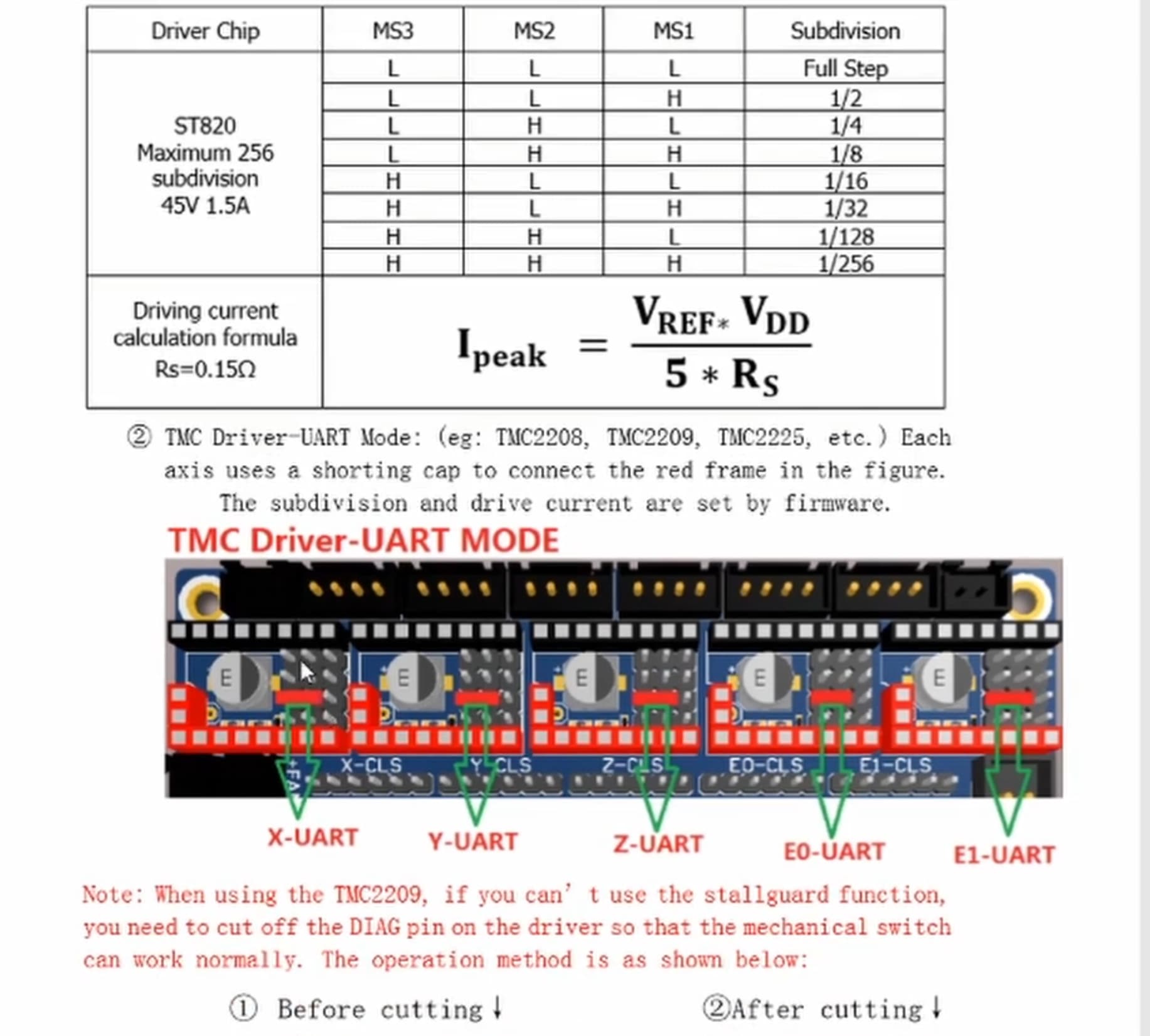
UART jumpers are correctly placed.
When a motor is connected to E1-MOT, it doesn’t move, instead I hear a repetitive “tap tap tap” sound every second.
The TFT always shows “TMC Connection Error”, even if there’s no driver installed in the E1 socket.
All other sockets/motors/drivers behave normally.
If I move Z2 to ZBM, the entire machine works correctly, because it mirrors what happens in Z1 that’s connected to ZAM
So I think the issue is isolated to the E1 port.
Context
I bought the SKR 1.4 as part of a second-hand kit from someone who had never assembled the machine. I’ve read here that model wasn’t supported, but it would be hard for me to purchase the right one, because I’m in Chile (it would probably take months to my house for any purchase)
My questions
Does anyone have any advice?
Have I done something wrong?
Given that I’m building a LowRider 3 — what alternative controller board would you recommend that is still sold, compatible with LR3, and has good community / forum support?
I’m willing to switch if that avoids more troubles.
Any help, suggestions are very welcome.
Thanks a lot!
I’m not 100% certain that you are using the correct firmware for the SKR 1.4. Perhaps another user here can confirm if the SKR 1.4 uses the 1.3 version of firmware.
Also can you confirm that you are not using the SKR 1.4 Turbo? That one uses different firmware as well.
Neither the 1.3, 1.4 or 1.4 Turbo are well supported here, although there is firmware in the Github depository for at least the 1.3 and the 1.4 Turbo.
The SKR Pro v1.2 was the go-to controller here for some time, and it is still well supported in the documents and in the Forum. There are still a fair number of people using this board (including me). If you already understand Marlin and how to edit and flash the firmware, that is not a bad choice.
However the Jackpot controller has been more popular here for the last year or so, and has the most recent documentation. User support is very robust. It uses a different language than the SKR boards (FluidNC instead of Marlin). Most people starting out now use the Jackpot board for a variety of reasons (embedded wifi capability, lower purchase cost, simpler programming changes, recent cases of poor quality control from SKR manufacturer, etc.)
Thank you very much for your reply! I think I’ll replace the board as soon as I can. I’ve still been trying to get things running on the LowRider using a PC with Repetier-Host, but when I send an M122 command through Pronterface I get the output below — which seems to indicate that the TMC UART communication isn’t working at all.
On top of that, my Z axis keeps slipping down when trying to draw the crown, so everything is a bit of a mess right now. At this point I’m pretty sure the issues are at least partly related to the SKR 1.4 board.
Thank you again for your help!
SENDING:M122

T3 X Y Y2 Z Z2
Address          0     0     0     0     0
Enabled          false false false false false
Set current      900   900   900   900   900
RMS current      1602  1602  1602  1602  1602
MAX current      2259  2259  2259  2259  2259
Run current      28/31 28/31 28/31 28/31 28/31
Hold current     22/31 22/31 22/31 22/31 22/31
CS actual        0/31  0/31  0/31  0/31  0/31
PWM scale
vsense           0=.325 ...
stealthChop      false false false false false
msteps           256   256   256   256   256
interp           false false false false false
tstep            0     0     0     0     0
...

Driver registers:
X   0x00:00:00:00  Bad response!
Y   0x00:00:00:00  Bad response!
Y2  0x00:00:00:00  Bad response!
Z   0x00:00:00:00  Bad response!
Z2  0x00:00:00:00  Bad response!

Testing X connection...   Error: All LOW
Testing Y connection...   Error: All LOW
Testing Y2 connection...  Error: All LOW
Testing Z connection...   Error: All LOW
Testing Z2 connection...  Error: All LOW
Having the wrong firmware would definitely do that. I haven’t looked at the skr lineup in a long time. But the skr Turbo 1.4 was a thing and we have firmware for that (it has Turbo in the name). Skr 1.3 has no other name and the skr pro v1.2 has pro in the name. They werw all released about the same time. The version numbers are all confusing. The skr pro is the biggest one.
Another common cause for that response from M122 is not powering the board. The USB can power the cpu, but not the drivers. You need to power the board with the same power you will use for the machine (12V or 24V) to get the motors powered.
Definitely something wrong here.The drivers are not communicating with the board.
I would follow @jeffeb3 's suggestion and check the power LEDs (12V, 5V, 3.3V). If the board is powered up correctly (from a power supply), then incorrect firmware is the next most likely culprit.
Thank you for your help. Right now I connected it directly to a pc and started using with repetier-host (it works), and purchased a the SKR 1.2 pro through amazon. it will take a month but since I’m such a noob following the most travelled path is the best way. Thank you for your kind reply!. (oh and the problem with the z axis was solved with lubrication, who would have thought XD )
Thank you! I did powered the board with a 24V 3a power supply. and placed the jumper that tells the board to be powered by the Power supply not through USB (though I can still use the USB to send stuff). I think it’s the firmware. tried to compile a new one but it was over my head. I purchased a new board a SKR 1.2 pro. Thank you for taking the time to reply !
yes that pon has to be bent as well, and I placed the jumpers that go bellow each 2209 so that they use UART, it’s the third pair down from the top. (saw it on a video detailing the process on youtube)


 !
!