Hi, tried to do a search for z probing but nothing came up but am sure the answer is there somewhere…
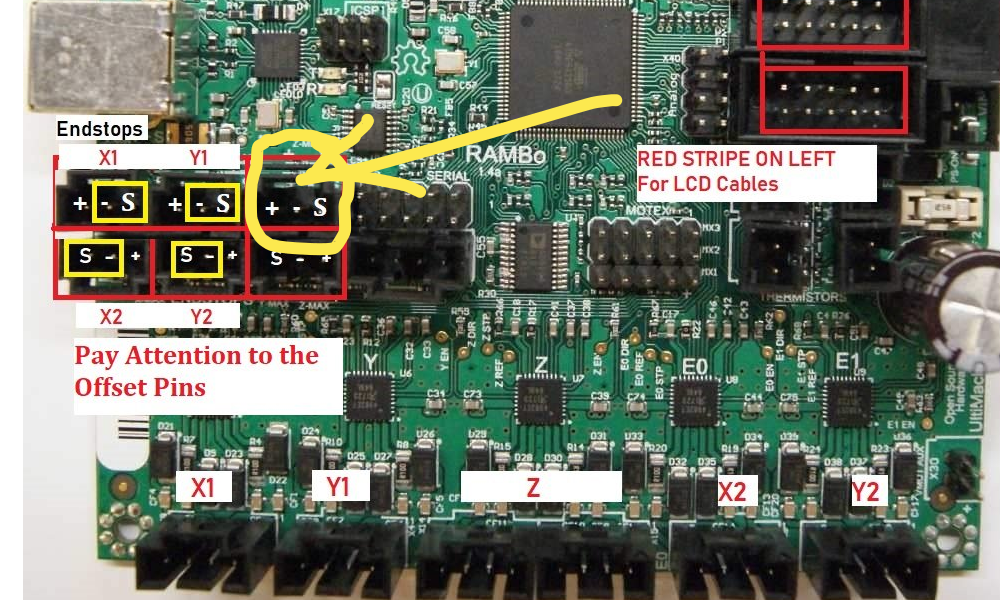
I received and built a MPCNC kit with dual end stop configuration. All is working great. I was wondering if there is an input that can be used on the board to home the Z axis. I have seen loads of YouTube videos about people using a metal plate and detecting when the tool touches it. These videos were not for MPCNC machines though.
Is this in the standard MPCNC version of firmware?Is there information on the Z axis homing techniques? Is there a method involving wires, clips and a metal plate that the Rambo 1.4 board supports?
There are three parts to the touch plate puzzle. First, is the touch plate itself. They are sold on Amazon and EBay and Ryan sells one in his store. I use and really like the one Ryan sells. And there are posts on the forum where people make them out of feeler gauges. It will make your life a whole like easier if you buy one that already has the Dupont connector soldered to the end. Most of the cheap touch plates on Amazon and EBay just have bare wires.
Second, is how to wire it. Ryan and Gian point the way. Just be very careful to wire it to the S and - pins and to avoid the + pin. Using the + pin can short power to ground and potentially damage the board.
Third, is executing the code to trigger the Z homing. There are multiple ways initiate a z homing. Some ways allow for the homing g-code to be customized, and some way are hard coded. The hard coded ones usually don’t account for touch plate thickness nor lift the bit off the touch plate. The best way will depend on how you deliver your g-code to your MPCNC and how you use your MPCNC. As a starting point (and not your long term solution) I recommend just putting a bit of code in a g-code file and sending or executing that file on/to your MPCNC. The bit of code that Ryan provides in his touch plate description in his store is a good first step:
G28 Z ; Home Z
G92 Z0.5 ; Account for touch plate thickness
G0 Z5 F480 ; Lift the bit off the touch plate
Note this g-code is for a 0.5mm plate. Values in the last two lines will need to be adjusted for plates of different thicknesses.