Hello everyone! I just got my kit yesterday and am slightly confused by a few somethings. I’m tech savvy when it comes to computers and run my own 3d printers, and have built them, etc, but have never worked on a CNC machine.
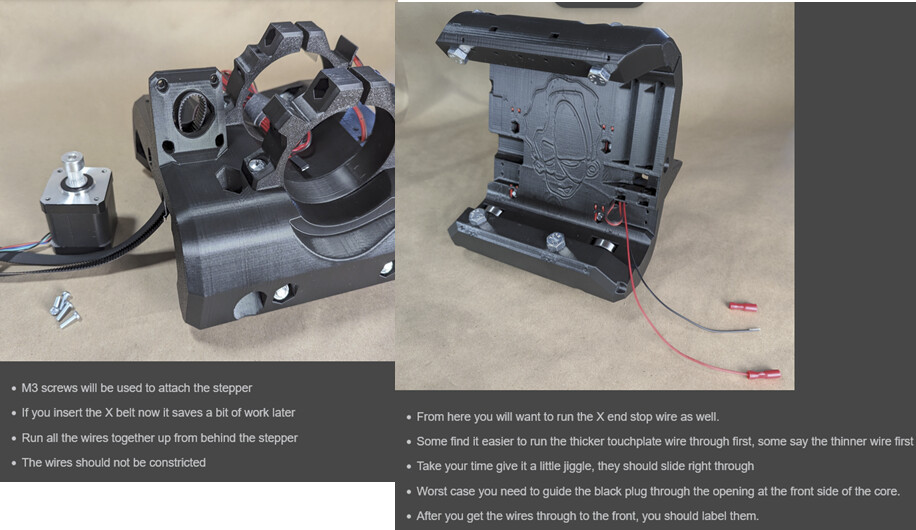
For the right image, do I just grab one of the endstop cables from the Endstop Cable 5pcs bag and run it through there?
For the left image, I only have one belt in my kit that says Belt GT2 20T, w.9mm, 8m/roll. Is that the belt for the X and the Y axis? Or just one or the other? Am I missing a belt?
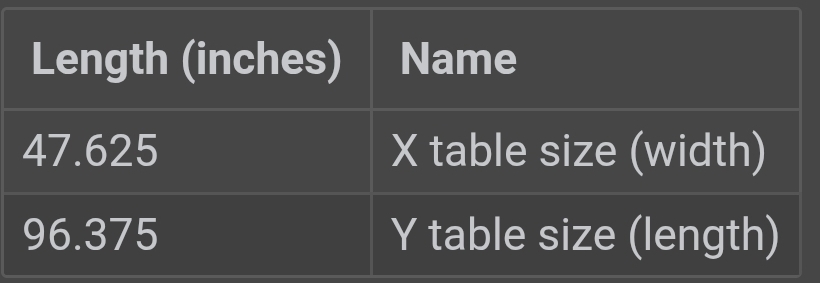
For the usable cutting area in the calculator, I’m hoping to be able to use a full 4’ x 8’ sheet of MDF. Do I just use 48” x 96” given that? I see that if I do that, the table size needs to be 5’ x 9’. Is there a way to say I have a table size of 4’ x 8’ (I made my first table out of mdf and 4x4s) and then get the cutting size area from that, or do I just have to mess with it until I get the table size to almost exactly 48” x 96”?
I don’t know what any of those weird numbers mean, but the table can be as big as you want it to be, the LR does not care. Just don’t make it too small.
Note that MDF sheets are typically 49" x 97". But yes, you can just play with the numbers until you get to the desired table size. Make sure you give a little wiggle room like the calculator suggests.
I didn’t realize MDF sheets were that size. Weird.
So I saw that it said
This output is the minimum table required - belt holders will be installed flush with the outside corners. An extra 25-50mm (1”-2”) or more on each dimension is nice if you will be pushing it up against a wall or in a corner and to provide some protection for the belt holders.
So if I have a full sized MDF sheet at 49” x 97”, I want the calculator to show me a minimum table size of 50-51” x 98-99”?
Actually it would be the opposite, you would want the calculator to show a minimum table size that is smaller by the 1” to 2”, not larger. If you are sourcing an MDF sheet that is 49”x97” and you want to give some space for the belt holders like you quoted from the instructions, then you will want to inset the belt holders back from the edge of the sheet the inch or two mentioned, which will effectively make your build size smaller.
For example if you want to give 2” of clearance around the perimeter to protect the belt holders, then you’ll want to subtract 4” (2” ea side) from your 49x97 dimensions - so try to get the calculator to give you 45”x93” dimensions. Hopefully that makes sense….
I may have misread the thread above. The calculator gives good results. If you want to cut a full US sized sheet of MDF, you need to add some extra to the sheet size. If you plan to use a 1/4” endmill ever, then you need to add at least twice that. I’d add an extra inch. Then tell the calculator you want 50” by 98”.
Whatever that spits out from the calculator is the table size to work a full sheet of MDF.
If the plan is to sit the machine on a full sheet of MDF and then have whatever remains as the cutting area… well then carry on with the subtraction.
I have a table made from a full sheet of MDF. I just realized that if the CNC machine is sitting on top if it, I need a table slightly bigger than a full sheet of MDF, right?
I’m not going to be making the table bigger at this point, so I would need to cut the MDF down a slight bit to fit into the CNC cutting area? I’m still not sure what to put in the calculator. lol
After reading some other posts, I’m thinking about whether I should make the whole thing smaller. I like having the Y at 4’ so I don’t have to cut the MDF slabs in two directions, but was thinking about going closer to 2’ x 4’ as the working area.
I made a LR3 with a 610 mm cutting area. If I would build it again I would make it 630-650 mm cutting area. So if I would go for a LR4 with a 1220 mm cutting area I would increase it to 1234 mm or similar.
So the 610mm build is on the edge of the workpiece, having some extra space makes the whole 610 mm cutting area useful.
 Just don’t make it too small.