OpenScad

Oh, my, Jamie! Whatcha’ doing? Anything useful? :rofl:

This is getting to be real fun. What you are doing looks to be way above my pay grade… it was a fun read.

I’ve spent the last several hours just playing with OpenSCAD and Gemini… learning how to prompt AI with the proper information to get something parametric and workable. I told Gemini I wanted to start simple and just concentrate on the original goal… to investigate the triangular beam idea originating with Peter’s triangular cardboard mailing tube idea.

After learning that OpenSCAD simply can’t parse STEP files perfectly as CAD software can… I gave up on the idea of simply creating parts. I then decided to ask Gemini, " I want to design a 3-axis CNC machine using R&P drive on all axis… using 3/4" EMT, skate bearings, etc…" and it came back with a bunch of words and finally asked if I wanted to code up the entire machine in OpenSCAD. I said, NO! Let’s start small… just a basic beam assembly.

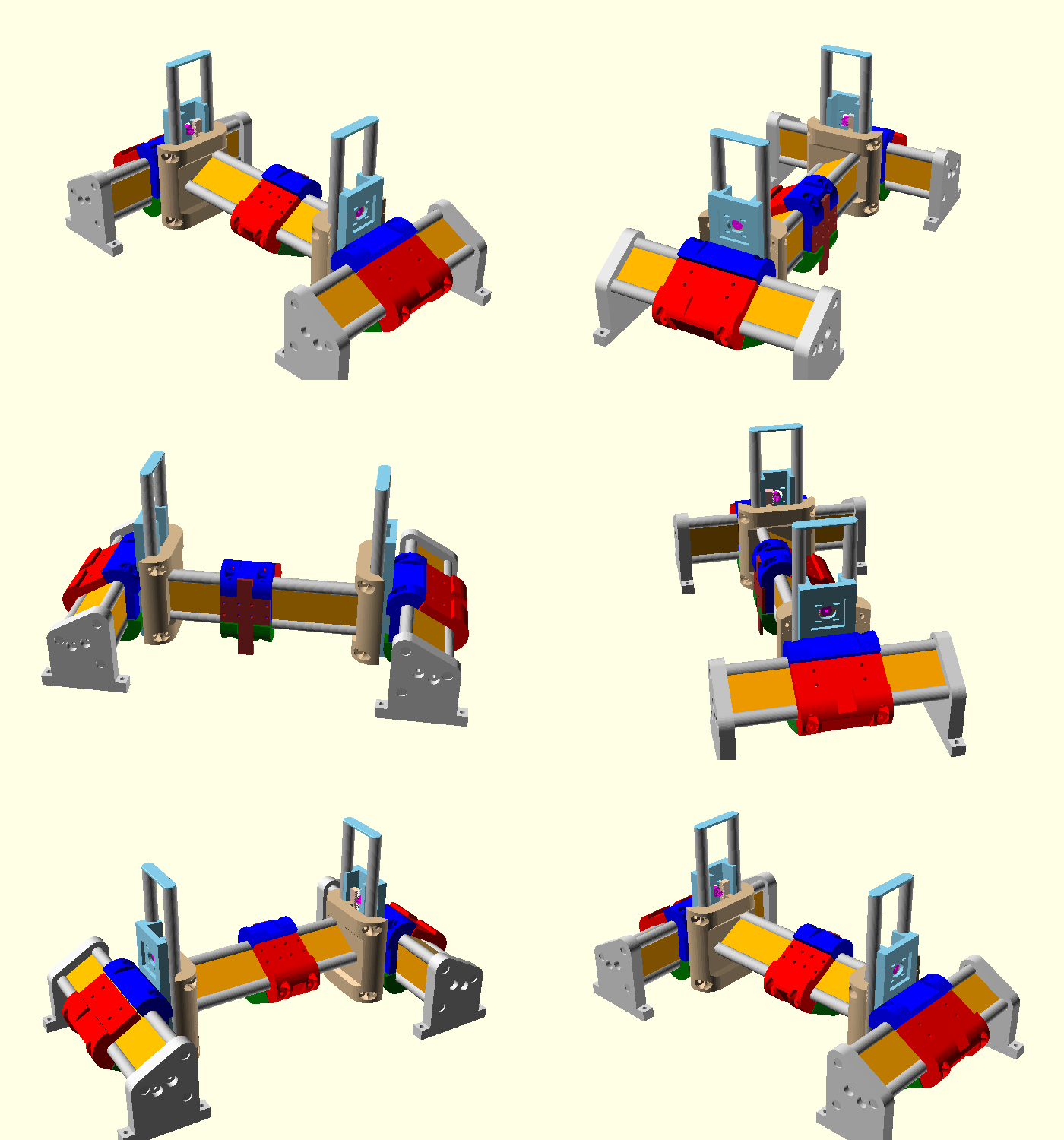
We started and in short order we came up with this which is surprisingly close to my real beam assembly…
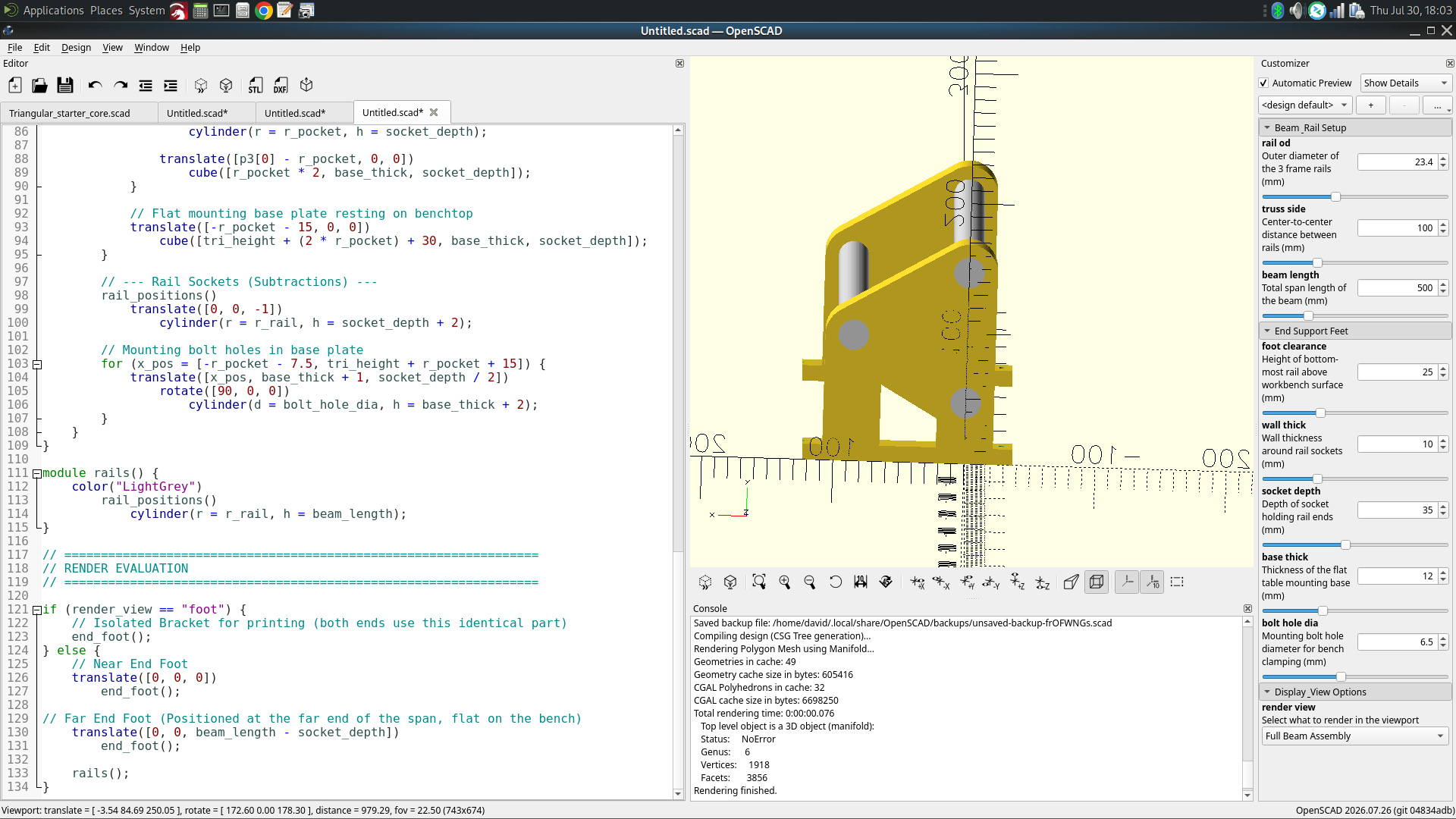
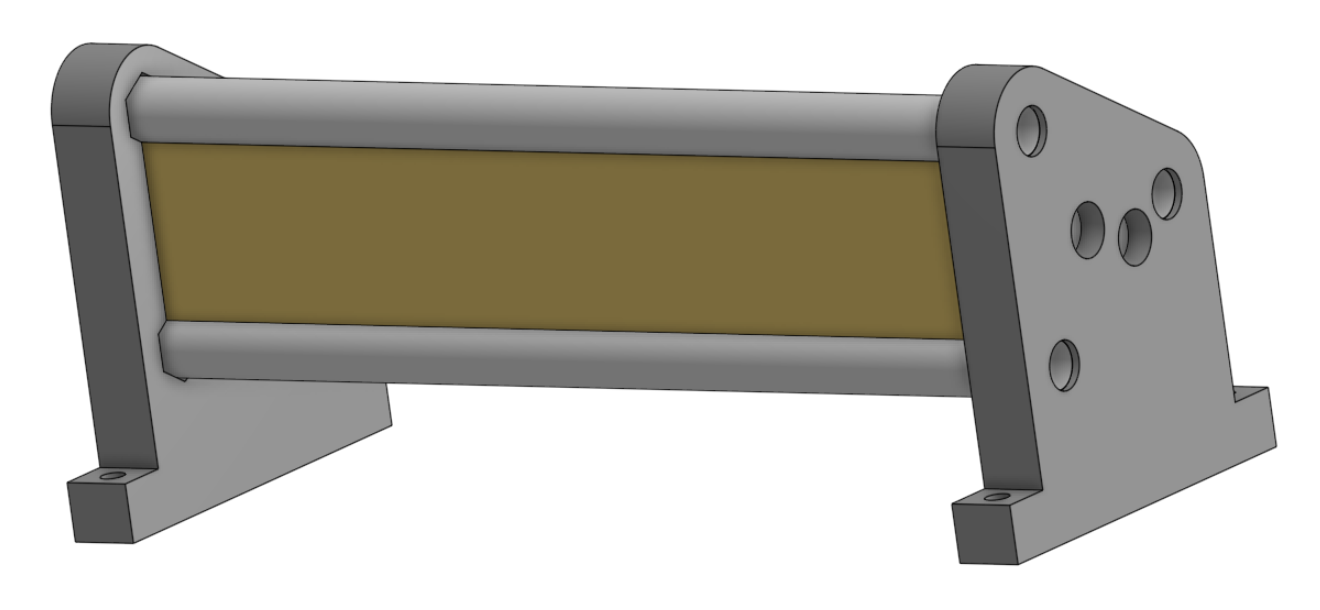
We finally got to here which is far from finished but IMO promising…
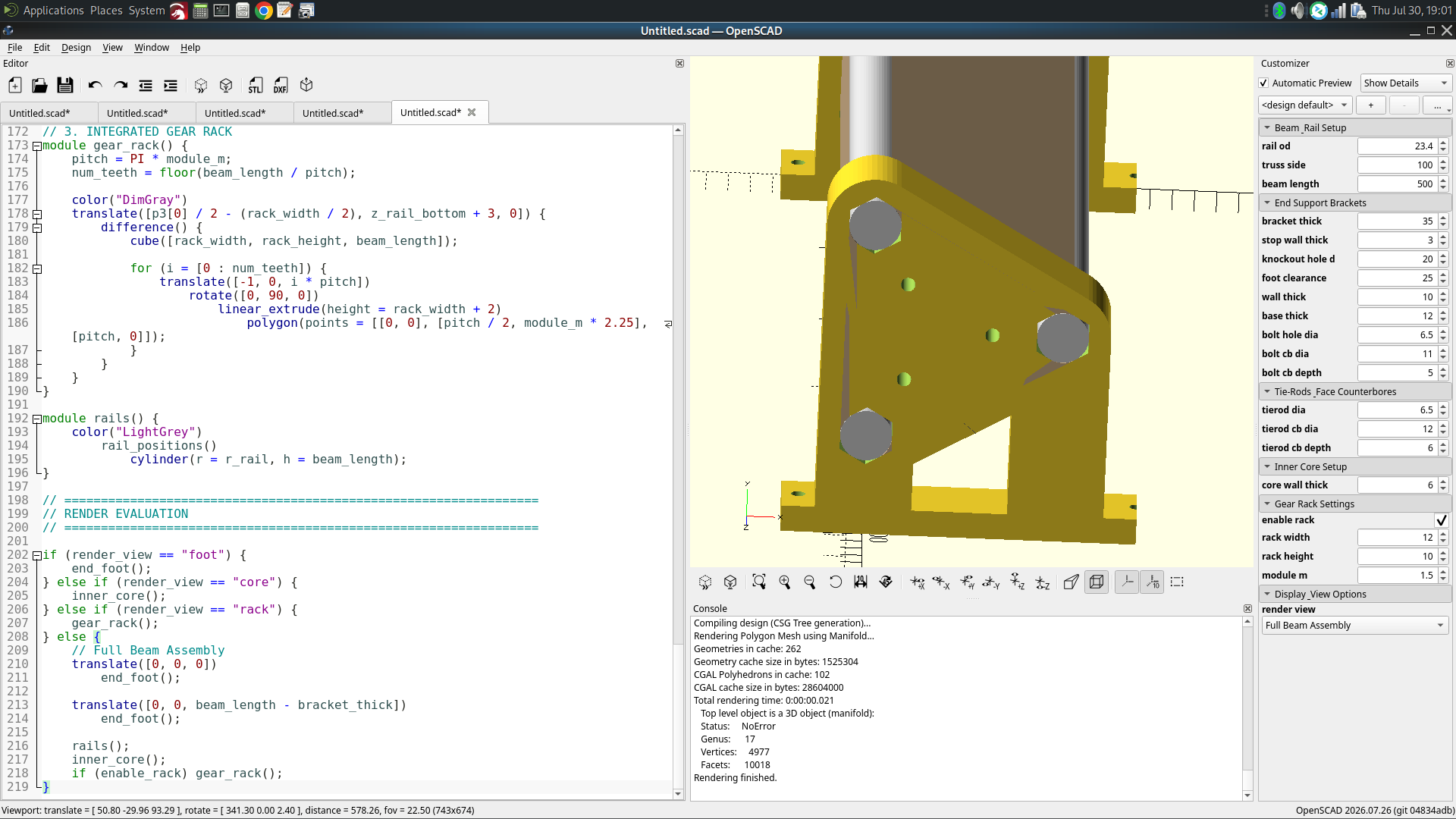
with this code (which I didn’t write a single line)…

// =================================================================
// PARAMETRIC TRIANGULAR BEAM ASSEMBLY
// Fixed: Shortened rails to expose the end-bracket solid wall
// =================================================================

/* [Beam & Rail Setup] */
rail_od         = 23.4;  
truss_side      = 100.0; 
beam_length     = 500.0; 

/* [End Support Brackets] */
bracket_thick   = 35.0;  
stop_wall_thick = 3.0;   
knockout_hole_d = 20.0;  
foot_clearance  = 25.0;  
wall_thick      = 10.0;  
base_thick      = 12.0;  
bolt_hole_dia   = 6.5;   
bolt_cb_dia     = 11.0;  
bolt_cb_depth   = 5.0;   

/* [Tie-Rods & Face Counterbores] */
tierod_dia      = 6.5;   
tierod_cb_dia   = 12.0;  
tierod_cb_depth = 6.0;   

/* [Inner Core Setup] */
core_wall_thick = 6.0;   

/* [Gear Rack Settings] */
enable_rack     = true;
rack_width      = 12.0;  
rack_height     = 10.0;  
module_m        = 1.5;   

/* [Display & View Options] */
render_view     = "assembly"; 


/* [Hidden] */
$fn = 60;
r_rail       = rail_od / 2;
r_hex        = r_rail / cos(30); 
socket_depth = bracket_thick - stop_wall_thick; 
r_pocket     = r_rail + wall_thick;

tri_height    = truss_side * sqrt(3) / 2;
z_rail_bottom = foot_clearance + r_pocket;

p1 = [0, z_rail_bottom];                             
p2 = [0, z_rail_bottom + truss_side];                
p3 = [tri_height, z_rail_bottom + (truss_side / 2)]; 

p_center = [tri_height / 3, z_rail_bottom + (truss_side / 2)];

tr1 = p1 + (p_center - p1) * 0.55;
tr2 = p2 + (p_center - p2) * 0.55;
tr3 = p3 + (p_center - p3) * 0.55;


// =================================================================
// MODULES
// =================================================================

module rail_positions() {
    translate([p1[0], p1[1], 0]) children();
    translate([p2[0], p2[1], 0]) children();
    translate([p3[0], p3[1], 0]) children();
}

module tierod_positions() {
    translate([tr1[0], tr1[1], 0]) children();
    translate([tr2[0], tr2[1], 0]) children();
    translate([tr3[0], tr3[1], 0]) children();
}

module end_foot() {
    difference() {
        union() {
            hull() {
                rail_positions()
                    cylinder(r = r_pocket, h = bracket_thick);
            }
            translate([-r_pocket, 0, 0])
                cube([r_pocket * 2, z_rail_bottom, bracket_thick]);

            hull() {
                translate([p3[0], p3[1], 0])
                    cylinder(r = r_pocket, h = bracket_thick);
                translate([p3[0] - r_pocket, 0, 0])
                    cube([r_pocket * 2, base_thick, bracket_thick]);
            }

            translate([-r_pocket - 15, 0, 0])
                cube([tri_height + (2 * r_pocket) + 30, base_thick, bracket_thick]);
        }

        rail_positions()
            translate([0, 0, stop_wall_thick])
                rotate([0, 0, 30])
                    cylinder(r = r_hex, h = socket_depth + 1, $fn = 6);

        rail_positions()
            translate([0, 0, -1])
                cylinder(d = knockout_hole_d, h = stop_wall_thick + 2);

        tierod_positions() {
            translate([0, 0, -1])
                cylinder(d = tierod_dia, h = bracket_thick + 2);
            translate([0, 0, -1])
                cylinder(d = tierod_cb_dia, h = tierod_cb_depth + 1);
        }

        for (x_pos = [-r_pocket - 7.5, tri_height + r_pocket + 15]) {
            translate([x_pos, base_thick + 1, bracket_thick / 2])
                rotate([90, 0, 0])
                    cylinder(d = bolt_hole_dia, h = base_thick + 2);
            translate([x_pos, base_thick - bolt_cb_depth + 0.1, bracket_thick / 2])
                rotate([90, 0, 0])
                    cylinder(d = bolt_cb_dia, h = bolt_cb_depth + 1);
        }
    }
}

module inner_core() {
    color("tan")
    difference() {
        hull() {
            rail_positions()
                cylinder(r = r_rail, h = beam_length);
        }
        hull() {
            rail_positions()
                cylinder(r = max(1, r_rail - core_wall_thick), h = beam_length + 2);
        }
        rail_positions()
            translate([0, 0, -1])
                cylinder(r = r_rail + 0.1, h = beam_length + 2);
        tierod_positions()
            translate([0, 0, -1])
                cylinder(d = tierod_dia + 0.5, h = beam_length + 2);
        if (enable_rack) {
            translate([p3[0] / 2 - (rack_width / 2) - 2, z_rail_bottom + 2, -1])
                cube([rack_width + 4, rack_height + 2, beam_length + 2]);
        }
    }
}

module gear_rack() {
    pitch = PI * module_m;
    num_teeth = floor(beam_length / pitch);
    color("DimGray")
    translate([p3[0] / 2 - (rack_width / 2), z_rail_bottom + 3, 0]) {
        difference() {
            cube([rack_width, rack_height, beam_length]);
            for (i = [0 : num_teeth]) {
                translate([-1, 0, i * pitch])
                    rotate([0, 90, 0])
                        linear_extrude(height = rack_width + 2)
                            polygon(points = [[0, 0], [pitch / 2, module_m * 2.25], [pitch, 0]]);
            }
        }
    }
}

// Fixed: Rail length adjusted to stop 3mm inside each end support
module rails() {
    color("LightGrey")
        rail_positions()
            translate([0, 0, stop_wall_thick])
                cylinder(r = r_rail, h = beam_length - (2 * stop_wall_thick));
}

// =================================================================
// RENDER EVALUATION
// =================================================================

if (render_view == "foot") {
    end_foot();
} else if (render_view == "core") {
    inner_core();
} else if (render_view == "rack") {
    gear_rack();
} else {
    translate([0, 0, 0])
        end_foot();

    translate([0, 0, beam_length - bracket_thick])
        end_foot();

    rails();
    inner_core();
    if (enable_rack) gear_rack();
}

With OpenSCAD’s Customizer GUI open, I can see that this might be a way for a person to share his parametric code… and the person on the other end could change a few parameters to suit and create his custom STL. I’m sure there will be gotchas but for as far as I’ve gone today… maybe it’s possible.

This is wild! I’m really interested, Jamie, in what you are doing. It looks to me that you had AI analyze the forum thread from “alpha3” start and summarize the content. Then you’ve decided on some important parameters and… ??? Are you trying to get AI to duplicate the alpha3 machine in OpenSCAD parametric code?

What FUN!
What fun, I never knew this thread would roll on like this!!! Love it!!

Alright! I finally got Gemini to agree to go our separate ways…

You should see some of the things I’ve told the ai team….. let’s just say it’s good they aren’t real.

Jamie (@jamiek) , what AI are you talking to? I need a new “friend”… hopefully, a free one?

I find it oddly enjoyable to reverse-engineer a mesh into an OpenSCAD model. I used to do it by hand but I might never do it by hand again. Sometimes for Ryan’s models, since OpenSCAD used to be so awful for remixes, I would make identical geometry (as near as I could) with OpenSCAD to then modify for the features I wanted.

In this case I gave it the 3mf files from Printables, and I gave it a copy of the forum thread that described the intent, and said go make OpenSCAD equivalents. I also gave it some of my personal conventions.

It made a couple mistakes and I corrected it, then I went to dinner and let it crank for a while. I came back and it had a couple things wrong but with a little bit of pointing out the mistakes it got it correct as far as I can tell.

I told it:

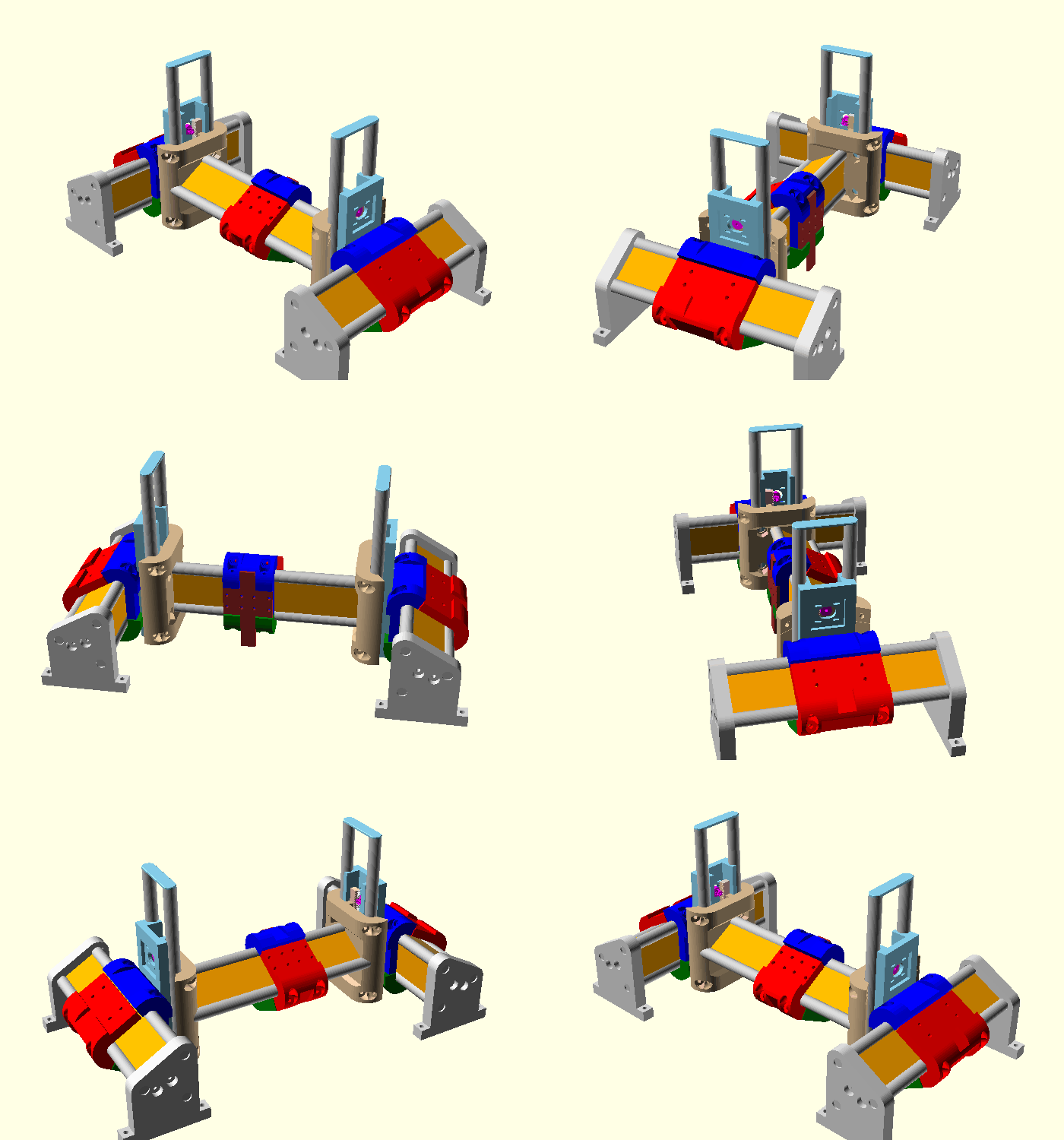
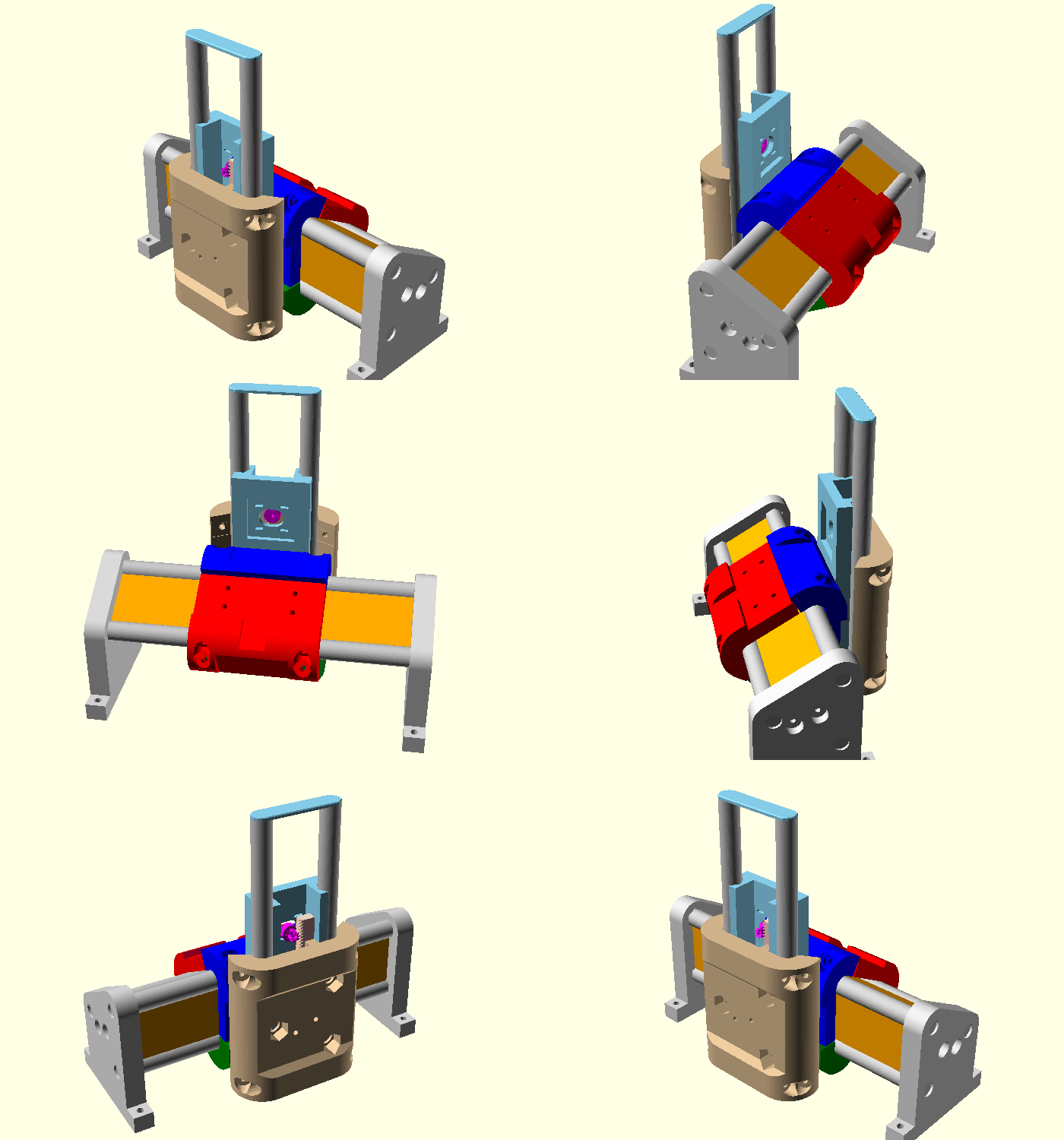
Make an animated gif of machine.scad and assembly.scad slowly rotating, maybe a 360 degree rotation in about 8 seconds.

machine_orbit
stage_orbit

The OpenSCAD files are available here:
https://www.printables.com/model/1795824-3d-printed-rack-pinion-cnc-machine-openscad-remast

I have seen AI do so many incredible things but it still blows my mind.

This is Claude Code, using Fable. I have the $200/month plan for personal use but my employer pays for it for me to mess around and learn stuff.

I tried Opus 4.8 briefly on another project and it was noticeably worse. I can’t say I’ve used other models enough to be sure of the difference. Since I have access to Fable I don’t have a lot of motivation to experiment to see how the other models are.

I should also mention, this would have cost about $215 if I were paying the normal retail API rates. The $200 per month subscription provides an allowance of about $2000 per week which is an insane discount if you use the entire allowance. I never use my entire allowance so the cost is effectively zero, but depending how you buy the tokens it can be a real cost.

But most of all, this is so much fun!

Whoops!

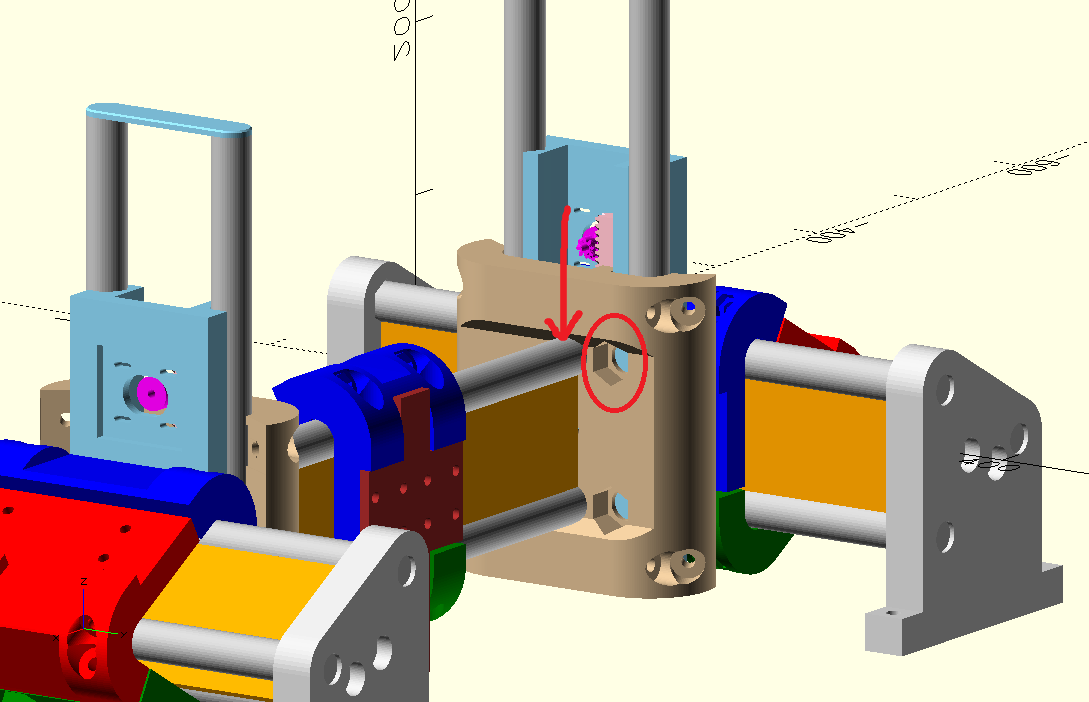
Look here. Please fix.

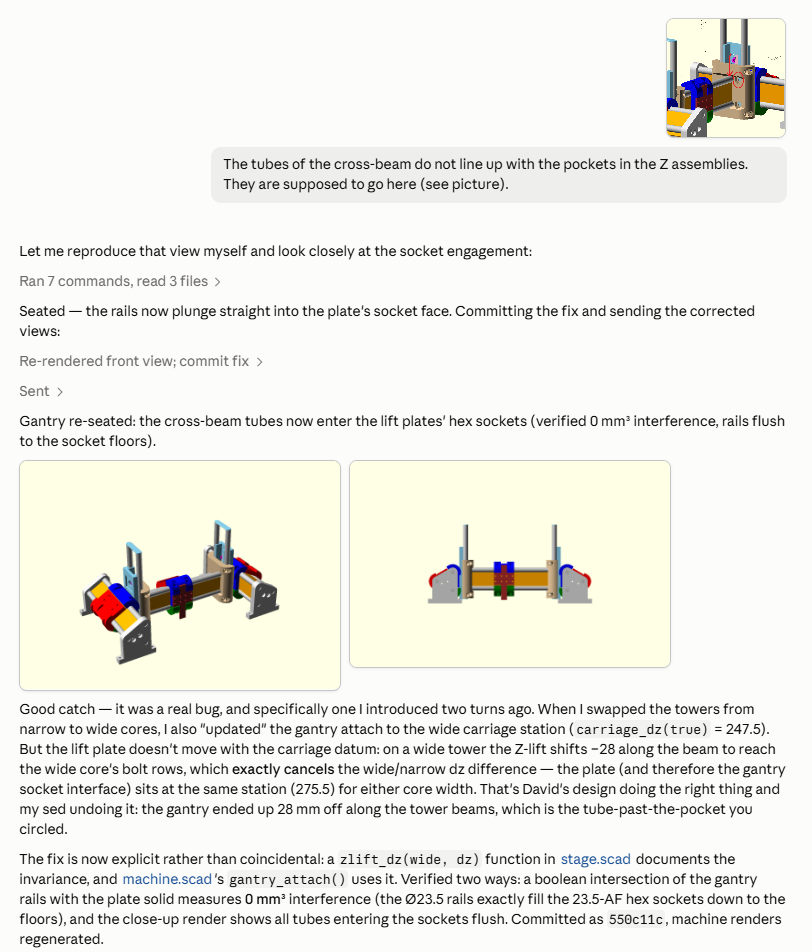
Done.

machine_orbit

So what does the code look like for all that?

Jamie, this seems so incredible. It’s beyond me… but I’m honored anyone would go to such effort. To even be considered worth the effort is truly mind-blowing to me.

As I have not actually completed a prototype machine using only the Printables parts you’ve looked at… I can’t help but wonder if they are alright. I THINK, based on what I see here, that your efforts have found the MPR&P-V3_alpha3 design to be reasonably sound?

I use several AI models for various things. What we want is one best for everything and we dont have it yet.

I find that Claude is by far better than the others as spacial project type thinking. Cross memory sucks but it handles long back and forths exceptionally well

ChatGPT is my daily driver. Its better at understanding my intent and such. I will have ChatGPT keep the other AI’s in line with my thoughts

Gemini is the all out king for easy access. He’s on my phone, watch, car, computer etc etc. I can yell across the room without touching anything. Tied to google account means native Drive, Notes, Calendar, etc.

Grok…. grok is a wild card. Hes like rainmain sometimes. how much for a sports car $5. How much string to tie the three closest stars together BAM. Grok is also better at insane number crunching. Hand him a full code stack and have him run pre-mortem tests or simulate however many different examples and chase bugs. Grok is the one I go to for deep searches or looking past tainted truths.

Here is one for you……. “grok, search the V1E forums and tell me how people are doing [insert thing here]” That is the best search engine for this forum out there. Look at the number of pages beings searched on the subjects and the way the answers come back. “Forum Practices"

I was trying to train a local model to handle Onshape feature scripting, but the symantics in onshape always seem to make the AI stumble and its easier to get a parameter list from the AI and lay out the geometry using it.

It looks okay to my eye but don’t read too much into it. I haven’t studied it from a functionality standpoint, I was presuming it is good and aiming to copy, so that’s where the focus went. Even relatively obvious collisions can get missed by the AI and I have to point it out, so the current workflow is poor at that sort of validation.

Someday soon it might be possible to feed it into a physical simulation and iterate digitally a few times. That could get interesting.

I wonder if Fusion’s AI can run those kind of tests?

Where the heck are you guys discussing this MPR&P stuff?

So it’s primarily a “fit” check more than a “function” check at this point? If AI can even put it together, I’ll consider that a “win”… as my fear is always that folks might not have the patience to fiddle with “close but not quite” alignment of parts they’ve downloaded from Printables. Since this is V3 for MPR&P and it just a barebones machine… I’m confident it’ll move and go through the motions if it can be bolted together properly.

Whether it’ll remain accurate over time and stand up to the rigors of “real work” is what remains to be seen. And I’m leaving it to others to add the quality of life features that, for some unknown reason, I simply don’t seem to need. It’s KISS for me… :wink:

It’s called the lounge, one of the perks for being a long time and very active member. It’s where we do beta tests and other things.

Like endstops for auto-squaring :slight_smile:
If we had this in SCAD, the mods would be a breeze and easy to share.

I see… probably explains why his link in the other thread didn’t work for me.

Anyway, yeah openscad has upsides to it but like anything in life is about compromise. It’s not great at everything.

Completely true.

Ok, I am going down Freecad journey for now. i have just designed this part. I have mad respect for you all that do this.

I just found Secret sauce #1 be careful how you design things. I want to now make it smaller, but the way I made my design certain things do not move well, even though they are Fully constrained!

(the more I think about it, this should shrink, I will check tomorrow).

Oh this is a MeshTastic case for Seeed Xiao ESP32S3 with SX1262 this has been daunting but fun and rewarding!

I had to re-learn what fully contrained meant when I started working in parametric designs. Its easy to fully constrain when you are giving the measurements. when you are leaving them as variables, every measurement almost has to be laid out in advance.

In Fusion or OnShape, that means going back and fourth in the timeline and adjusting a separate table of parameters and such.

In scad, it means scroll back up and add a line for the variables definition.

I have been working on a gcode generator that is laid out much the same way. Variable = this….. a couple lines later, use that variable to define others. Way down later in the actual script, use them as needed.

It really pushed me from an old timer with a drafting machine and pencil into the modern age.

Don’t know if this helps or not, but I recall @jeyeager and/or others working on extending gcode to support macros and imperative coding primitives (conditions, variables, branching, loops, etc…). Something like support we get in Klipper macros. Maybe some of this is creeping into fluidnc codebase too :man_shrugging:

I keep waiting for one of you coding master types to fork klipper for our machines sepcifically.