I am wondering if anyone could please give me some advice on settings to make my lowerider CNC cut faster? Someone asked me to cut a guitar body, it ran for probably 3-4 hours, then I had to pause the job because it was getting to be late and it is noisy obviously. When I tried to unpause in the morning it failed.
I am wondering if it should take this long to cut something like that? It had only get out 3 fairly small pocket holes about 25mm deep, nothing major.
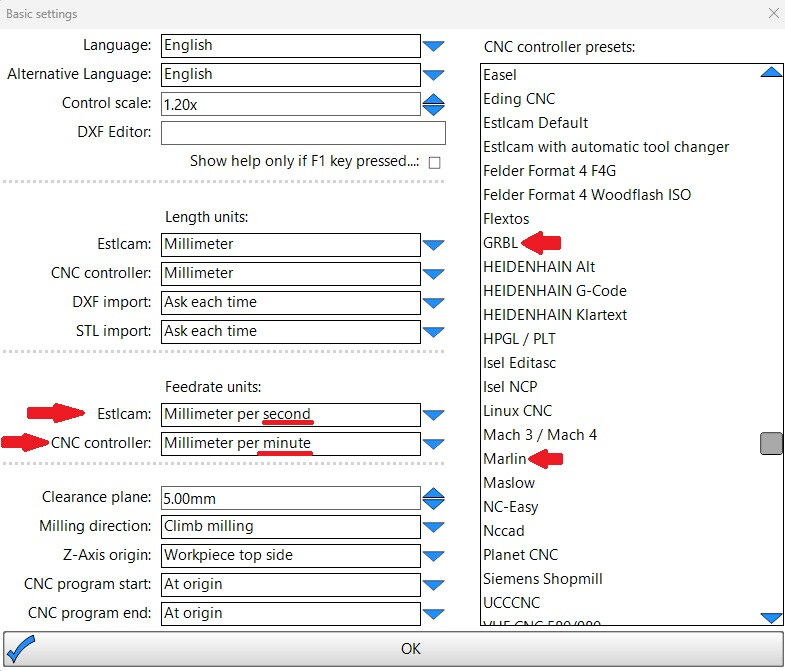
I am using ESTLCAM with a 1/4” bit. 3mm depth per pass, 25mm/s feed rate, 8mm/s plunge feed rate. Stepover 75%.
Would there be something in FluidNC overriding these settings making it slower? Sorry I’m pretty new to this still, I’ve only been using the CNC for slab flattening, moving it manually at this point.
Typically a very slow feedrate is because the CAM program (eg. Estlcam) was setup to output mm/s rather than mm/min.
The controller is expecting gcode in mm/min. Check your gcode (or post a snippet here). If it shows F 25 instead of F 1500, then you are using the wrong units (F 25 will only move about one inch per minute).
Ok, stupid mistake I think lol. In my bit settings in ESTLCAM I has 0.25mm as the diameter of bit for 1/4” upcut. It should have been 6.35mm, I didn’t see that it was in mm not inches lol, not sure how I missed that.
I am going to be cutting in hardwood, other maple or walnut but presently cutting in MDF for testing. What is a safe depth of cut for hardwood? When I googled it, I got 3mm, but when I watched a youtube video the guy was cutting Alder at 12mm! I have feedrate at 25mm, is that good?
Your machine is unique, we can’t give you exact answers. Start at 1/2 the bit diameter, try all the way up to 2x the diameter per pass. Anything more than that and chip control gets tricky in slots.