LR4 Tolerances

Hello!

I was wondering what tolerance you guys set and how you do it.

You can skip this next paragraph but maybe its some context for my question/issue.

I’ve already cut some things with the LR4, for example the full size table Ryan shared and a torsion box. Oh and my first CAD and CAM project, which was a step for being more squatted when pooping. First thing I cut was the gantry reinforcement ofcourse, but the SVG generator I’m guessing did large enough tolerances for it to fit pretty perfectly.
The poop chair took quite the hammering to fit. The table also got some severe elbow grease put into it, but thats because my floor has deviations of up to 100mm and is not a flat surface to assemble on, however still, the table assembled perfectly.

So now I just designed and cut this, which is something a friend needs for art stuff.
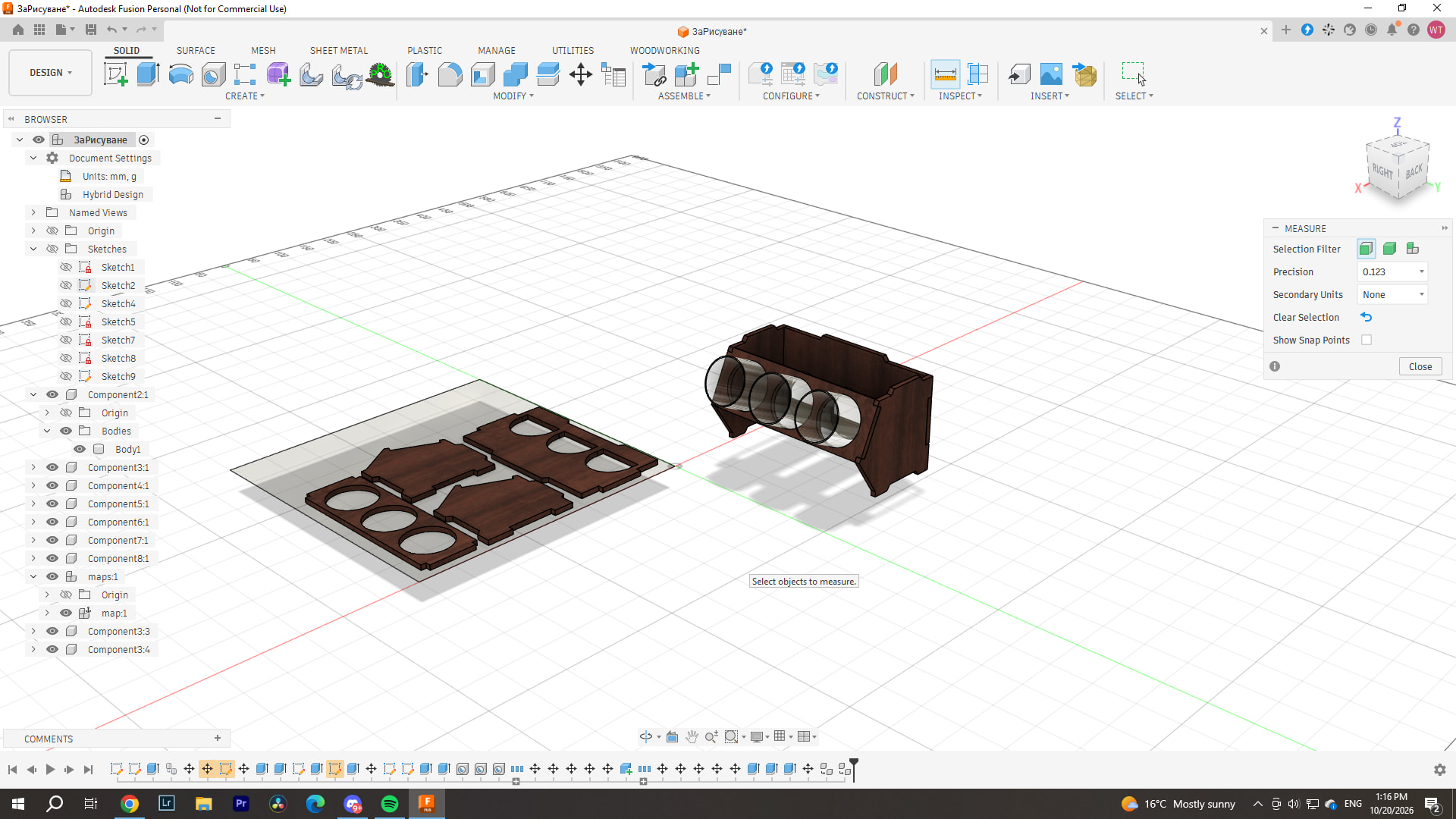
For example, current small project I set 0.20mm on each side of the parts that I need to fit, so total 0.40mm. I set them at 0.40, because those were the tolerances on Ryan’s table, and everything fit perfect.

I’ve measured diagonals and every part every time I cut with the LR4 it’s square and cutting straight everywhere, and on the whole 2500mmX1250mm, anywhere I measure the cut, its exactly within +/-0.20mm of the exact size set in fusion.

However, when it came to assembly, them parts were somehow 1/1 equal size down to 0.03mm?
This is the first time I tried to set bigger tolerance in the 3D model itself, so it fits easier and not like my first project, however it came out too tight again.

How do you go about with setting the tolerances on your LR4? Do you always cut test pieces, is the tolerance the same every time or does it deviate and you change it each time you cut, I’m 100% green to CNC and everything I learn is from trial and error with the Lowrider, thank god it just skips a step or ruins a bit if I make a mistake.

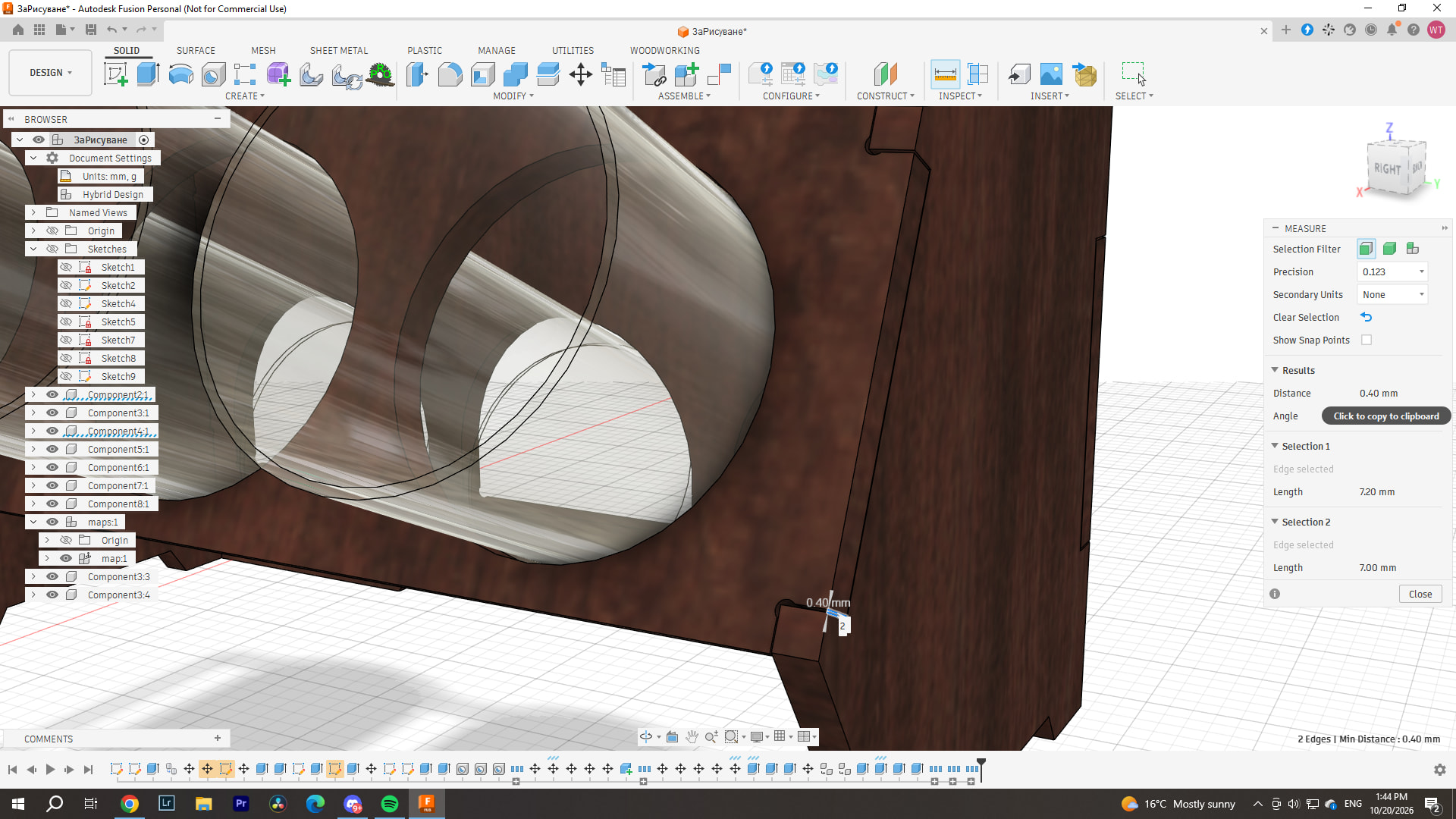
Now I’ve set them to .40mm on each side. The glass diameter is 65mm and I’ve set the holes at 66mm, and they were spot on the first cut. I’ll wait for some advice before cutting this one as I’ve got material for one more left :sweat_smile:

from my experience , which is only couple of yrs worth, there are so many contabuting factors , material , tool direction feeds/ speeds, different software, tool diameter

i do trial runs with all my materials that need precise cutting , yes it can be hair pulling getting the sweet spot

how precise is your tool diameter in your cam - ive found say you have a tool that spec say its 6mm so you type 6mm in tool diameter but in fact when measured its 5.87mm that .13 makes a huge difference

i find software to be a big headache also

design in one cad program import to a cam and there is always a 0.?? difference

so i design everything to its correct size , than in my tool operation , ill put stock to leave +/- what ever it needs

eg: i do all my cabinetry designs in free cad than export as DXF than import into mill mage where i need to than scale up to 1000% for them to appear correct size, measurements show as correct but if i just cut them they end up 1mm undersized or i just set stock to leave as 0.5mm

i have run a test by just drawing a square in millmage and cut it and it is exact with no stock to leave selected

material one of the worst materials for me is particle board , the mixture of floor sweepings and glue play havic with everything i have minimal wiggle room in my settings , its like running your tool through 80 grit

Oh wow, well, I most definitely trusted that 3.175mm tool diameter without checking it, I thought it was some precision stuff that doesn’t get measured… :smiley: I did my model to exact size at first and then removed that 0.20 just from where the joints are. I’ve now added yet another 0.20 and it still took hammering to fit in one spot… 0.80 total. However I noticed that its much tighter, where the cut goes both in X and Y axis, If it’s only moving at X or Y, it seems to get it 100% spot on. But this is a mixed/diagonal movement so It’s the only reason I could maybe think of as a possible difference. So maybe I should triple the clearance in such spots, or double I’ll have to quack around and find out.
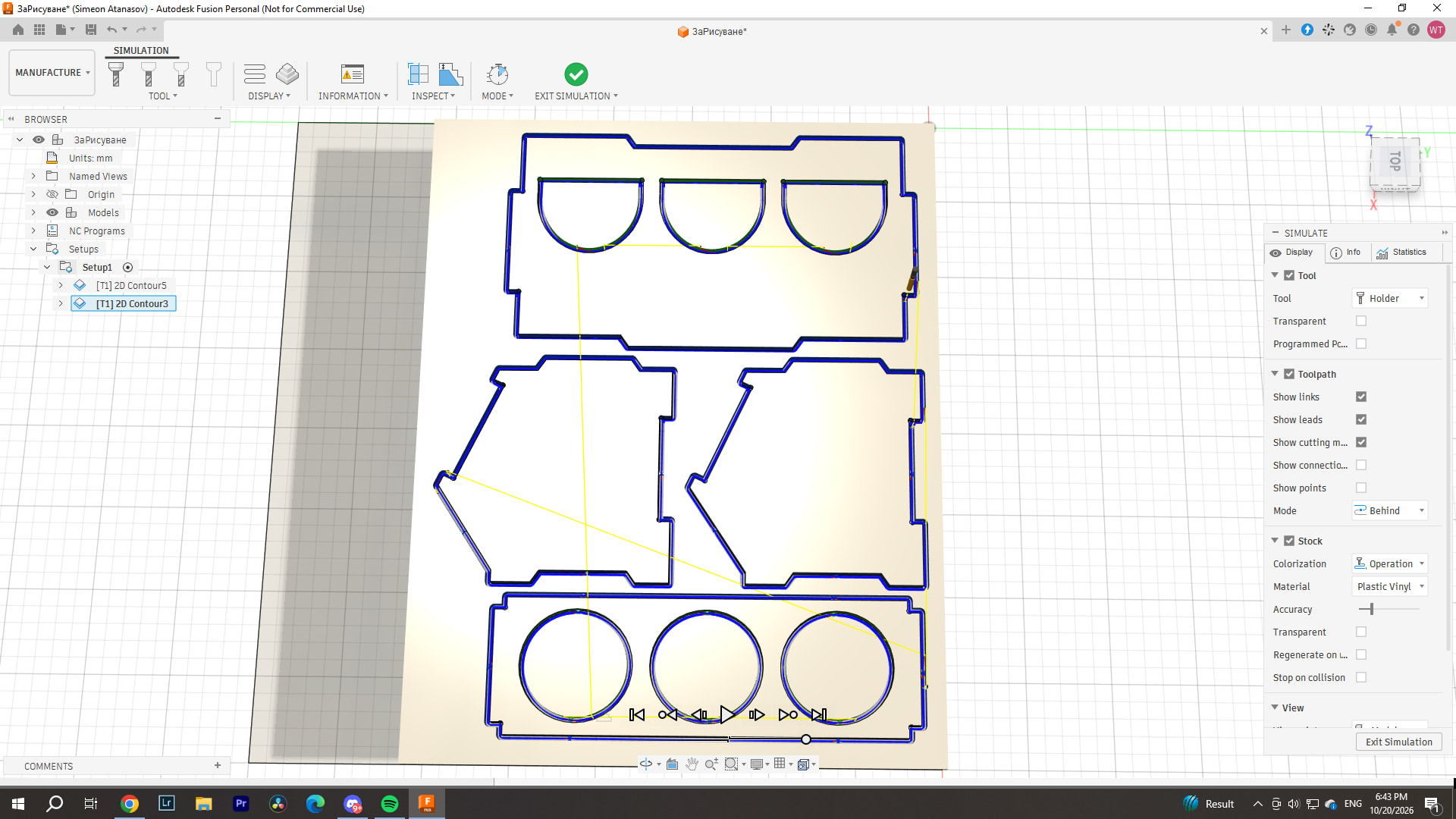
Interesting, I was wondering what stock to leave meant. Now I hear from you that I can use it as an all around tolerance setter. That’s neat!

Are you using a full depth finishing pass? You noticed that cutting on an X Y diagonal produced the tightest joints. By leaving 0.8mm of stock on your initial cut you can go back and do a full depth cut removing that 0.8mm and get a much more precise joint. Give it a try on a test piece.

that sounds like could be a deflection issue , prob in the tool what tool ? feeds and speeds, doc , conventional or climb

I’ve not yet done finishing passes, for now I’ve been cutting to exact dimensions from the start. I’m still learning each feature one by one and playing around. For example I now use ramp at 35 angle and It doesn’t stop to plunge for the next pass but just gradually goes down, sounds much better too.

I use 3.175mm upcut single flute carbide bits, its cutting lenght is 15mm aaand I’m still not very well versed in these things, but I don’t really know what I’m using, I couldnt find it anywhere for an option to change conventional and climb. But I use 2000mm/min feedrate, 1.5mm doc, 35 degree ramp, 1500mm/min on the ramp, 300mm/min on plunge. at around 15/16k rpm, its a line before dial 3 on the makita so its somewhere there. I’m guessing at default it cuts conventional?

First time I cut, I used the extra long 1/8 upcut flute from V1, and then I learned about deflection as I cut 18mm OSB :smiley: , but it still managed to pull through without issues, untill it dulled after one crash from entanglement with the dust hose. But since then I finished the table and torsion box, and now I could use a spoilboard so now I only use 3.175mm bits which are much shorter and are much deeper nested in the collet and dont pertrude as much. I did buy some 6mm bits, but I’m still scared to use them untill I learn more about cutting.

If you plan to measure anything, always do a finishing pass 100% of the time.

Make a single pass and measure your cut width. Almost all 3.175mm bits are 3mm.

I just made some chairs for the MakeGood project, my “nice” plywood varied about 0.3mm ±. That makes tabs pretty hard to get “perfect”


If you are asking about fractions of a mm you need to start being careful and checking everything. Carpenters typically think a 1/8 is “perfect”, finish carpenters want 1/32", People with a CNC start asking about 1/256" (0.1mm), just for some context.

Forgot I can highlight replies like this! So, I never knew that was a thing. Since I’ve cut idk, lets call it raw no finishing pass and measured every time, it was always within 0.20mm on the full sheet at any given point, so I thought oh well, its cutting accurately! Didn’t know finishing passes are used for accuracy, do they improve the topside of the cut aswell? I’m seeing a bit of fraying but nothing much until the bit gets used a bit.

So, I measured the bit shank, that’s 3.175 no +/-, I tried measuring the flute/tip, kinda hard because of the shape, but I managed to grab some widest part around 3.00/3.05. Measured the line it cut, its somewhat between 3.00 and 3.10, hard to measure as it seems slightest pressure or shift in the angle moves it.

I use metrics, but It’s not because I’m trying to achieve some craaaazy precision, I’m not making metal/aluminum machine parts, just wooden thingies, however a nice snug enough but not too tight fit helps a lot with glue ups and when making moving parts like sliding drawers without metal sliders. But I do measure just to keep things in check and notice if there are any issues ocurring, or in this case learning to make things fit well.

Do you do a full depth finishing pass and by how much for best finish/accuracy?

Thanks for useful advice everyone!

It helps accuracy and surface finish.

Measuring the bit does nothing, it has to be the cut.

Use those numbers, 3.05 sounds fine. This also accounts for any spindle/collet runout.

yes Always, 10-20%bit diameter in wood.

Then you have to do test cuts when you change material. A 10 minute test cut, will save a lot of greif dealing with a bad fit later. You would be shocked at what some consider a good fit, you are on the more perfect side for sure (that is a good thing). But to be honest you are dealing with tenths of a mm in wood, that is far beyond standard woodworking ( I do the same thing).

I did some test cuts and it works best when sticking closer to the recommendations of the endmill. So you could try like 800mm/min speed and rather cut a bit deeper.

You can pretty easily handle 2x diameter as the depth of cut in wood. Increase speed after you get to that depth. I think most of us run 1/8" at about 6mm doc and 25mm/s feedrate with a low speed on the router.

So true. If you are chasing zeros, a finishing pass is a must, always measure your bis ( light pass into some scraps) ramp entrance and dont get crazy with the speeds!

Nice :sweat_smile: well if you didn’t have this character trait, the LR4 wouldn’t have been this perfect!

Oh wow, I haven’t even dared to go that deep! But it 3mm DOC at 1500mm/min (25mm/s) Most definitely sounds faster than 1.5mm DOC at 2000mm/min, even though its kind of satisfying to see this machine zoom around :smiley: Will most definitely experiment a bit more with cuts these coming days, want to try the 6mm bits aswell.

Would 13-14k rpm be sufficient for those cut settings in plywood?
I recently discovered how OSB 3 absolutely destroys bits because of the resin and glue its infused with for waterproofing :confused:

BUT I will have to check how to set up this finishing pass thing in the CAM. How long does the 3mm bit last at such cut settings? 30 hours? Or do you guys measure in cut lenght as its life, or just once it starts making big fuzzies then you change?

By this you mean to set my tool diameter in the CAM as 3.05 right?

Thanks everyone, lots of help from this thread!

Will most definitely try the finishing pass!

I see people are not afraid to cut deep here :sweat_smile: , I should tip my toes there aswell.

However I must say after having skipped steps because a little dust hose entanglement, when i went to wash my teeth for exactly 1 minute. I must share how I have no idea ,but the 1/8 extra long single flute bit from the V1 shop, went to cut sideways at about 35mm DOC, and it went on to cut that depth for maybe 300mm or so sideways, it was most definitely ugly and wavy, but that bit didnt break, and the LR4 just derailed itself and drilled a hole down to the collet, just as I came back in time to check what the noise was. What a beast of a machine, and I was sceptical about pushing it to x1 the bit size, LOL . Will most definitely try now x1 and x2 to see how it does.

I found out cheap 4mm bits allow me to cut faster/deeper but not crazy . The supplier i use have them to be 4mm exactly (single flute -upcuts) but i mostly cut acm sheets. They last me around 80 sheets per bit. (I use 1.5mm extra doc to have clean cuts)

These Hozly bits

Please do not leave the machine running unattended. 1 second can be enough to start a fire from the friction of a stuck machine. Not saying you can’t have fun with the machine, you just have to be in the same room when it runs… you can also pause a job to take a break!

Yep, learned that lesson fast!