Hi Jason,
*Note from edit: Now the file seems to get even more corrupted every time I delete from flash and re-upload. Now even the OG file (un-edited) is having issues where when I press “Restart Board” button on WebUIV3, it just says “restarting” forever. Then I can’t connect or even delete config from flash or even re-upload a new config. At that point I have to go to fluidncinstaller website via USB-C and delete then re-upload. Confusing.
Here is the $SS output:
$SS
[MSG:INFO: FluidNC v3.9.9 https://github.com/bdring/FluidNC]
[MSG:INFO: Compiled with ESP32 SDK:v4.4.7-dirty]
[MSG:INFO: Local filesystem type is littlefs]
[MSG:INFO: Configuration file:config.yaml]
[MSG:INFO: Machine LowRider]
[MSG:INFO: Board Jackpot3 TMC2226]
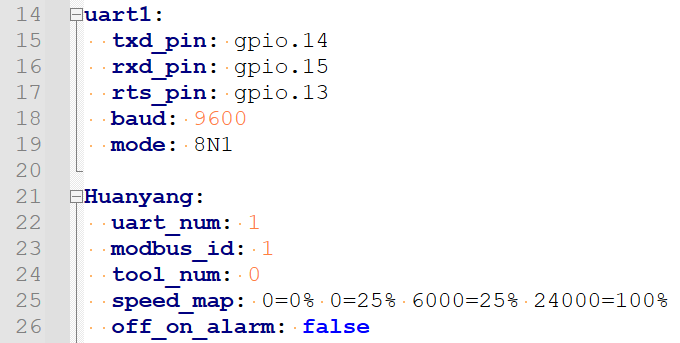
[MSG:INFO: UART1 Tx:gpio.14 Rx:gpio.15 RTS:gpio.13 Baud:9600]
[MSG:INFO: I2SO BCK:gpio.22 WS:gpio.17 DATA:gpio.21Min Pulse:2us]
[MSG:INFO: SPI SCK:gpio.18 MOSI:gpio.23 MISO:gpio.19]
[MSG:INFO: SD Card cs_pin:gpio.5 detect:NO_PIN freq:20000000]
[MSG:INFO: Stepping:I2S_STATIC Pulse:2us Dsbl Delay:0us Dir Delay:1us Idle Delay:255ms]
[MSG:INFO: User Digital Output: 0 on Pin:gpio.26]
[MSG:INFO: User Digital Output: 1 on Pin:gpio.27]
[MSG:INFO: User Digital Output: 2 on Pin:gpio.0]
[MSG:INFO: User Digital Output: 3 on Pin:gpio.2]
[MSG:INFO: Axis count 3]
[MSG:INFO: Axis X (3.000,1223.000)]
[MSG:INFO: Motor0]
[MSG:INFO: tmc_2209 UART1 Addr:0 CS:NO_PIN Step:I2SO.2 Dir:I2SO.1 Disable:I2SO.0 R:0.110]
[MSG:INFO: Neg Limit gpio.25]
[MSG:INFO: Axis Y (3.000,2443.000)]
[MSG:INFO: Motor0]
[MSG:INFO: tmc_2209 UART1 Addr:1 CS:NO_PIN Step:I2SO.5 Dir:I2SO.4 Disable:I2SO.7 R:0.110]
[MSG:INFO: Neg Limit gpio.33]
[MSG:INFO: Motor1]
[MSG:INFO: tmc_2209 UART1 Addr:3 CS:I2SO.14 Step:I2SO.13 Dir:I2SO.12 Disable:I2SO.15 R:0.110]
[MSG:INFO: Neg Limit gpio.35]
[MSG:INFO: Axis Z (-147.000,3.000)]
[MSG:INFO: Motor0]
[MSG:INFO: tmc_2209 UART1 Addr:2 CS:NO_PIN Step:I2SO.10 Dir:I2SO.9 Disable:I2SO.8 R:0.110]
[MSG:INFO: Pos Limit gpio.32]
[MSG:INFO: Motor1]
[MSG:INFO: tmc_2209 UART1 Addr:3 CS:I2SO.19 Step:I2SO.18 Dir:I2SO.17 Disable:I2SO.16 R:0.110]
[MSG:INFO: Pos Limit gpio.34]
[MSG:ERR: X Axis TMC driver not detected - expected 0x21 got 0x0]
[MSG:ERR: Y Axis TMC driver not detected - expected 0x21 got 0x0]
[MSG:ERR: Y2 Axis TMC driver not detected - expected 0x21 got 0x0]
[MSG:ERR: Z Axis TMC driver not detected - expected 0x21 got 0x0]
[MSG:ERR: Z2 Axis TMC driver not detected - expected 0x21 got 0x0]
[MSG:INFO: Kinematic system: Cartesian]
[MSG:INFO: Connecting to STA SSID:BINKY1135_2.4GHz]
[MSG:INFO: Connecting.]
[MSG:INFO: Connecting..]
[MSG:INFO: Connected - IP is 192.168.0.98]
[MSG:INFO: WiFi on]
[MSG:INFO: Start mDNS with hostname:http://fluidnc.local/]
[MSG:INFO: HTTP started on port 80]
[MSG:INFO: Telnet started on port 23]
[MSG:INFO: Huanyang Spindle Tx:gpio.14 Rx:gpio.15 RTS:gpio.13 Baud:9600]
[MSG:INFO: Probe gpio.36:low]
ok
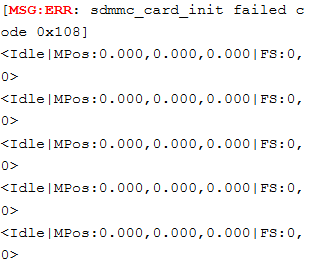
<Idle|MPos:0.000,0.000,0.000|FS:0,0>
<Idle|MPos:0.000,0.000,0.000|FS:0,0>
<Idle|MPos:0.000,0.000,0.000|FS:0,0>
<Idle|MPos:0.000,0.000,0.000|FS:0,0>
<Idle|MPos:0.000,0.000,0.000|FS:0,0>
<Idle|MPos:0.000,0.000,0.000|FS:0,0>
<Idle|MPos:0.000,0.000,0.000|FS:0,0>
<Idle|MPos:0.000,0.000,0.000|FS:0,0|WCO:0.000,0.000,0.000>