Laser: MPCNC or Lowrider?

Hello!

I have a working MPCNC with a 12”x12” working area. I have made a couple of cool things with it and its Makita clone router, but it is just so dang loud in operation I just always talk myself out of using it. Then my kids got me a 5W diode laser on a gantry, 8”x8” working area, and using that plus Lightburn has been a ton of fun. The only issue with it is the size and it has a practical limit of about 3mm thick plywood with 10 passes.

So it seems like I can solve all my problems by buying one of those 24W JTech lasers and making my MPCNC bigger! (I have smoke extraction figured out for all combinations, so leaving that out of the discussion for now. I know I’ll need to design the right eye shielding around the machine in addition to the goggles, but I’ve done this before and will have a safe setup before applying any laser power.)

My question is this: I want my standard workpiece size to be 2’x4’x1/4” plywood. I will only be using a laser, never a router. I’ll be taking apart my MPCNC Primo, which uses the JackpotCNC board, the NEMA17s, endstops, all that stuff. My workshop is my garage, and I will be lifting the machine up (over the car) when not in use, so it will probably be mounted to a piece of plywood which will sit on sawhorses in operation (screwed or clamped). I have a P1S 3D printer, so no problem printing parts.

Should I make my MPCNC bigger, or should I make it a Lowrider V4 instead? I’ve read that that ~3ft is the point where the Lowrider becomes the better option, but that’s assuming a router, correct? Does the laser-only approach change anything? I searched for similar laser builds but I did not find anything that answered this question.

Thanks!
You already have all of the parts for he MPCNC, and for a laser, there’s practically no loading on the core, so the size limitations aren’t as big a deal.

There still are size limits though. The Primo CNC depends on having the rails be parallel to each other, and sag can be a problem. The trucks are designed to allow supports on the rails, but not on the gantries. At some point, the gantries are going to vibrate and shake, and that will play havoc with what you wan tthe laser to do. I don’t know what that point is, but it will be there.

For the LowRider conversion, you can re-use the controller, stop switches, motors, and a bunch of the 5/16" nuts and bolts, 608 skate bearings and the M5 hardware. you will need more M5 hardware, and the MGN12H linear rails, as well as all printed parts, of course.

Both options need new steel ad a base.

Now, the limitations for both MPCNC and LowRider. These are both machines intended to be capable of moving a large amount of mass, and are themselves somewhat massive. A laser benefits from being able to change direction quickly, and neither of these machines is really designed to do that. I have used a laser with my MPCNC and with my LowRider (3) and no longer have a laser attached to either. Instead I have a purpose built laser that used LowRider style kinematics, with no Z axis that is good for an area 65cm by 90cm. (It was intended to be 2’ by 4’, but my Y rails are a bit short, so it’s 2’ by 3’) And I have another laser based on the MP3DPv3 that is about 45cm square (16"). Of the two, the coreXY laser gets far more use, because it still is able to change direction faster, making it far quicker to complet projects of the same size. The big laser gets used for things like FliteTest models on foamboard. both lasers are “40W” models (About 10W optical power) One is an E40 and the other is an A40640. Both have air assist nozzles. To me the purpose built kinematics for the laser made far more sense.

I’ll probably change out the large laser for a CoreXY based design in the future, in order to reduce moving mass and make it faster. I have ideas about changing that one over to a CO2 based laser instead, but that is a whole other magnitude of safety concerns, as optical power will also be increased by a lot. (I will NOT entertain the idea of a CO2 based laser with anything like the current setup with 2 independent Y axis motors, as squaring and alignment with the CO2 is so critical to both function and safety.)

1 Like

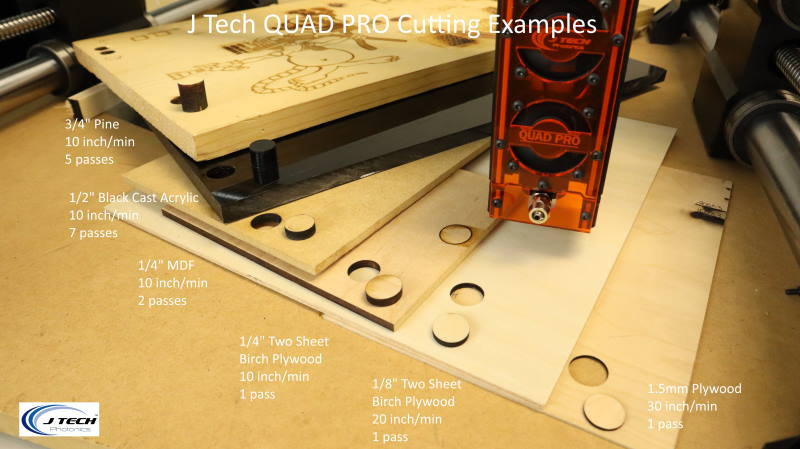
Thanks! Lots of good stuff. For speed, this page looks like 10 in/min is the sweet spot. That’s 254 mm/min, I think I was using 250 in Kiri:moto for milling wood. So a lot slower than I was zipping my 5W around with for removing anodize from aluminum cards, but much faster for cutting 1/4” plywood.

It’s not just the speed, it’s the acceleration.

The Primo and LR alike are more than capable of going fast enough, but doing things like raster graphics or filled areas has the machine going back and forth, and slow accel means either karge overshoot movements, or dealing with the laser ramping up power, which doesn’t scale entirely linear. (You can have the laser at 1% power at 1/50 the feed, but it won’t burn like 50% power, ever.)

This also applies to direction changes at corners. You want the speed to change quickly, not slow down then speed up again gradually. You can increase the acceleration parameters, but something like a CoreXY will easily outperform either a Primo or LowRider.

Edit: this shouldn’t be taken as the CNC being unable to do a good job, because it certainly can. Just that there are slways trade-offs, and the CNC machines gear towards heavier loads at lower speeds, and lower accelerations.

2 Likes

I see, I hadn’t thought of acceleration. So it sounds like MPCNC and Lowrider are about equivalent in this use case, with a CoreXY being superior. That’s an easy decision then: I’ll make the bigger MPCNC, which is very minimal +$ and +time, and then see how that works vs a more involved change.

Thanks for the help, I’ll get started on the reconfiguration. I can try it with my 5W laser before spending any big money, I’ll post how it goes!

1 Like

This is exactly what I did with my Primo. I took the router off of it and just use the LR4 for that work and mounted a Laser Tree 20w laser on it. it works well. Mine is around 650mm x 650mm usable with the laser

2 Likes