What are the differences in the jackpot boards and if I have one of the original jackpot boards is it worth upgrading to the new board
Short: No.
Longer: No, not really. Except you want to support Ryan or want to have another one just because. 
The JP3 has some more features that are not really necessary for a “normal” user and uses internal drivers and ESP so there are less components for Ryan to ship and no chance to fry the ESP any more accidentally. Besides that they are pretty equal.
From a different topic (link below)
Edit: Below is the full quote…
The Jackpot V1 has a removable ESP-32, and removable TMC2209 stepper drivers.
The Jackpot V3 has a built-in ESP-32 and built-in TMC2209s.
The connectors on the Jackpot V3 are more user friendly, and the packaging is improved (where wires or cables come or go, and the ESP-32 antenna is in a better spot.)
Thermals on the V3 are a bit better if you’re running the machine hard.
The IO on the V3 is switchable between 5V and VMOT.
For most applications and for most users there’s really no significant difference between them.
The V3 is an incremental improvement, and for most use cases is slightly better.
Ryan keeps the controller prices very affordable, so the V3 in my opinion is an exceptional value- but the V1 remains affordable. I tell him all the time he should double the price. He’d rather have the boards be affordable for our worldwide community of makers.
There are reasons the V1 will stick around. The removable ESP-32 enables things like using an external antenna (if you put the Jackpot inside a metal enclosure) or playing around with development of the firmware.
I wouldn’t have any worries about starting a new build with a Jackpot V1.
The biggest issue with the jackpot board is the lag. It seems like every action requires a 5 or 10 second software lag after the movement is done. Perhaps the improved location of the wifi makes the v3 faster? Although the problem doesnt seem to be the wifi, it seems like its the proccessor or other computing bottleneck. The old v1pi setup was way faster.
That’s odd. I have not had that issue one bit. For me the Jackpot responds just as fast if not faster than the SKR Pro did for me. And for Pauses during a job its MUCH faster
Hmm ..well at least it is running very consistently for me. I am tempted to upgrade but my lr3 build is cutting so reliably right now I dont want to touch it.
Can you describe this on more detail? Are you running gcode files via the WebUI or a sender? This has not been my experience.
I am using the web ui in sta mode. I have really good wifi in the shop. When I press the homing button it will run the homing routine but there is a lag after its done, and i wait for the green start job button to be available. It is really very tolerable but just not snappy. Kind of the same lag while zeroing out the surface with the probe . The attach probe message come up immediately but the resume button before and after the probing takes a second to be available.
Oh, this might be a super simple fix. I’m guessing you’re using WebUI v2? I don’t have access to get a screenshot at the moment but what is your reporting set to? There are auto-reporting and poll options.
Chip ID: 34872
CPU Cores: 2
CPU Frequency: 240Mhz
CPU Temperature: 57.8°C
Free memory: 79.69 KB
SDK: v4.4.4
Flash Size: 8.00 MB
Sleep mode: Modem
Available Size for update: 1.88 MB
Available Size for LocalFS: 192.00 KB
Web port: 80
Data port: 23
Hostname: fluidnc
Current WiFi Mode: Client Station (D8:BC:38:DF:38:88)
Connected to: CenturyLink7781
Signal: 100%
Phy Mode: 11n
Channel: 1
IP Mode: DHCP
IP: 192.168.0.91
Gateway: 192.168.0.1
Mask: 255.255.255.0
DNS: 192.168.0.1
Disabled Mode: Access Point (D8:BC:38:DF:38:89)
Notifications: Disabled
FW version: FluidNC v3.7.12
WebUI version: github.com/MitchBradley/ESP3D-WEBUI@279b61e
Well, that’s rather old but if everything else is working ok, you don’t need to upgrade. Current version is 3.9.9.
You are on WebUI v2. I was referring to this:
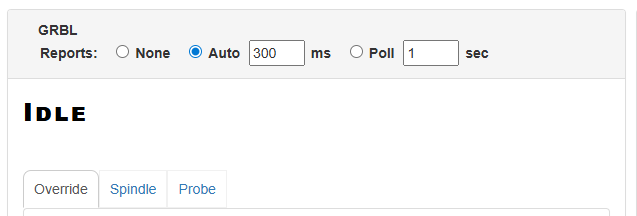
That setting defines how quickly it gets updates.
- Auto: This sets up auto-reporting where it will receive updates as soon as they are triggered, but not more frequently than the defined milliseconds. This is what I would recommend.
- Poll: This sends a “?” command to get updated status/position on the defined frequency. I’m guessing you have it set to this and is the source of the lag.
OMG I was on poll 10 seconds. Will be upgrading the firmware as well. Much thanks!