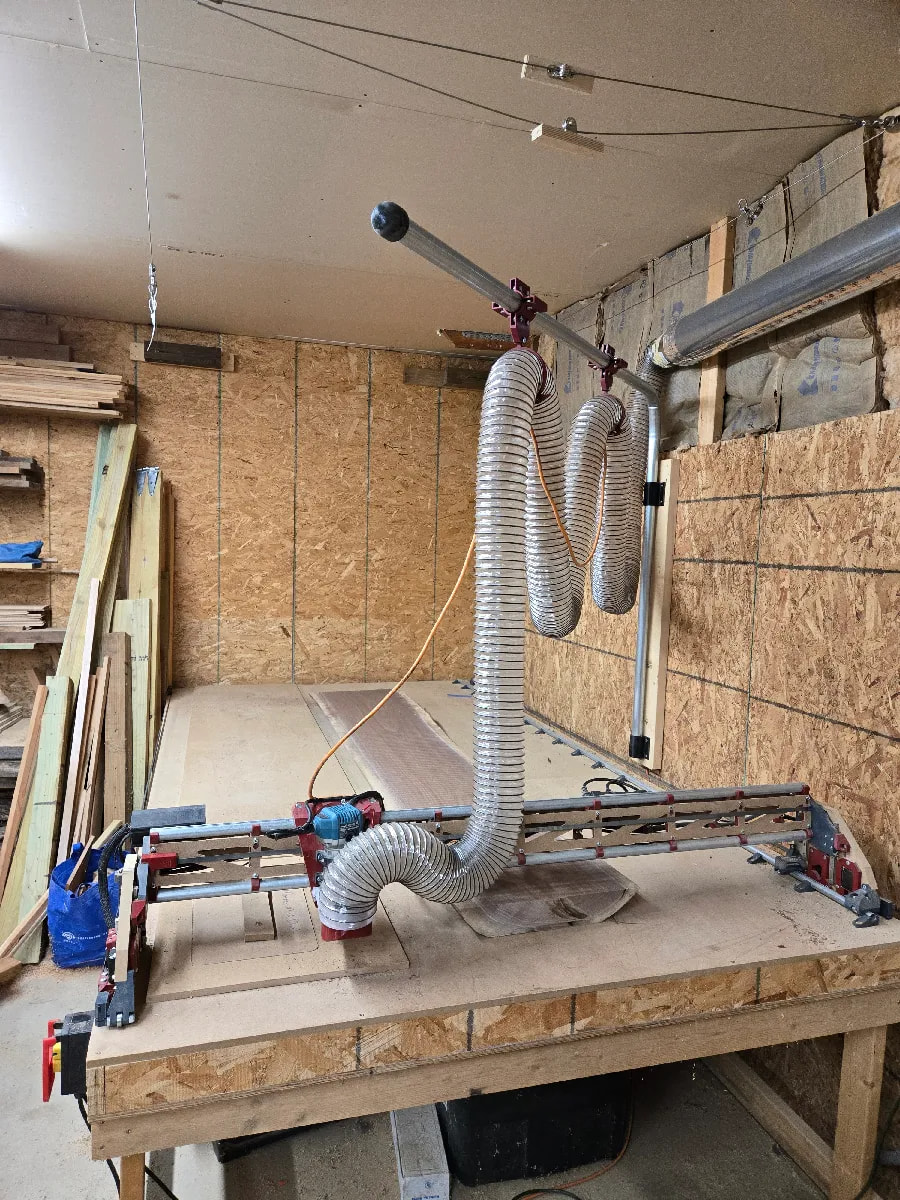
I’m look for a little bit of help. I recently completed my Low Rider V4 build and I’m experiencing some issues with the machine losing steps. I first noticed it when I cut a circle and it stop about 3/16 of a inch from completing the circle raised up and went home. Then I being cutting out some simple cursive words like welcome, grateful, and hello. The text didn’t look right so i decided to home the machine and drill a hole at x of 2" and y of 2". I then reran the single word cut out that is about 16" long and 8" tall. When the program completed it i then returned the machine to x of 2" and y of 2" and the router bit was about 1/4" from the hole most off in the x direction. I reran this zeroing everytime before running the program and ran it back to x of 2" and y of 2" each time the bit returned offset of the original hole by a differing amount and not always in the x axis. Then when running the last test one of the z axis motors stopped responding properly. So know it appears all axis are losing steps. I’m not sure what to do. Here are the particulars on what is being cut and what I have done to try to eliminate the problem today.
Material is 1/4" mdf I have tried cutting in one pass, two pass, and even three and all yield the same results.
Router bits are 1/8" i have tried compression and straight flute doesn’t seem to matter all have the same result
Cut speeds is 44 inches a min
Machine is 4’ x 8’ and I’m using the Autospin t1 router on a speed of about 2.5 and I’m using the jackpot 3 control from the Low Rider shop
What i have tried to date:
1.) grounding dust collector hose
2.) undoing all wire extension connections and retapping them after folding back
3.) checked all set screws
4.) changed router bits
Thank you guys and gals in advance for any help you can offer.
One last item do you think it could be the jackpot board that is bad?
Check your core. This sounds like the core is loose and wobbling on the rails. With the router off!!! Grab the bit and see if you can rock the core in any direction. If so, the top 2 bolts are where you tension this at. Go VERY slowly. No more than 1/16th of a turn at a time just until the rocking stops. It is normal to have to retension this a few times on a new machine.
Also both of the bits you tried are not the best thing to use. Try a single flute upcut bit.
I think I figured out what was going on the dust collection setup seems to be creating some additional drag on the machine when it moving. I disconnected the dust collection and everything seems to work as it should. I was running the cantilever system shown below (not my picture but the same system) with a 4" dust hose. Now that I have unhooked it, i have successfully cut three programs and they return to my predrilled indexing holes with no issues. I’m not sure if the hose is to heavy, the cantilever pipe is binding, the trolly is binding, or if my 900 cfm dust collector is to much suction and pulling the core over towards it.
do you loose any steps if you are not cutting ? run the same gcode with the endmill above the material. also double check all the wiring especially if you have connectors in the middle of the cables
Look for mechanical issues. You’re already investigating the core. Other things to check:
(just noticed you already listed this) Are the grub screws that hold the pulleys to the motor shafts all tight? Drawing a line on the pulley and end of shaft can help make this visible. A bit of low-strength thread locker is recommended to prevent the screws from vibrating loose over time.
Are the belts at an appropriate tension?
For further troubleshooting, does this happen repeatably at multiple points in the work envelope, or only near to (or far from) the origin point, far edge, or center of the machine?