I’m a bit frustrated. I’ve had my LR4 since November of 2025. I feel like the moment I get something dialed in, something else breaks. I haven’t been able to get through an entire project without somehow disassembling and reassembling different components. I’ve read and reread the assembly guide and I can not get any consistency out of my machine. Right now, I am bouncing around several different issues.
1: My Z-axis will randomly stutter on one side or the other causing misalignment and producing edges that aren’t even close to to 90 degrees. I’ve disassembled and reassembled both Z-axis no less than 6 times this week. When I reassemble I make sure to lubricate the linear bearings and attached the Z plate in a way that allows the bearings to glide smoothly.
2: Random X Axis skipped steps. I just thought I had everything finally assembled correctly, squared, leveled, etc. I ended up surfacing my entire machine with no issues. After surfacing I ran a cut with a single flute upcut bit and everything was perfect. I thought I had it figured out and on the last 5% of the file my x axis skipped steps.
Please…anyone, tell me you have don’t have to fix your machine every time you go to run it. I don’t mind doing normal service on a regular basis but since I’ve had the machine I’ve spent at least 80% of my time fixing it and 20% thinking it’s the best thing since sliced bread.
It would be helpful to know a bit more about your machine.
Did you print your own parts? What controller are you using? What CAM for your g-code? Which Spindle choice did you use? What “feeds and Speeds” are you using? ETC.
When I’ve had a continuous challenge with my V1 machine I usually find that I made some small change in a 3D print setup, or moved too far from “The yellow brick road”. It put his into perspective, I’ve built the following V1 machines: Primo MPCNC, 2x Lowrider 3, one Lowrider 4 (in process).
for the ones I’ve completed, i find that occasionally I will break something through overloading the machine. I consider that my fault and it really doesn’t happen as frequently as you seem to have.
I ordered all of my parts from V1E/Ryan initially. It’s full size. ~48x96" cut size. I had a bit of “melting” accident when I put my CNC outside earlier this year to clean the garage out. Since that particular issue I reprinted the braces and core. I used the new supports and core for a bit until an issue appeared last week with a bit of bowing in my gantry tubes. After doing more reading I noticed I didn’t print the braces and core with the proper infill so it lacked rigidity. I reprinted those things with 70%+ infill in the default orientation. I’ve been using HDPE for the struts which extend the full width of my LR4. I’m using the most recent jackpot controller and ESTLCam. For my spindle I went with the Carbide Compact Router which is supposedly and barebones Makita.
Feeds and Speeds, I’m not sure I can be incredibly specific here as I have tried so many combinations. I typically work with plywood, I am now trying out MDF. For plywood I’ve used everything from a 1/8" bit - upcut, downcut, compression, ball nose to 1/4" and all the same types. I’ve recently (over the last month) attempted using exclusively 1/4" single flute upcut bits per Ryan’s recommendation. I’ve tried speeds from 10mm/s - 40mm/s with DOC varying from 1mm-20mm.
I’m not trying to blame the machine/design at all but being relatively new to CNC, especially the LR4 I really don’t know what to expect in terms of reliability. Early on I absolutely made horrendous mistakes that were 100% my fault. Terrible feeds/speeds, DOC, forgetting to home, and a slew of other things. Over the last week during my rebuild I read everything slowly. Assembled everything slowly, and I still seem to have inconsistent behavior. For example, I can cut 6 off the same item and have 1 left, and it can go horribly wrong. And those are the moments that throw me off the most.
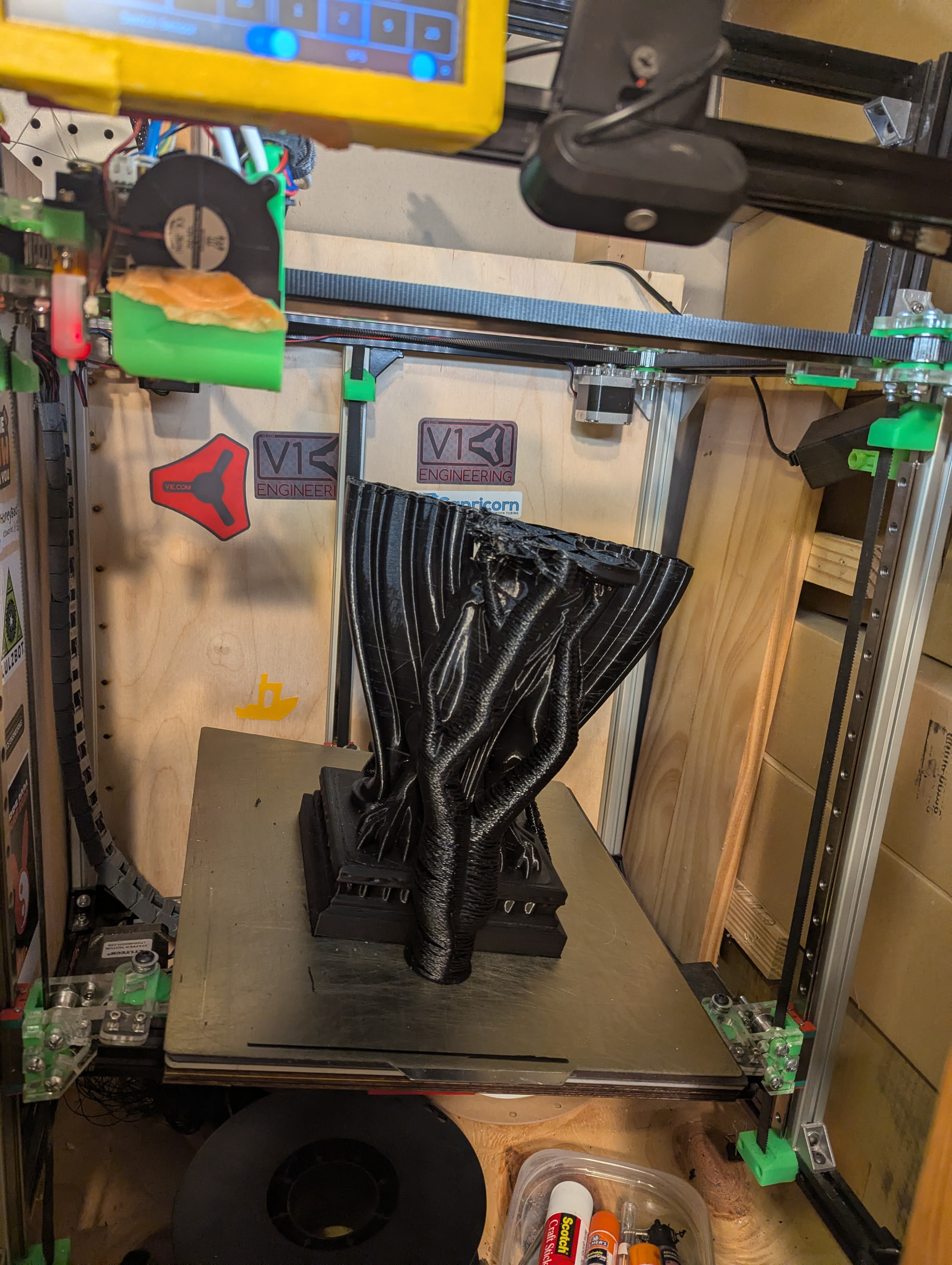
My lr4 just works now. It has not always been like that. My mp3dp printers (both) are like your lr4 experience, though i have had seasons of long runs on those. Fix one thing, break another… I printed this thing first try last week:
The extruder gear jammed and this picture above was taken after cleaning spaghetti (orange tape quiets a harmonic at high speed).
I finished the top after the 5th try and glued it on. Moral of the story: grit, tenacity, persistence may be required to get through it, but you will get it dialed in. The machine has good bones. Most of the issues can all be attributed to build quality of components I selected. Keep at it!
No, mine just runs. I’ve cut probably 100 or more things with it. I’ve cut wood up to 1.5 inches thick without issue. Now, don’t get me wrong, there have been issues. But they are far and few between. And any issues are more or less easy to fix and then I’m back up and running again.
If you could tell us more about the machine or provide pictures, we might be able to help with some suggestions.
Sometimes you can have something right under your nose and not notice it.
I’ve had my couple of hiccups but I’ve resolved each. I mean I’ve had the first time it cut a whole sheet ran it for 14 hours straight and it crashed in the last 2 minutes, because it got tangled in the dust hose and skipped steps.
I followed everything in the build guide and it most issues I’ve had afterwards were induced by me for now.
Yeah I have had similar experiences with it working great and then not working. It is certainly frustrating as it’s just a really intricate and complex system, but it’s also so well designed that it’ll still work decently well if something is out of spec. So until you have a lot of experience, you just don’t know what you don’t know.
Granted all of my problems have been because I didn’t print things properly (wrong infill), or my cut settings were bad, or the bit slipped, or it hit a screw I used to hold down the workpiece, or my shit wire management caused it to get tangled, or some screws are loose because I swore I was going to tighten them down before I ran the next job but forgot about it.
All this to say: you aren’t alone! Just running a CNC machine is an entire career field, and you’re doing that + building the machine + designing the stuff in CAD. It’s a lot. So take it easy on yourself and trust that you’ll get there eventually, and we’re all here and able to help
Unlikely but I initially had A BUNCH of weird, non-consistent issues due to using a cheap micro SD card. Worth getting something verified and name brand. What card are you currently using?
Can’t stress this enough. The fact that you can’t really break the LowRider because it’s just going to jump off the rail is really great for learning the ropes.
I built mine around the same time, I initially classed my issues as nightmares , but they ended up only being minor , they are nightmares because you are walking into the unknown with something new
did you replace the lock nuts, after doing it that many times , you have prob worn the nylon down and they may now work loose with vibrating
pulling the machine apart wont fix the problem, from my experience of stutter and miss steps its always been the steeper motor cables the wire is so fine a constant kink or stretch can break a wire and at a certain point in the job it will short and than re join and data misses a few steps
the only real way to test is run air job ,wiggling every inch of cable to the motor in question
only average my machine has run 15-20 hrs every week, since initial build , ive replaced 2 stepper motor cables, motherboard ( which in the end wasn’t mother board issue so now have spare board )
1 router housing bracket due to typo and running feed at 18000 mm/m, 1st disassembled last week to clean X bearings as clogged up due to some sappy timber
Yep, had mine jump off and just dull the bit by plunging through the material at once. Ofcourse i also ran my belts a bit floppy and not tight for that to be able to happen. Its pretty nice how the most expensive hiccup would either be a new bit, which is cheap or a new sheet of material which varies but yeah, atleast the LR4 will be fine.
Okay, you have all of our attention; it should not be this way at all. Unfortunately, no one can just say “this is your issue”. And you need to stop suffering in silence and trying so many different things. This is a well-defined and widely used system; we can get you on the right track no need to guess blindly.
So lets slow down a little here.
1- Upload a few pictures of your build so we can look for obvious issues.
2- The next time you have an issue, stop, and tell us every little detail. We can easily fix specific things, it is much harder to fix everything in your first post all at once.
So start another little project or do some air cuts and let us know what happens, we will ask for any other relevant info.


 Its pretty nice how the most expensive hiccup would either be a new bit, which is cheap or a new sheet of material which varies but yeah, atleast the LR4 will be fine.