I'm curious and learning, how do I load the software onto the control board?

The optical stops, I had to get from Amazon:

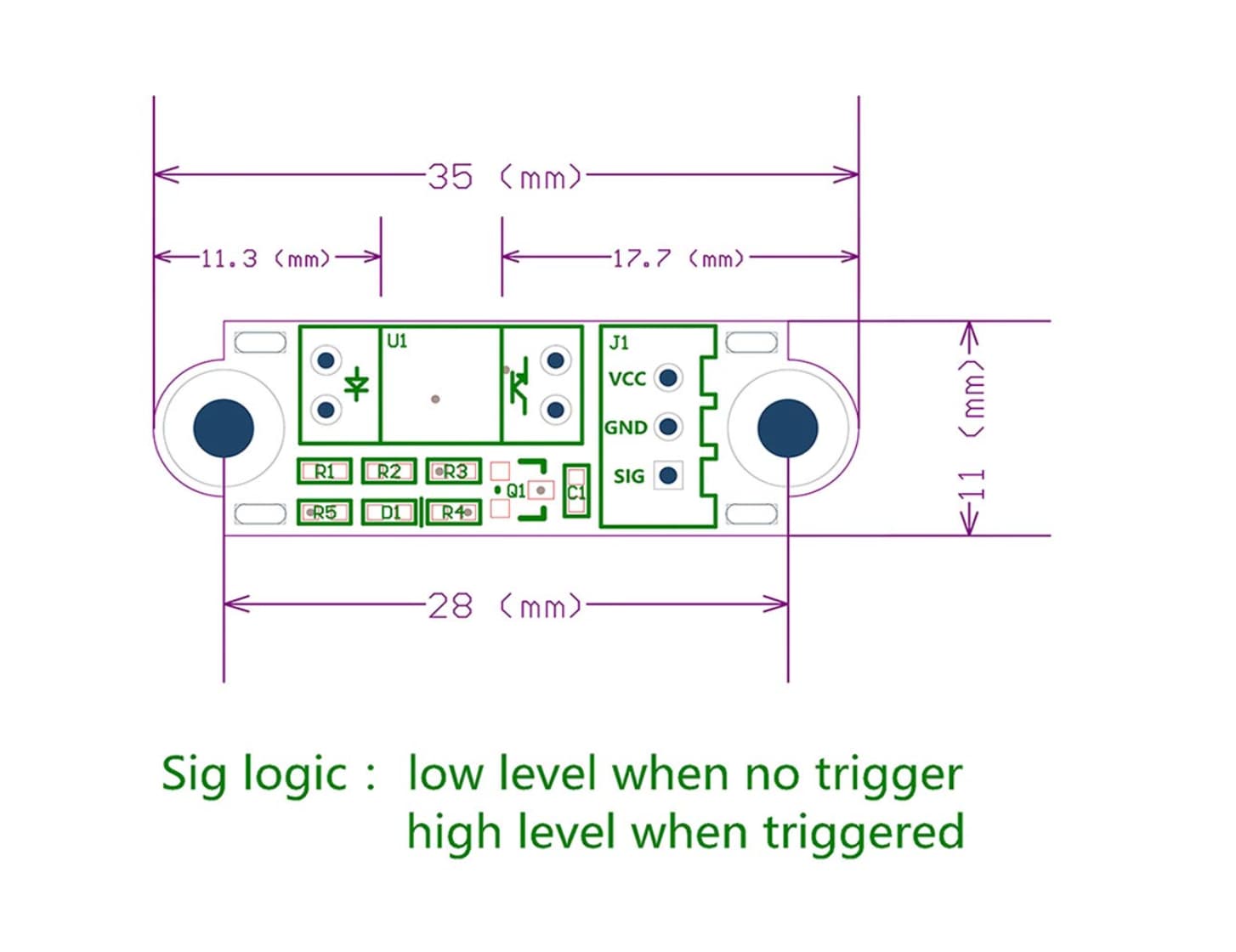
MakerHawk 6pcs Optical Endstop with 1M cable Optical Switch Sensor Photoelectric Light Control Optical Limit Switch Module for 3D Printer

About this item

  • VCC: 2.7V to 5V.
  • The trigger is sensitive and quiet.
  • With high repeatability and no mechanical collision.
  • Using optically transmissive principles of design, no loss, no noise with a longer life.
  • SIG logic: output low level when there is no trigger and high level when there is trigger.How to trigger the photoelectric: Use the stopper to trigger the limit when it moves to the middle of the red contact groove (it is recommended not to use a transparent material stopper)

The Pinout looks identical to the one that is linked from the page where I purchased the control board.

It is def a Bart Dring Pen Laser board.

That would be these?
https://www.amazon.com/MakerHawk-Optical-Endstop-Photoelectric-Control/dp/B07PMW2QMT

And if so, the only documentation seems to be:

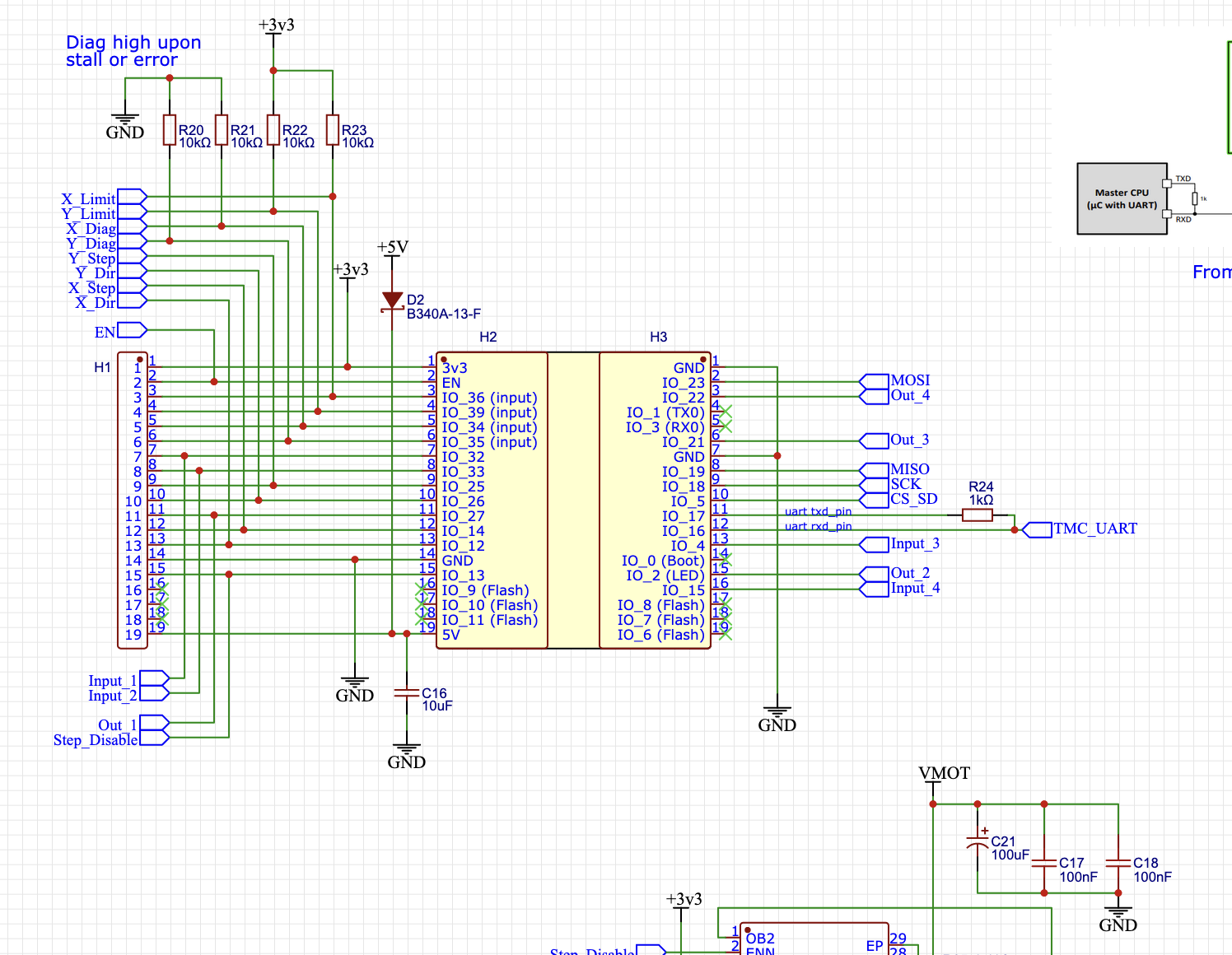
Looking at the schematics for the Bart Dring Pen/Laser board, the X and Y limit GPIO inputs are pulled up to +3.3V.

So, I wouldn’t hook these optical endstops directly up to +5V for Vcc. I don’t see a 3.3V output on any of the pen/laser connectors- so this needs a little thought. Perhaps a series resistor (something like 10K ohms) might work. I need to think about that.

For reference- this section of pen/laser schematic:

confirmed, that’s the ones. I’ll stand by for thoughts on the end stops.

What about the config file?

Honestly, I would just connect them to 5V. The “right” way to do it is to use a logic level converter. But in my experience, the esp is pretty robust to this kind of thing. If it were to put anything at risk, it would be the ESP, which is a pretty cheap part. I have enough on hand that I would risk the $5-10 ESP instead of buying some $5-10 logic level converters (until I killed one, then I would protect the second).

I have a slightly different board, but this is a link to an old config file. I have at least one update to make it home on boot, but that won’t affect you now:

Make sure you are paying attention and remember that yaml is for a dumb computer, so you have to be precise with the whitespace characters. I’m guessing you can merge an example config for that board with the settings I have on mine.

OK, remember that I’m an idiot. I log onto the web interface and I copy those settings into there?

Nope. You’re going to have to try harder than that. I don’t have the right file for that board. You’re going to have to build it. That means reading the docs, unfortunately.

Could you link me to the docs I should read?

I’d connect the endstops Vcc to +5V (Maybe with a 1K series resistor), and then connect the signal pin to the endstop inputs through a 10K or maybe a 1K series current limiting resistor.

Less likely to blow up and ESP-32.
I don’t have anything to test with.

To be fair, while none of this is supposed to be plug and play, the ZenXY documentation seems to be a frustrating path.

The ZenXY control board documentation recommends the TMC2209 Pen/Laser Controller from Bart Dring on Tindie which shows as “Product Retired”. The documentation also links to firmware and a Github repo that doesn’t help with the new version of the board that I’m assuming is what is being used here.

One of the things I’d like to have as an outcome here is to get the documentation pushed further forward.

I’ll work on that.

When I finish my LR3, one of the first projects after getting my repeat printer V5 side panels cut will be a ZenXY. When I do that, I’ll get Jackpot documentation put together as well.

We’ll get this current thread capped off with a working machine, then move on out from there.

1 Like

I think @Ryan was talking about wanting to update the zen instructions for the jackpot, which would include a working config file. There was a step for the homing which recently got figured out on the rmrrf table.

A jackpot config file won’t help LosTyger though.

1 Like

Yes, when I build one up I’ll use jackpot and will document the configuration that works for me.

Understood.

That’s right, I’ll help sort that out in cooperation with @LosTyger .

Since I don’t have a pen/laser board, we’ll have to iterate on that with me reading the various pen laser board examples and then we’ll have to test and iterate that on that other setup.
When I was poking around, I saw that the FluidNC Pen/Laser CNC Controller TMC2209 from Bart Dring on Tindie links to this source FluidNC Pen Laser TMC2209 Drivers - EasyEDA open source hardware lab (oshwlab.com).

image

which includes this yaml file:
fluidnc_pen_laser_2209.zip (1.0 KB)

It’s been a bit since I was able to look at this.

Frankly, I’ve gone a bit cross-eyed comparing configs and trying to make sure that I was referring to the correct boards and configs.

I don’t have a board to test with, so here’s the content for a config.yaml that I think we could test with.

It’s probably not right, but it’s at least a better starting point to try and test from.

(Make sure to copy all of the text from the blockquote…)

Edit: trying to get the formatting not to suck, just a sec.

name: "Table ZenXY"
board: "FluidNC Pen/Laser 2209"

stepping:
  engine: RMT
  idle_ms: 255
  dir_delay_us: 1
  pulse_us: 2
  disable_delay_us: 0

kinematics:
  corexy:

start:
  must_home: false

axes:
  shared_stepper_disable_pin: gpio.13:high

  x:
    steps_per_mm: 100
    max_rate_mm_per_min: 8000
    acceleration_mm_per_sec2: 300
    max_travel_mm: 405
    soft_limits: false
    homing:
      cycle: 2
      positive_direction: false
      mpos_mm: 25.00
      feed_mm_per_min: 500.000
      seek_mm_per_min: 1000.000
      settle_ms: 500
      seek_scaler: 1.100
      feed_scaler: 1.100

    motor0:
      limit_neg_pin: gpio.36:low
      #Diag pin is gpio.34
      tmc_2209:
        uart:
          txd_pin: gpio.17
          rxd_pin: gpio.16
          rts_pin: NO_PIN
          cts_pin: NO_PIN
          baud: 115200
          mode: 8N1

        addr: 0
        r_sense_ohms: 0.110
        run_amps: 0.333
        hold_amps: 0.333
        microsteps: 16
        stallguard: 0
        stallguard_debug: false
        toff_disable: 0
        toff_stealthchop: 5
        toff_coolstep: 3
        run_mode: CoolStep
        homing_mode: CoolStep
        use_enable: false
        direction_pin: gpio.12
        step_pin: gpio.14
        disable_pin: NO_PIN

  y:
    steps_per_mm: 100
    max_rate_mm_per_min: 8000
    acceleration_mm_per_sec2: 300
    max_travel_mm: 335
    soft_limits: false
    homing:
      allow_single_axis: true
      cycle: 1
      positive_direction: false
      mpos_mm: 5.0
      feed_mm_per_min: 500.000
      seek_mm_per_min: 1000.000
      settle_ms: 500
      seek_scaler: 1.100
      feed_scaler: 1.100

    motor0:
      limit_neg_pin: gpio.39:low
      #diag pin is gpio.35
      tmc_2209:
        addr: 1
        r_sense_ohms: 0.110
        run_amps: 0.333
        hold_amps: 0.333
        microsteps: 16
        stallguard: 0
        stallguard_debug: false
        toff_disable: 0
        toff_stealthchop: 5
        toff_coolstep: 3
        run_mode: StealthChop
        homing_mode: StealthChop
        use_enable: false
        direction_pin: gpio.26
        step_pin: gpio.25
        disable_pin: NO_PIN

spi:
  miso_pin: gpio.19
  mosi_pin: gpio.23
  sck_pin: gpio.18

sdcard:
  cs_pin: gpio.5
  card_detect_pin: NO_PIN

coolant:
  flood_pin: NO_PIN
  mist_pin:  NO_PIN

probe:
  pin: NO_PIN

1 Like

@MakerJim you really want to use 3 backticks to do codeblocks. The whitespace doesn’t look right.

N/M! You edited it right away. Sorry.

1 Like

Yep. I noticed my mistake as soon as I posted. Should be corrected now.

1 Like

The file looks pretty good. The microsteps on x should be 16. I bet the steps per mm should be 100.

We can change the current later, but dropping it to 0.400 or 0.250 is probably fine (and who wouldn’t want a 50% reduction in energy usage?).