Help with self sourced Steppers not working

Hi All

I’m working on my first CNC build (LR4) and have loved every minute of it so far! I’ve now assembled everything and started testing today.

The problem I’m having is that all the steppers lock up when connected to the Jackpot 3 board. I’m assuming the issue is the same across all axes, so I’m concentrating on troubleshooting the X-axis first, hopefully applying the same fix to the others.

I can get the X-axis to jog, but the movement isn’t smooth.

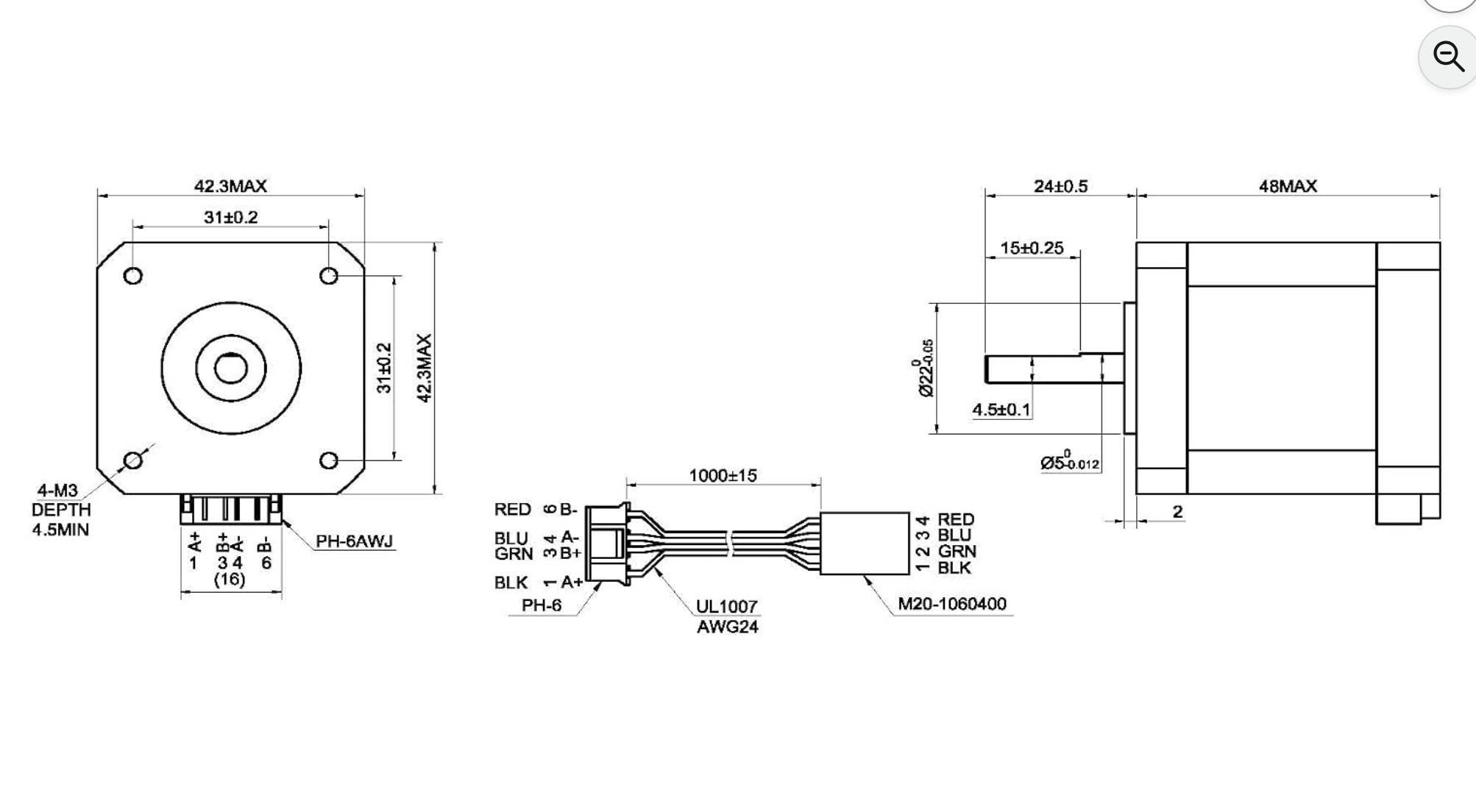
These are the stepper motors I’m using: Amazon.co.uk .

I’ve noticed that they’re rated at 2A, while my .yaml file is currently set to 0.8000. Could this be the cause of the problem, or should I be looking elsewhere?

Any advice would be greatly appreciated!

shared_stepper_disable_pin: NO_PIN
shared_stepper_reset_pin: NO_PIN
homing_runs: 2
x:
steps_per_mm: 50.000000
max_rate_mm_per_min: 9000.000000
acceleration_mm_per_sec2: 200.000000
max_travel_mm: 1220.000000
soft_limits: false
homing:
cycle: 2
allow_single_axis: true
positive_direction: false
mpos_mm: 3.000000
feed_mm_per_min: 300.000000
seek_mm_per_min: 1500.000000
settle_ms: 500
seek_scaler: 1.100000
feed_scaler: 1.100000

motor0: 
  limit_neg_pin: gpio.25
  limit_pos_pin: NO_PIN
  limit_all_pin: NO_PIN
  hard_limits: false
  pulloff_mm: 4.000000
  tmc_2209: 
    addr: 0
    cs_pin: NO_PIN
    uart_num: 1
    step_pin: I2SO.2
    direction_pin: I2SO.1
    disable_pin: I2SO.0
    r_sense_ohms: 0.110000
    run_amps: 0.800000
    hold_amps: 0.700000
    microsteps: 8
    toff_disable: 0
    toff_stealthchop: 5
    use_enable: false
    run_mode: StealthChop
    homing_mode: StealthChop
    homing_amps: 0.800000
    stallguard: 0
    stallguard_debug: false
    toff_coolstep: 3

Greetings, Andy. Welcome to the V1 community forum!

What exactly do you mean that they lock up?

There could be many things at play here.

One is that the steppers you are using have 1.3 Ohm coils, where the recommended one is 1.8.

Your config looks like it has the default drive current, which should be OK even with the lower coil resistances.

First off, can you run the $SS command in your terminal window, and copy/paste the results here in the forum? Use the preformatted text option on the forum editor toolbar to format the text. That icon looks like this: </>

Next, turn off your machine and very slowly move your X axis by hand. You don’t want to move it rapidly because the motors become generators when off and the EMF from them can damage your board. Does your X axis move freely (again SLOWLY by hand) from one side of the beam to the other?

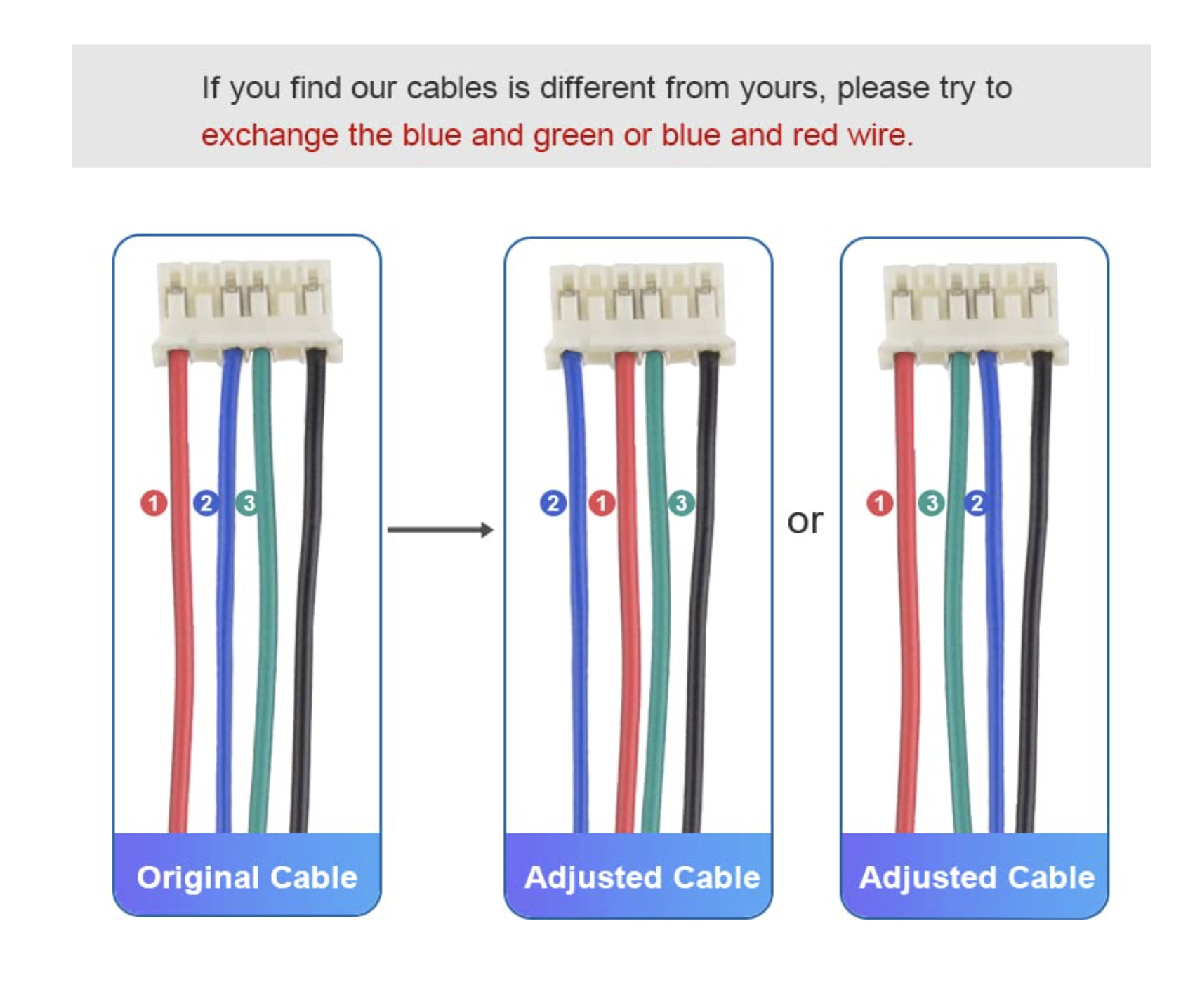
Have you tried rearranging the wires like it says on the description? Be sure and power off the Jackpot before unplugging and plugging back in the steppers.

I did! The last option matches the Jackpot 3 pins. This is stepper config.

The steppers are supposed to hold their position when powered.
If your movement is not smooth it might be that the belt is to loose and it is skipping steps. But you also should not make it to tight.
The motors/steppers might get to hot if you give them to much power, better stay with 0.8 for now.
Do you have the strut plates already installed? I had some trouble until I got them.

This is the $SS result. The X axis does move freely!

$SS
[MSG:INFO: FluidNC v3.9.9 https://github.com/bdring/FluidNC]
[MSG:INFO: Compiled with ESP32 SDK:v4.4.7-dirty]
[MSG:INFO: Local filesystem type is littlefs]
[MSG:INFO: Configuration file:config.yaml]
[MSG:INFO: Machine LowRider]
[MSG:INFO: Board Jackpot3 TMC2226]
[MSG:INFO: UART1 Tx:gpio.16 Rx:gpio.4 RTS:NO_PIN Baud:115200]
[MSG:INFO: I2SO BCK:gpio.22 WS:gpio.17 DATA:gpio.21Min Pulse:2us]
[MSG:INFO: SPI SCK:gpio.18 MOSI:gpio.23 MISO:gpio.19]
[MSG:INFO: SD Card cs_pin:gpio.5 detect:NO_PIN freq:20000000]
[MSG:INFO: Stepping:I2S_STATIC Pulse:2us Dsbl Delay:0us Dir Delay:1us Idle Delay:255ms]
[MSG:INFO: User Digital Output: 0 on Pin:gpio.26]
[MSG:INFO: User Digital Output: 1 on Pin:gpio.27]
[MSG:INFO: User Digital Output: 2 on Pin:gpio.0]
[MSG:INFO: User Digital Output: 3 on Pin:gpio.2]
[MSG:INFO: Axis count 3]
[MSG:INFO: Axis X (3.000,1223.000)]
[MSG:INFO:   Motor0]
[MSG:INFO:     tmc_2209 UART1 Addr:0 CS:NO_PIN Step:I2SO.2 Dir:I2SO.1 Disable:I2SO.0 R:0.110]
[MSG:INFO:  Neg Limit gpio.25]
[MSG:INFO: Axis Y (3.000,2443.000)]
[MSG:INFO:   Motor0]
[MSG:INFO:     tmc_2209 UART1 Addr:1 CS:NO_PIN Step:I2SO.5 Dir:I2SO.4 Disable:I2SO.7 R:0.110]
[MSG:INFO:  Neg Limit gpio.33]
[MSG:INFO:   Motor1]
[MSG:INFO:     tmc_2209 UART1 Addr:3 CS:I2SO.14 Step:I2SO.13 Dir:I2SO.12 Disable:I2SO.15 R:0.110]
[MSG:INFO:  Neg Limit gpio.35]
[MSG:INFO: Axis Z (-147.000,3.000)]
[MSG:INFO:   Motor0]
[MSG:INFO:     tmc_2209 UART1 Addr:2 CS:NO_PIN Step:I2SO.10 Dir:I2SO.9 Disable:I2SO.8 R:0.110]
[MSG:INFO:  Pos Limit gpio.32]
[MSG:INFO:   Motor1]
[MSG:INFO:     tmc_2209 UART1 Addr:3 CS:I2SO.19 Step:I2SO.18 Dir:I2SO.17 Disable:I2SO.16 R:0.110]
[MSG:INFO:  Pos Limit gpio.34]
[MSG:INFO: X Axis driver test passed]
[MSG:INFO: Y Axis driver test passed]
[MSG:INFO: Y2 Axis driver test passed]
[MSG:INFO: Z Axis driver test passed]
[MSG:INFO: Z2 Axis driver test passed]
[MSG:INFO: Kinematic system: Cartesian]
[MSG:INFO: STA SSID is not set]
[MSG:INFO: AP SSID FluidNC IP 192.168.0.1 mask 255.255.255.0 channel 1]
[MSG:INFO: AP started]
[MSG:INFO: WiFi on]
[MSG:INFO: Captive Portal Started]
[MSG:INFO: HTTP started on port 80]
[MSG:INFO: Telnet started on port 23]
[MSG:INFO: Probe gpio.36:low]
ok

Thank you

Hi I was planning to cut the strut plates when it was up and running! I might cut them by hand.

Problem solved! It was my mistake, I made a crossover connection and failed to them in the correct order. The x axis glides along now. Thanks for all the speedy replies.