Help with new build sourcing parts, electronics (especially controller, and driver)

I am a software engineer and a tinkerer. I also have a small woodshop and make cabinets/bunk bed/custom shelves for my home. I am new to CNC/stepper motors but not completely new to electronics. I have built drones from scratch in past using flight controllers but building a CNC appears to be a scary task.

Ideally I would like to have around 2’x2’ size CNC. I want to have a dewalt router mounted on it and do some cutting. Here are a few questions I have:

  1. 3D Printer: I just purchased a Ender 3 v2 for 250 at microcenter in hopes to print mp cnc parts. Being new to 3d Printing I learnt that I need PETG and not PLA for MP CNC. Ordered PETG from Amazon and it will be delivered tomorrow. I heard that PLA is ok for many people but people recommended to use PETG so that’s what I am going with. I live in Minnesota and this machine will sit in garage, and temperatures wont go that high, but either way it appears to be a safe choice. How long does it usually take to print? Do you guys know optimal setting for printing parts on Ender 3 so that it wont take so long to print?

  2. Conduit and Hardware: I learnt that I need to buy conduit first, and then print corresponding parts as per the OD of the conduit. This is the conduit I am planning to get:
    homedepot -> 3-4-in-x-10-ft-Electric-Metallic-Tube-EMT-Conduit-853429
    its 3/4 inch conduit

On the forum I also read that there is some talk around homedepo 3/4 inch conduits.

I see that the question is answered there on the product description page:
Q: Is the 3/4inch ID or OD?
A1: With all electrical conduit, measurement are made with inside diameter of the conduit.
A2: The nominal inside diameter is .824 inches and the nominal outside diameter is 0.922.

I believe I should treat it as a 1 inch OD in that case when printing parts.
There are 3 different sets of printed parts C-23.5mm, F-25mm, or J-25.4mm (1 inch). The measurement is for the Outside Diameter of the conduit/rails/tubing.
Which means I should print J-25.4mm parts.

All is good up untill now, I believe I can buy the hardware as listed on the page as well. Ball Bearings, M screws are all good.

  1. Electronics: What I am most worried about is Electronics. I have been trying to read up on controllers and find a good one.

Essentially, from what I understand, I need one controller and multiple motor drivers. I see that there are 5 motors required for this build. So do i need 5 motor drivers, or only 3 motor drivers for 3 axes?

On Amazon all the CNC kits that I see come with at max 4 motors:
[4 Axis Stepper Motor Nema 23 Dual Shaft 425oz-in 112mm+CW5045 Driver 4.5A 256 Microstep+5 Axis Breakut Board+400W 36V Power Supply CNC Controller Kit For CNC]

[3D Printer CNC Controller Kit with for ArduinoIDE, Longruner GRBL CNC Shield Board+RAMPS 1.4 Mechanical Switch Endstop DRV8825 A4988 Stepper Moto]

If I buy one of these kits, I think I will have to buy more motors to make the total count to be 5 motors. My question is, do I need 1 motor driver per motor?

And the prices are so vastly different amongst them. I understand that some are using nema 17 and some are using nema 23.

I do not mind spending some cash on a good controller. I was looking at this one from spark-concepts:
[CNC xPRO V5]

It looks pretty good, it has a USB type C interface as well. Is it any good? On the description it has a lot of features mentioned. If I do get this controller, do i still need a motor driver? I think I do but I wanted to check. Does any one have any experience with this controller? Also can someone help in letting me know if I get this controller, then in terms of electronics what else do I need to get?

Thank you all for having such an amazing community here. Any help is greatly appreciated!
The recommended material for the MPCNC is PLA, not PETG. PLA is a stiffer material.

I learnt that I need to buy conduit first, and then print corresponding parts

In the US, people are building there machines using one of three types of tubing: 3/4" conduit, 1" stainless steel tubing, and 1" DOM tubing. Conduit is the cheapest of the three but also is less stiff than the other two choices, though lots of conduit machines are successfully built and used. Note pipe and conduit are measured from the inside diameter. Metal tubing is measured using the outside diameter.

I believe I should treat it as a 1 inch OD in that case when printing parts.

No. 3/4" conduit is 23.5mm OD.

Electronics: What I am most worried about is Electronics

Boards are talked about on the forum a lot. Almost all machines are built from just half a dozen different boards. Whether you plan to purchase from Ryan or not, take a look at the boards he sells. You will have the least amount of trouble with one of these boards since Ryan maintains the Marlin firmware for these boards. Ryan also maintains firmware for the Ramps 1.4 boards. Ramps 1.4 is one of the cheapest solutions, but it can be delicate. It is not uncommon to burn out the voltage regulator in the cheap Arduino Mega clones that come with the Ramps kits. Some people do use more “exotic” boards, but there will be additional work needed on the firmware, and there is less help available on the forum.

On Amazon all the CNC kits that I see come with at max 4 motors:
[4 Axis Stepper Motor Nema 23 Dual Shaft 425oz-in 112mm+CW5045 Driver 4.5A 256 Microstep+5 Axis Breakut Board+400W 36V Power Supply CNC Controller Kit For CNC]

Ryan’s 3D printed parts are for Nema 17 steppers. You would have to do some redesigning for Nema 23 motors, plus you probably would not get much benefit from the larger steppers.

My question is, do I need 1 motor driver per motor?

There are two different ways of wiring up the MPCNC often referred to as ‘Serial’ and ‘Dual Endstops’. Serial wiring only uses 3 drivers. For Dual Endstop wiring, you will need 5 drivers. End stops allow you to electronically square the machine. You can achieve similar squaring on a ‘Serial’ machine by using a hard stop to push the axes against before you start cutting.

[3D Printer CNC Controller Kit with for ArduinoIDE, Longruner GRBL CNC Shield Board+RAMPS 1.4 Mechanical Switch Endstop DRV8825 A4988 Stepper Moto]

A few people run GRBL for their MPCNC, but most use Marlin.


I’ve only provided a brief (and perhaps simplistic) answers to your questions. You will find on the forum long discussions on some of the questions.

4 Likes

Robert fixed the first two misunderstandings. Use PLA, it is brittle, but it won’t bend, and the parts use enough plastic that it shouldn’t break. PETG flexes too much. 3/4" conduit is always the 23.5mm C parts. Always!

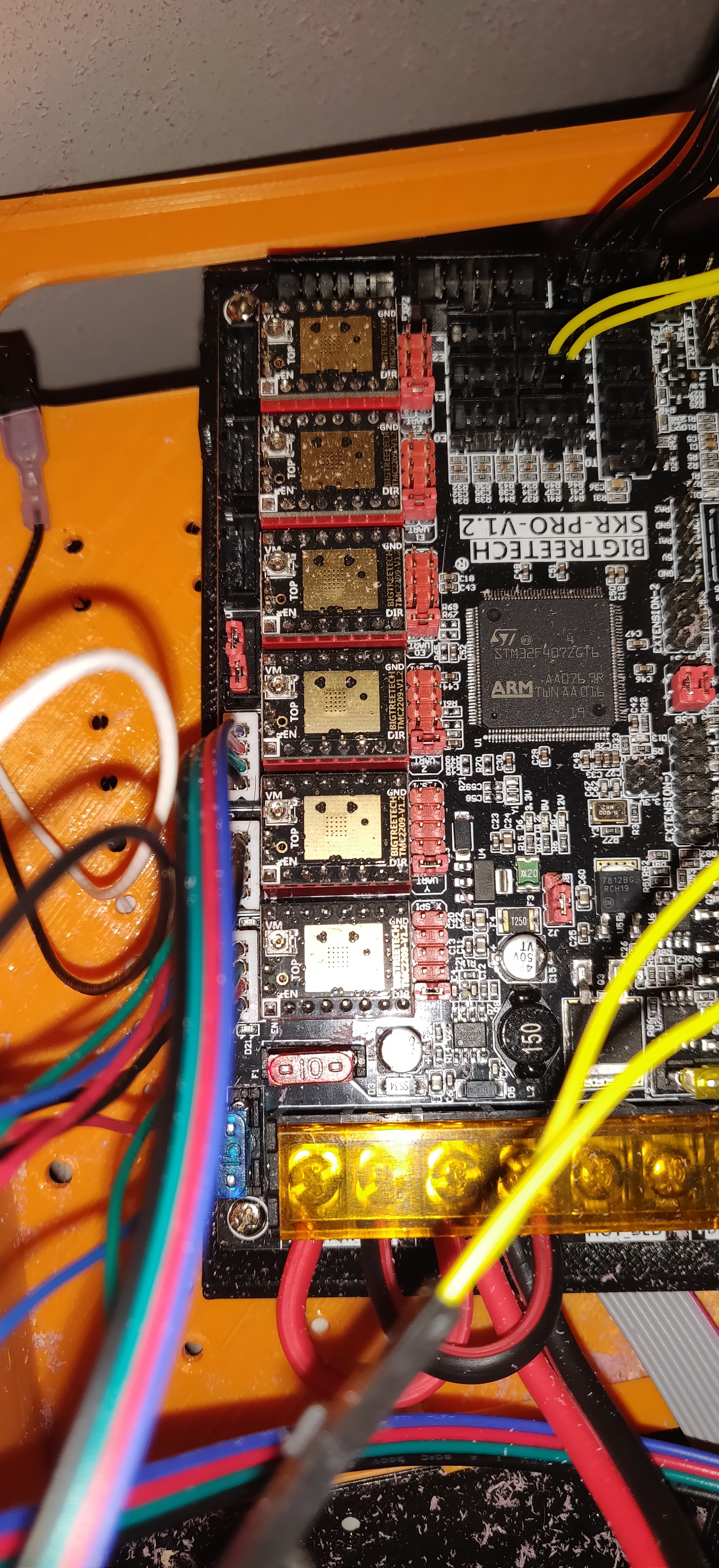
On the controller, don’t look for CNC controllers. The reason this machine exists is because 3D printers have made these kind of parts very common, so we use 3D printer controllers. You’re new to 3D printing, but you will see soon that most of the 3D printer firmwares run Marlin. Marlin handles the 5 motors (called dual endstops) better than any of them and it supports a ton of boards. Go with the skr pro or the rambo, if you can find it at a reasonable price.

Ryan has worked hard to push CNC features like the dual endstops into Marlin and we have worked to get preconfigured versions of Marlin for a few boards (check out the MarlinBuilder releases).

We used to wire the double motor axis to one driver and that works fine. You just wire the two motors in serial. But if you let Marlin control each motor separately, it can use the endstops to adjust each axis to make the whole thing auto square. So you can use 3 drivers, but 5 is better, but only if your firmware supports auto squaring.

If you haven’t seen the shop, Ryan sells the hardware in precounted packs and he sells these controllers with the firmware installed. He also sells the printed parts or just the core if you have trouble with that larger piece. Buying from Ryan supports his time for designing new versions and pays for the forum and documentation:

Be sure to check out the docs too: docs.v1engineering.com. this isn’t me saying RTFM. I don’t get mad if people ask questions that are in the docs.

Welcome. You’re going to have a lot of fun.

5 Likes

Thank you for your comments. They were very insightful. I have two questions though:

  1. In my post you see that I’ve mentioned that “3/4 inch” conduits at home depot are actually 0.922 inches in outer diameter. Doesn’t that mean I should go for 1 inch size?
  2. Price not being a huge factor, which controller is the best in your opinion? I’m definitely going to go with 5 drivers setup, marlin firmware from what you have explained.

the 3/4 is inside dimension… i have the home depot conduit and it is the “c"files or 23.5. mine measures 23.51mm or .9255”

1 Like

I think “best” is relative but I have heard Jeff say that the skr pro is the most future proof board.

i love my skr. so easy to flash

1 Like
  1. In my post you see that I’ve mentioned that “3/4 inch” conduits at home depot are actually 0.922 inches in outer diameter. Doesn’t that mean I should go for 1 inch size?

If cost is not a problem, go for 1" tubing. According to Ryan’s testing DOM tubing is a bit stiffer than stainless steel tubing, but DOM tubing rusts and must be treated with a non-silicone wax.

  1. Price not being a huge factor, which controller is the best in your opinion? I’m definitely going to go with 5 drivers setup, marlin firmware from what you have explained.

Best is a relative term and I don’t have experience with other boards beyond the one I purchased for my machine. Based on discussions on the forum, the Rambo board seems like the front runner when it comes to ease of getting the system up and running and reliability. Ryan has had trouble keeping the Rambo boards in stock. There are a number of discussions about boards on the forum where folks air their preferences.

1 Like

0.922in = 23.4mm.

It is close between the genuine Rambo and the skr pro with tmc 2209 drivers. The skr is probably better and critically, the rambo is having supply issues. I am still not positive the skr is going to be as tough as the rambos have been. But I think the trend is definitely leaning SKR.

Just to make this perfectly clear, you can’t find pipes or tubes in home depot that fit the 25.4mm parts. The 25.4mm tubing is stronger than the 23.5mm tubing. But you need to find a local metal shop or something to find the 1" tubes. Don’t go printing the J parts without first finding the tubes. Some people have found the tubing at crazy prices, and then got angry.

The 23.5mm is a great choice. It is still very strong.

I should have done this calculation. Thank you for doing this for me! I will get the regular 3/4 inch tubes from HD, get my vernier calipers out and go measure them and print accordingly. Now I have both PETG and PLA. I am getting mixed reviews on what to use. I think general cnsensus on this site is to use PLA now because of its firmness. However, outside of this site, and on reddit etc, people recommend using PETG.

I see that there is a skr pro 1.2 sold here on this website and there is a skr pro 1.4 turbo model sold on Amazon. BIGTREETECH SKR V1.4 Turbo 32bit Controller Panel Board for 3D Printer Compatible With12864LCD/ TFT24
Logic says that 1.4 > 1.2, would that be correct?

I see that RAMBo is available on site now, and I may just purchase it instead if you all recommend it. On the description page of RAMBO board I see:
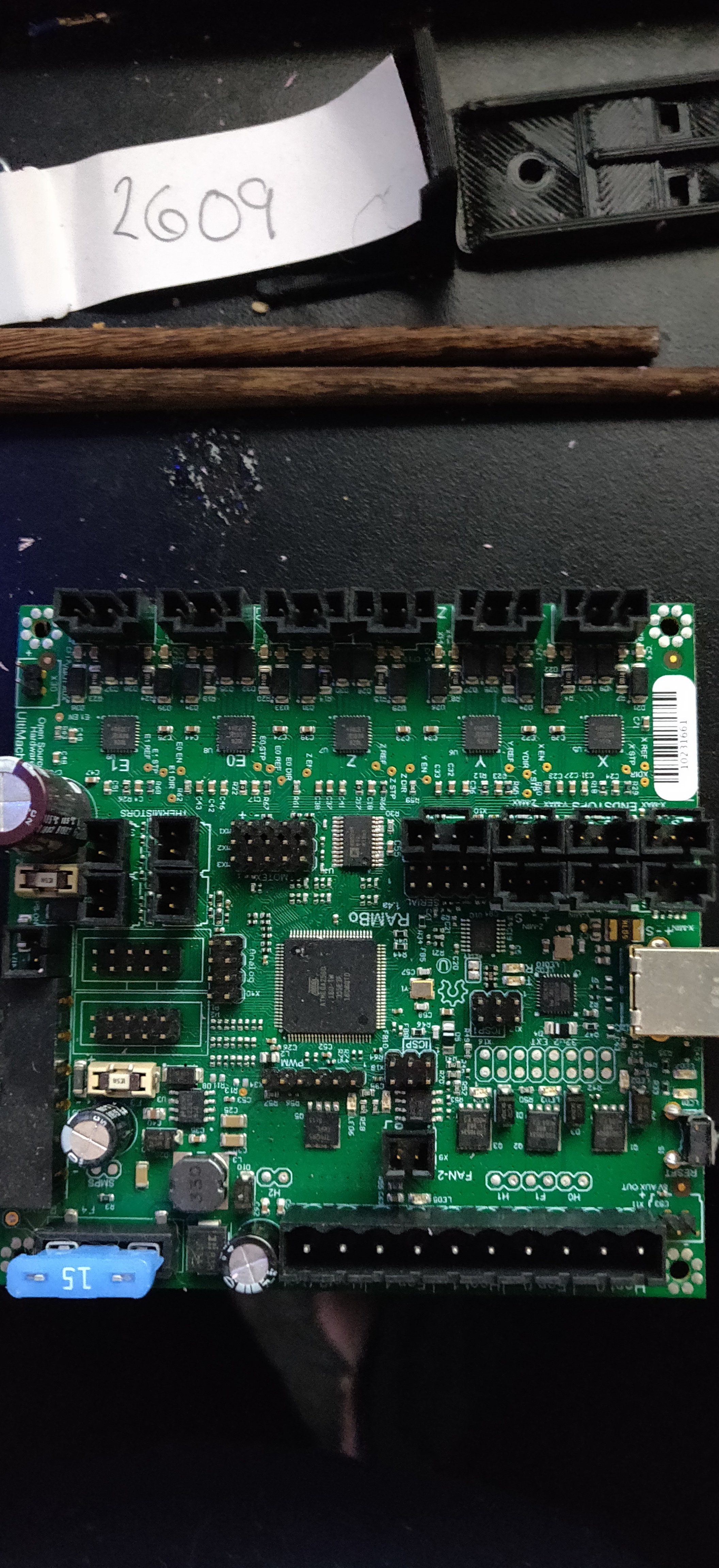
The RAMBo board is an all in one motherboard. It is a full remix of the RAMPS design with the Arduino MEGA and stepper drivers all on one integrated PCB.
Does it mean that stepper motor drivers are inbuilt in the board and I do not need stepper motor drivers if I use RAMBo board?
Usongshine Stepper Motor Driver TB6600 4A 9-42V Nema 17 Stepper Motor Driver CNC Controller Single Axes Phase Hybrid Stepper Motor for CNC/42 57 86 Stepper Motor

Any opinion on Duet 3 board, I have heard high praise on youtube for this board.
Duet3D Duet 3 6HC 3D Printer Controller Board

The pro 1.2 is the newest model for skr. It supports 6 drivers instead of the 5 the 1.4 turbo supports. The Rambo does not need external drivers. The duet is pricey for what we need it for. I have a duet2 on my printer and a duet2 clone that I want to try on my primo

2 Likes

Nope. I hate their version numbers. There is a Skr, Skr Pro, and Skr Turbo. They all have different versions at different times. The turbo is ok, but it’s endstop pin outs aren’t as clear.

1 Like

That is really good information. Thank you!

If rambo does not need external drivers and SKR Pro does, would’t Rambo be better in terms of cable management? So Technically with Rambo Setup I need to:
Power Supply → Rambo → Stepper Motors
without need of any external stepper motor drivers. I wonder why every youtube video for stepper motor driver asks to use a external motor driver with reasoning that nema 17s need more ampere.

the drivers arent really external per say. they plug into the board. if one goes bad you can easily replace it. with the rambo they are built into the board. if 1 goes bad its harder to replace for the common person.

Wiring wise it is the same between the rambo and the skr


small squares near the top are rambo drivers


shiny parts down the side are skr drivers

1 Like

That is really helpful. Is tehre a way to see complete diagram of the wiring for each board? Right from powersupply to the board then to the motors?

red and black wires at the bottom are straight from the power supply. the three white plugs on the side go to the steppers. they are fairly easy to set up. most problems come when setting up duel endstops(which are not need at all)

There is also now the GTR board that claims to be an upgrade from the skr pro… looks beastly… I was thinking of picking one up for my next 3dp. 6 on board drivers and an expansion board for 5 more… thats a lot of filament choices right there.

1 Like

Would you have a link to that please? Since I haven’t made a purchase yet, it’ll be nice to pickup something that i won’t have to upgrade in near future. Thank you in advance.

Also, would i need external drivers with this controller? Would you know?

Its like the skr pro, it takes “extrrnal” plug-in drivers
Here is a link that includes the gtr, touch screen, 6 drivers, and expander board… though I can’t think of why you would need the expander on a cnc.

Dual endstops so that would be X, X2, Y, Y2 now say you want a 2nd spindle or a laser that is Z and W… then throw on a Rotary or two and now you are up to 8. Even more if you do a 4th/5th type rotary. Or you could have say 4 heads on a machine and each be independently driven with different tools :slight_smile:

1 Like