Made my first CNC design/cuts over the weekend - nothing complex, just a 100mm Square and circle, and a few questions.
The Square came out at 97.7, 97.8, 97.8 97.9, and the circle 99.5 - 99.6 all around - so the X & Y are both good, if a little undersized… How much is excpected?
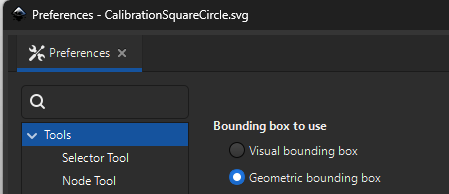
I drew them out in Inkscsape and imported into EstleCam… on cutting I found the square to be undersized… checking back through the process, I found that the square had imported into Estlecam as 98.2mm and not the 100mm I’d specified in Inkscape, on re-opening the .svg in Inkscape, it came up as 100.22mm… so something odd happened there.
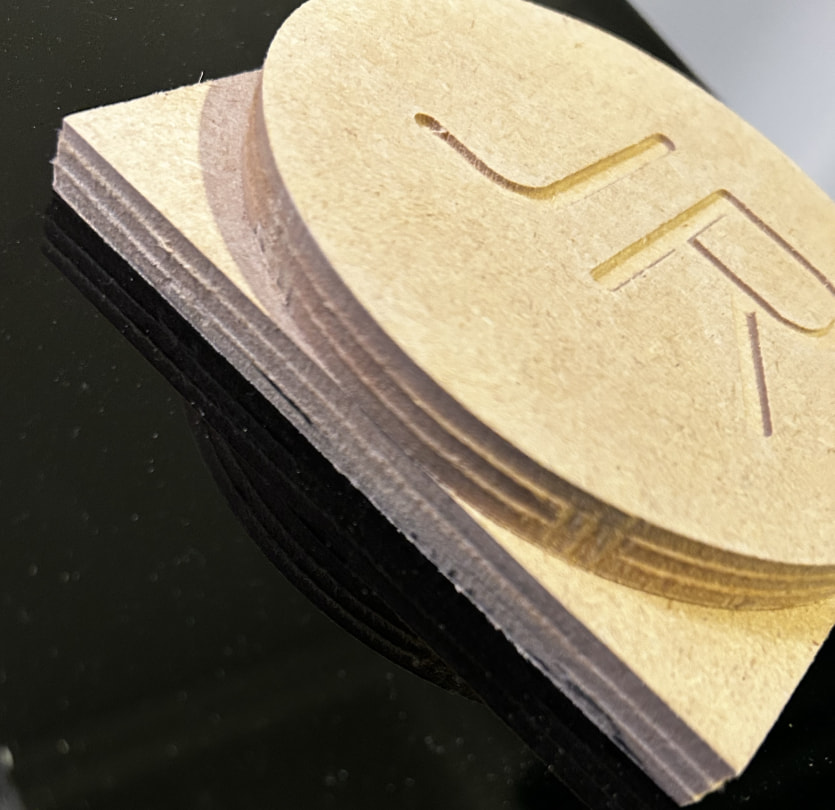
DOC was set at 3mm, using a 3.175mm dia single flute upcut endmill. The three passes are clearly evident on the edges of the parts - is this normal or something I’m not setting correctly in the final pass?
I’ve attached a photo, anything else that would help diagnose?
If you want to fine tune your cnc, you could bu running the tests usinf a finishing pass. Those difference are easy to fix with a little of belt tension.
In Inkscape, the width of the “stroke” outline impacts the size of each shape. You can choose to display in a outline mode (View - Display Mode - Outline) so that edges are a sinlgle pixel to minimize this effect when drawing things that will get exported and cut out.
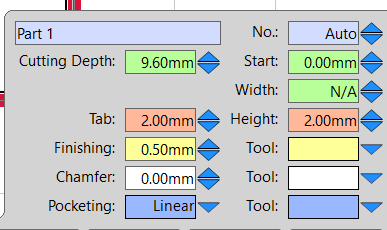
Nice first cuts. On size: the Estlcam import at ~98.2 mm already explains most of the square shortfall before the cutter ran. The extra ~0.4 mm down to ~97.8 mm is a pretty normal result on a fresh belt machine with full-width roughing. A finishing pass that leaves 0.2–0.5 mm and takes it in one light cleanup usually helps more than chasing belt tension alone.
For the steps on the edge: 3 mm DOC on a 3.175 mm bit is basically slotting each layer, so witness lines are common even with decent tram. Drop DOC on the last layer, or leave a thin finish pass. Also check that the tool diameter in Estlcam matches the bit you measured with calipers — a few tenths off shows up as consistent undersize on outside cuts.
Thanks - I’m hoping to get some time tomorrow or the weekend to try another couple of cuts - happy with where I’m at and success so far, just want to get it dialled in and making stuff (CAD is a whole new rabbit hole).
You can also click the “wrench” in your tool and set the finishing pass for the 1/8 endmill. It says “open detail view” and in the second column you can set the finish pass.