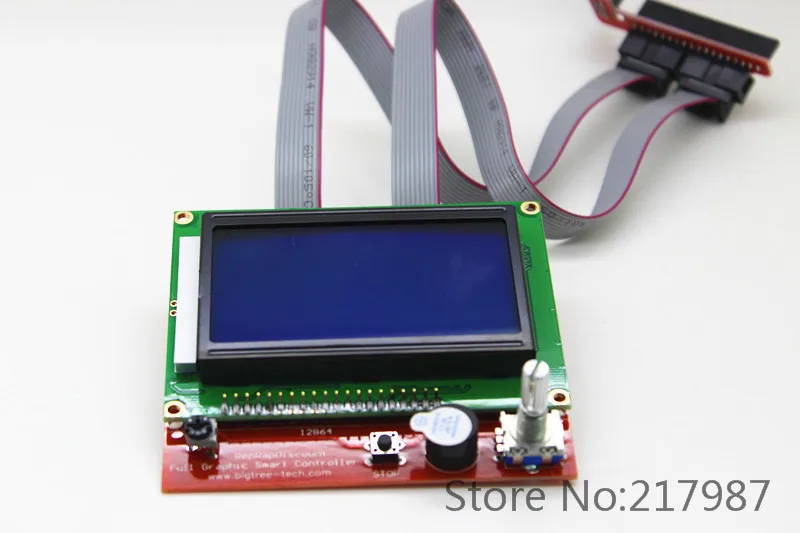
Hi Karl (hey, I’m Karl too!)
I am in the process of upgrading my MPCNC and would like to try your mods. What LCD are you using, the 2004, or the full graphic? Or something else?
Thanks!
The other Karl
Hi Karl (hey, I’m Karl too!)
I am in the process of upgrading my MPCNC and would like to try your mods. What LCD are you using, the 2004, or the full graphic? Or something else?
Thanks!
The other Karl
Hi Karl,
I finally got around to flashing RC7 Marlin (from the files here). I made sure the LCD was working with that one, and then I tried copying over your modified files. When I tried compiling, I got an error that said missing binary operator before token “(” for every line that started with if ENABLED( or if DISABLED(.
I am using version 1.5.6-r2 of the IDE. Any idea of what I can do about the errors?
Thanks,
The other Karl
Did you try the version of the original code that I have on my github- and that compiled without error, then copied/replaced my modified files, restarted the arduino ide, and it wouldn’t compile? Weird!
It has something to do with the pre processor of arduino I think, but you should get the same errors with the original file…
Hi Karl, thanks for the reply. No, I didn’t use the original code from your github. I used Ryan’s firmware and just replaced the 4 files from github. I did download the whole package, so I will give compiling with your original code a try.
Just tried to download the version I have on Github - it compiled!
Replaced the original files with my modified ones (4 files), and it compiled without problems as well!
I am using Arduino IDE 1.8.0 (windows) and make sure you compile it for the Mega 2560
//Kalle
Karl, hello!
I try to load your modified files with RC7 and see this errors in a arduino ide 1.8.1
sketch\ultralcd.cpp: In function ‘void PrintOnLCDKalle(int, int, const char*)’:
sketch\ultralcd.cpp:1780:80: warning: default argument given for parameter 3 of ‘void PrintOnLCDKalle(int, int, const char*)’ [-fpermissive]
static void PrintOnLCDKalle(int RowIndex, int ColIndex, const char* text=NULL){
^
sketch\ultralcd.cpp:176:15: note: previous specification in ‘void PrintOnLCDKalle(int, int, const char*)’ here
static void PrintOnLCDKalle(int RowIndex, int ColIndex, const char* text=NULL); //Custom function to over write something
^
sketch\ultralcd.cpp: In function ‘const char* Kalles_ftostr32(int, char*, const float&)’:
sketch\ultralcd.cpp:3457:8: warning: address of local variable ‘convK’ returned [-Wreturn-local-addr]
char convK[20];
^</em>
But i can load it in a MKSGen 1.3.
Then when i try from LCD same as your press to go to home, move only Z axis in uppen about 50 mm and down without triggered z mix endstop. X and Y not move anyway.
What wrong i do?
Hi!
Thanks for your input!
I think I have found and corrected the errors (the compiler errors at least)
First error: defined “const char* text=NULL” twice
Second error: gave the address to a local variable (now global)
EDIT: I see now that I dont even use the function “Kalles_ftostr32” anymore… so if that is still causing you problems, try removing it!
I dont really understand what you mean by:
Then when i try from LCD same as your press to go to home, move only Z axis in uppen about 50 mm and down without triggered z mix endstop. X and Y not move anyway.
Are you saying that you press “Home”/“All” and the result is that Z moves up 50mm and then down without stopping when hitting endstop?? Sounds like your marlin bugged out…
Try compiling in arduino again (with the new ultralcd.cpp) and try again!
//Kalle
Yes, exactly.
First i try to use sketch EEPROM clean, then load RC7+your modified files and this work like wrote early but its normal work from repitier-host. If i said got to home from repitier its ok.
Try compiling in arduino again (with the new ultralcd.cpp) and try again!What version ultralcd.cpp is newest?
I have already updated file on my github:
ultralcd.cpp
Cool, i will try it today, after test will write result.
Thank you very much, great mod for lcd menu!
Karl,
unfortunately still error after update ultra lcd.cpp (
UPDATE
I think I answer myself, look like problem with AIDE. After reload app and re-check firmware no more errors.
I see that it’s only the unused function that it complaints about now… New version is up on github without that function!
Give it a try!
Are you sure you got the latest version? The one i linked to did not have a local variable…
OOps, I see now that it had… 
So did you get it to work now?
And have you tried the custom functions?
@Anton, did you try it with the regular MPCNC Marlin first? Maybe you have some endstop hardware problems.
@Jeffe, yes i try first regular MPCNC and it work from RH same as in version from Kalle.
It look like this https://goo.gl/photos/ii3Mp9r5r4cctEfr6
So i tried again and result is same as before.
May be problem with configuration of endstops?
Haha, I see now what the probelm is…
You use my custom command: “Go to home” which is exactly what it sais (go to position X0 Y0 Z0)
What you want is a function to “Set home” which i havn’t implemented yet!
I’ll see if i have the time to do it today, I let you know here when it’s done!
/Kalle
Just uploaded a new version with the menu item “Set home” and there you do either “Z0 (probing)” or “X0 Y0 (Endstops)” - didn’t combine Z with x and y to minimize fuck-up
I haven’t tried this one yet, so make sure you have a finger on the emergency-button!
@Karl, it’s work fine,yesterday i was tested code. thank you very much. I Look how you made changes and now everything is understand.
Maybe someone can help me undesterd work correct configurated endstop in my config of MPCNC?
Now it look like in pic.
My conf
x max - 320 mm
y max- 220 mm
z max - 150 mm
Endstops
x max
y min
z min
When i send command to rep. host g28 mpcnc go to x320 y0 z 0, after than i send g1 x0 f 3000 and its go to position x0 y0 z0.
How config it to go after g28 in X0 not x320?
And second big question how configurat z hight if i use z min endstop, and when press z+ in rep.host z axis go up butmaterial is lower z0