Specific question. I’ve been playing around cutting foam for a week or so and generally feeling pretty good that I haven’t caught the house on fire yet.
But it has become clear to me that I will want to change tools regularly (weekly?) and the current mechanism isn’t working well for me. I have a drag knife, a Makita 700, and now an Ortur laser. For instance, I need to remove the Makita from the mount to access the screws, which increases the likelihood it has to be re-trammed with every change.
I’ve researched the HicWic system, but its unclear to me whether its a good choice for the router. (also appears to be older.) Is there a more current version for Burly/Primo or is it still the 525?
Another option seems to be to use the Burly plate? Would this be more rigid than HicWic?
I think I now understand that this will be a continuous exercise in choices. I’ll give up some rigidity to get the machine to do a wider variety of jobs. In the end, building 2 machines may be the solution. But for now I need this one to do triple duty.
I don’t know anything about the burly plate, but I’ve had the hicwic mount on mine for 8 years. Kept that mounting system even when I upgraded to the burly and now the primo. Works fine for me. Only thing is that it can be a tight fit, and therefore can take a little work to switch out the tools. But once in, the mount holds them tight.
If I remember correctly, the redesign of the mounting system for the Primo was made so that the router was pulled closer to the Z axis resulting in less of a cantilever. The Burly mounting plate will fit on the Primo. If you go this route, I suggest you print the Burly mounting plate with extra perimeters and then bore out the holes so you can use the Primo bolts and nut trips.
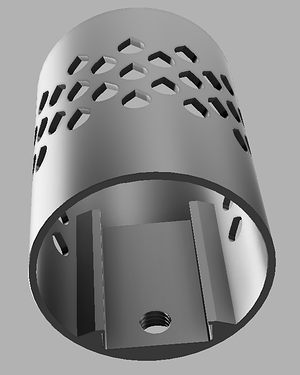
I too want to make my switching as easy as possible. My solution was to create a laser mount that fits down inside the Malita mount:
This mount is for the NEJE A40640 laser. I loosen the two screws on the Malita mount, slide the router out, and slide the laser in. I don’t know if the Ortur laser module is small enough to be mounted in a similar way. I provided the step files for this specific mount in this post.
Thanks very much. After a brief bit of CAD, I don’t think it fits. There’s a mount on the back that I don’t think I can squeeze in without a really flimsy result. But it has given me another option which would be a larger router mount (with a printed collar to increase the router’s diameter) then creating laser and drag knife mounts for that same system.
Just visually looking at it, I agree that it looks like the burly plate still pushed the router out from the Z center, which would potentially increase the cantilever effect. Seems like a potential way to get started and split the difference for now. The HicWic system is super cool, but I do worry about the distance. I had this exact problem with one of my 3d printers (unbalanced tool with cantilever) so perhaps I’m gun shy.