I’m setting up to make a few guitar bodies and taking it, as beginner, one step at a time to ensure everything works as expected, which has been far from the case so far! I first just drew the shape with a pen and it came out perfect. Then, I glued up some scrap MDF and set the depths for each of the cuts. Everything seemed to going fine and the neck pocket, control knob holes and pick-up slots came out perfect. It then made the first body cut that looked correct but then skewed off about half way through the second cut by about 3/8". You can see to the left where it made a sudden course change. It looks a lot like something threw the X axis off but I checked the cables and nothing was stuck or hung up anywhere and there were no scraps or objects on the table. I don’t want to try again unless I can come up with some possible reasons for this to have happened. Any ideas what might have caused this? I’m using Estlcam, but I don’t think that has anything to do with it because the “view tool paths” shows the proper cuts.

Looks like a feed and speed issue that caused the X motor to skip steps. What feedrate, depth of cut, bit type and size, and router speed setting are you using?
Missing steps. These cnc machines are dumb, they don’t actually know WHERE they are cutting, they only follow the directions that are being fed to them. Smarter ( and more expensive) can do some self correction.
So if something cause the tool head to pause, and it gets fed 30 steps before it starts moving again, it starts up thinking it is at step 31. The 30 steps are missed (hence missing steps) and everything goes straight to hell.
Finding why you’re missing steps is the heard part. Sometimes it’s physical, sometimes it’s an electrical glitch. The xcarve I started with would lose it’s mind if you turned on a vacuum nearby to clean up it’s chips. I ruined more than 1 guitar trying to not be messy. But a dull bit, a hard part on the material, trying to feed faster than it cuts… anything that obstructs it at all will cause it.
It looks like you’re cutting mdf, so unless you were trying for just an insane speed or doc, you are unlikely to have had an issue with the cut itself, so I’d guess physical obstruction on the X.
I’m using a brand new 4" x 1/4 spiral upcut bit with a 2" cutting length. Feedrate is 800mm/min and the depth of cut is 4mm. It seems pretty slow. The Makita spindle is set on “6” - a bit below it’s fastest speed setting.
Maybe a cable snagged for a brief second and caused the shift, but I have my cables and vacuum hose dropping from overhead specifically to avoid that problem. I was using a portable battery powered Makita vac to clean up dust around the bit. There’s also the shop 2-stage HF collector running in a separate room and a Jet ceiling mounted room dust collector running.
I plan on trying to re-cut the guitar on the same piece without moving it from where it is now, but only the body, to see if it repeats (and therefore a gcode issue) or completes the cut without problem. No portable vacuum and a closer eye on the cables.
MDF should be able to cut at 600-800 mm/min with a depth of 4-6 mm at a speed of 2.5-3.5 on the router (I’m using 1/8" bits, so your router speed will likely be less than what I’m running). I was cutting last week with one and when I slowed down the router and put in a new bit, it stopped skipping. I use cheap 1/8" 2 flute upcuts, but a dull bit will certainly skip as will a loose bit. Bits will loosen if you run the router speed too high and it gets hot. Are you smelling any burn? is the collet super hot when it is finished?
Could also be caused by something like a cable or the hose getting snagged momentarily while moving.
I’m surprised it hasn’t been suggested previously, but you might want to check the grub screws on the X-axis motor. When the motor is engaged, do you feel any play in the X-axis at all?
It does look like a “layer shift” from the printing world. I’d be interested to know what you learn caused it!
I slowed the router down to 3.5 but kept everything else the same and ran just the body outline tool path of the gcode on the same piece of material. It went perfectly.
The collet and bit were cool to the touch at the end.
I watched the cables and vacuum hose careful on each pass but could not see where something might have hung up on the previous run. I just can’t rule out that something did hang up. Hopefully that was the case rather than something to do with running other electric motors in the vicinity of the control board, random seizures of the board, etc.
There is no play in the X-axis when the motors are engaged, but I will double check the grub screws.
I’ll continue to investigate, but unless it happens again and I catch the cause, I don’t think I’m going to conclude what caused this.
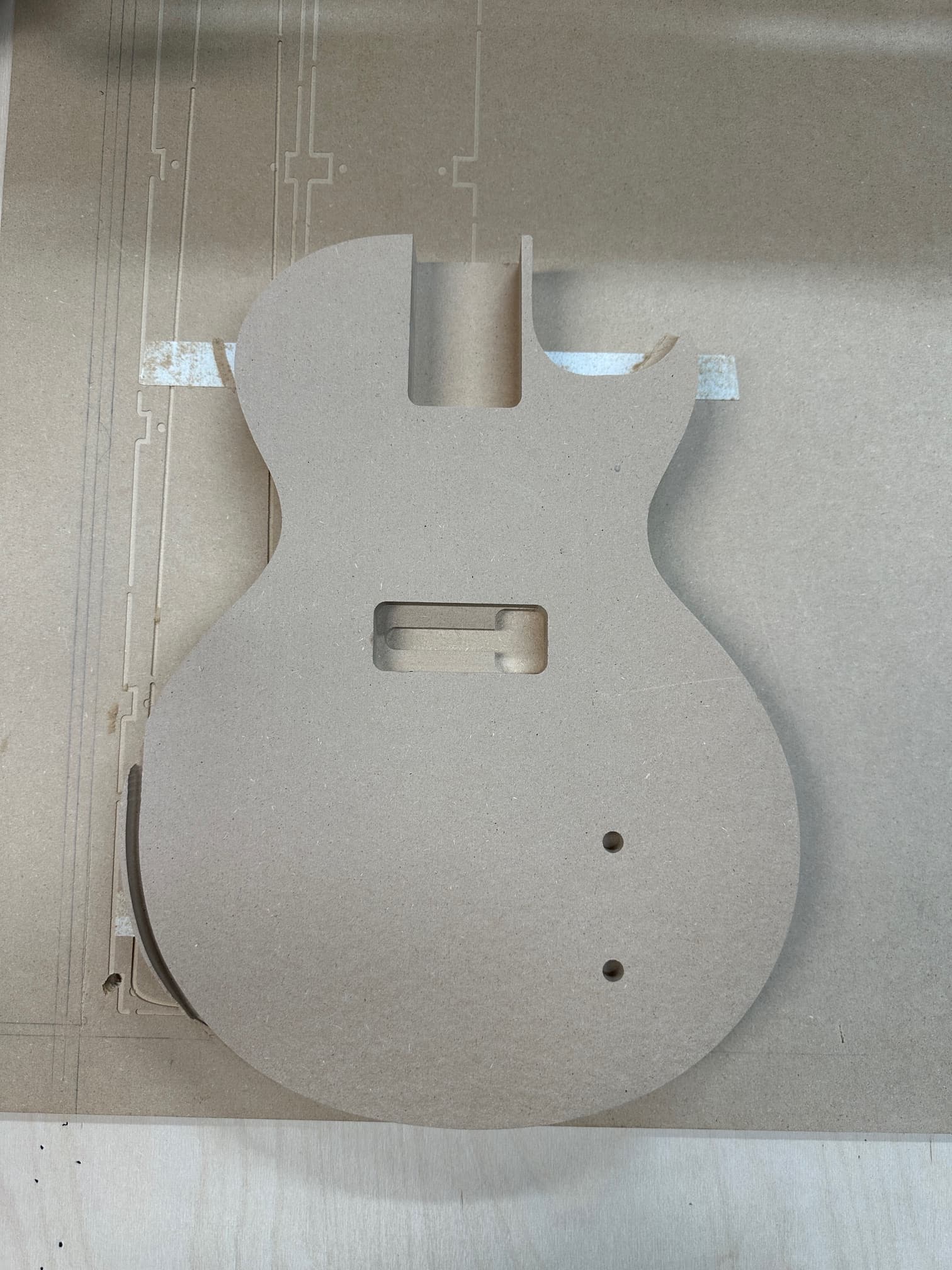
As an upside that is completely salvageable if youre actually planning on an mdf body, but im guessing youre just test carving.
This was just a test to see if I could get everything to work and line up properly. It’s the first thing I’ve tried to cut with multiple depths and MDF is cheaper than hardwood.
The next test is to cut a random pocket in a scrap piece of mahogany to see if the feed rate and spindle speed will be a problem, then on to keeping my fingers crossed and trying a full body with some hardwood.
And here I am overthinking it with 3D models and flipping… Are you going to do the details by hand later?
Good question. I’ve only built the one guitar, a '57 LP Junior, in the photo, and while it looks pretty good, it’s complete junk. I used templates I bought through Reverb and the neck side template is wrong. The neck angle is off by about one degree and I didn’t know that until I glued in the neck - a mistake I won’t make again. As is, the bridge has to be so high to get proper strings height that the PUP is too far away and, well, it’s just unplayable. So this one is going to the band saw. I hope to save the neck.
I enjoy carving and profiling necks, so I plan to continue to do that, but flat bodies are pretty much simple slabs and easy to create (Leo Fender thought so). I built the LR4 to be able to create templates for bodies and necks, but then I realized that a template for a body is pretty much the same thing as making a body, minus a little carving. The same might apply to making necks, at least for Fender-style guitars (I’m not ye sure how I would CNC the angled peghead of a Gibson-style guitar). So, for now, I plan to round over edges of the body and carve the arm rest area by hand. I might figure out how to use a round over on the CNC, but I’m not at the point of figuring out carving with the CNC, plus I think there should be some element of hand work involved in making guitars - at least for me. I’m only a few weeks into CNC, so I might change my mind in the future.
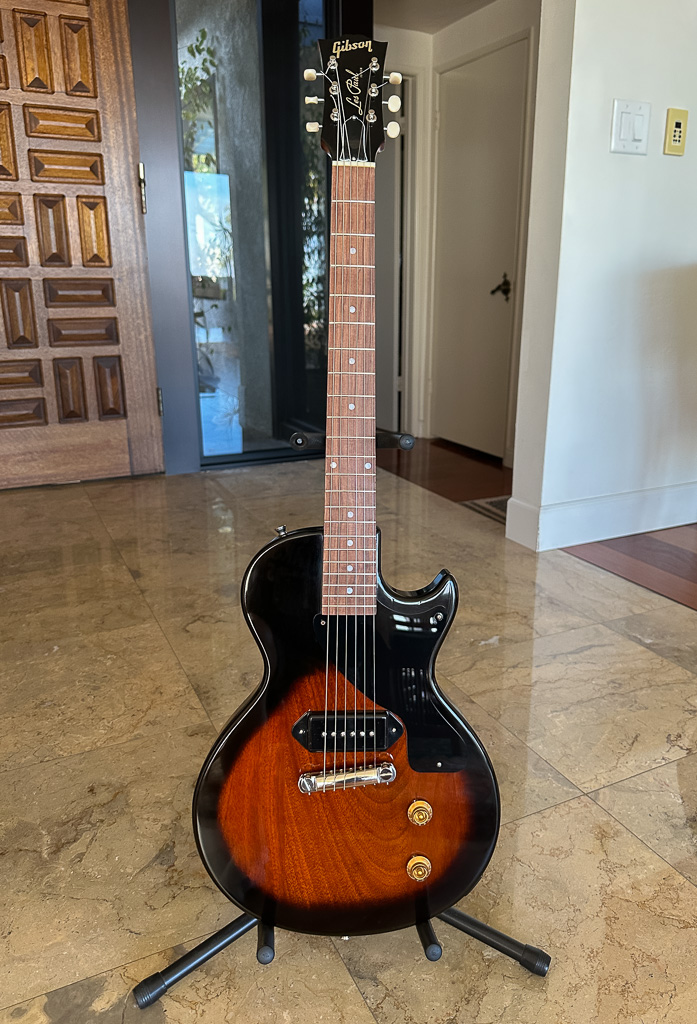
It does look awesome though!
closing old topic to help fight spambots