Advice on 48V lowrider V4 build

It’s more or less a done deal already.
But just wanted to make sure how crazy we are for doing this.

we’ve bought a 48v powersupply,
5 external motor drivers - Mellow TMC 5160 plus
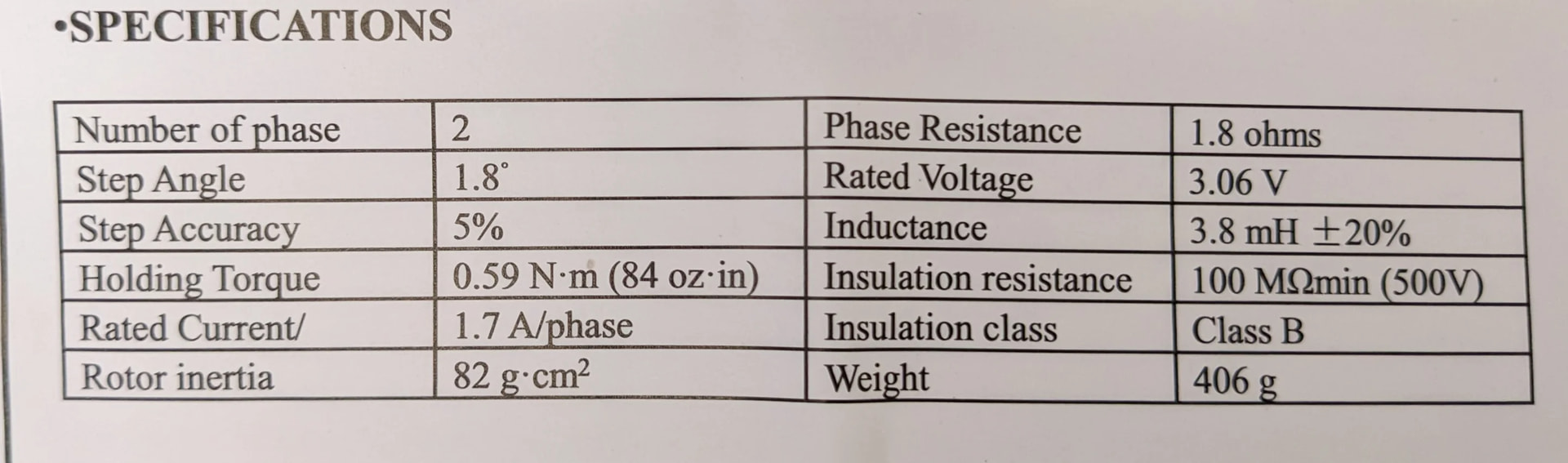
5 42STH48-2504AH motors
1 PiBot FluidNC ESP32 GRBL Laser CNC Controller V4.96 Pro
and 5 proximity switches.

reason for doing so is because of the missed steps we experienced with our previous 12V lowrider v3 build. knowing closed loop won’t solve missed steps (it will detect them), and higher voltage will solve skipped steps (gives more room to play) we went that route.

the interface between motors and controller is something we still need to figure out, controller needs to be configured to SPI. and we think the FPC cable needs to be used in conjuction with the step stick to connect motor to motorboard. Not sure if need to set any jumpers beneath the step stick though. we’ll route 48V straight into the motordrivers.

Sounds like a plan? What do you guys think?!

1 Like

I am not sure why you went that route with the stepper drivers instead of getting the common and well-tested DM542T?

I also had external drivers for all three CNCs with 24V, that’s also fine. I just replaced the X driver with a closed loop on the LR4. You said they don’t prevent loss of steps, the way they work they jobs of do though. Only if they can’t return to the point where they should be they throw an alarm.

Regarding the board: there now is one called the Doberman for external drivers and FluidNC.

Nevertheless I like external drivers and more voltage. My other CNC now has got 36V and closed loop steppers and I have yet to find the limit. :slightly_smiling_face:

Greetings and welcome to the V1 community forums!

You haven’t told us much about your machine, your workflow, or yourself.

Generally speaking, the LR4 is extremely well tuned to the workloads that it is suitable for. If you were losing steps, there’s probably a lot more to that which we should understand and help you with.

You’ve jumped right to throwing a different driver setup, and using steppers that are lower torque than the ones Ryan sells in the V1 shop.

It isn’t clear what issues you’ve had, nor how you use your machine.

If you do a better introduction, it would help us help you with whatever your objectives are for your build.

Once again, Welcome. I’m very interested to hear what you’re up to.

Hi there,

we’ve chosen the motors based on graphs and information shared by @TheMrFish

These motors continue to have torque over the others. We aren’t doing any reduction though, but still these looked to be a good fit for a 48v system where we are trying to keep torque even at higher speeds.

Our previous lowrider v3 could Not do more then 3mm DOC in plywood without skipping steps. This With Nema 17 motors bought from Amazon with the same specs as the motors in the kit.

That does not sound like a LowRider problem, to be honest. :sweat_smile:

That’s well off the beaten path we keep calling the “Yellow Brick Road” (the proven path.)

You still haven’t introduced yourself, your machine, or your workflow, which is the key to helping us help you.

That motor is quoted as a 55N-cm Holding Torque, drawing 2.5A max, which isn’t as good a match for our controller electronics as the one from the V1 shop.

The motor from the V1 shop is a 59N-cm Holding Torque.

Throwing higher voltage at the stepper, when a NEMA 17 is universally going to lose torque at higher speeds, is not a certain improvement.

We really do need to know more about your build and your application to be able to help you.

how fast are you planning to move during cutting ? the high voltage only helps for high speeds because of motor back emf

you need 48v for really high speeds like more then 300mm/sec. people use 48v drivers on speed benchy 3d printers

it makes more sense to add a closed loop stepper if you are worried about missed steps. i think @Tokoloshe used one on X axis

i may add a mks servo42d myself as well. not because i have any issues but just for fun and faster accelerations and rapids.it will be nice to have a accelerations a bit faster but it is a heavy gantry on belts

i do not think LR4 usually do cutting at speeds faster then 50mm/sec - 3000mm/min which is well in range of our 24v power supplies.

all my skipped steps were from bad cables.

P.S.
last advice from me is to follow the documentation and change machine later. most of my issues were from trying to do something different from the docs.

1 Like

Thanks for the warm welcome!

Fair point that I should introduce myself and the project a bit better.

I’m Andre, a freelance/tech-lead type developer from the Netherlands. Professionally I mostly work with web development, automation, Docker, AI workflows, and custom software. On the hobby/maker side I’m building out CleverCrafted, where the idea is to combine CNC, automation, design, and small-scale production. So I’m reasonably comfortable with software, wiring, config files, Docker, debugging, etc., but still learning a lot on the CNC/electronics/mechanical side.

The machine is a LowRider-style build, currently moving toward a LowRider V4 setup. Our previous build was a 12V LowRider V3-ish setup, and we ran into missed/skipped steps. That may very well have been caused by tuning, acceleration, wiring, current limits, mechanical resistance, workflow, or simply us pushing the machine outside the happy path. So I fully accept that throwing voltage and external drivers at it may not be the “cleanest” first diagnostic step.

The reason we went this route is that we wanted more electrical headroom and a setup that gives us room to tune rather than constantly running near the limit. We bought:

  • 48V power supply

  • 5× Mellow TMC5160 Plus external drivers

  • 5× 42STH48-2504AH motors

  • PiBot FluidNC ESP32 GRBL Laser CNC Controller V4.96 Pro

  • 5 proximity switches

The goal is not to make the machine dangerously fast or overly powerful, but to get a more robust setup with better stepper performance at speed. We understand that closed-loop steppers do not magically fix the underlying cause of lost steps, although they can correct within limits and alarm when they cannot. For now we chose higher voltage/external drivers first because that seemed like the better route for more torque at higher speeds and more tuning room.

Where we are still unsure is mainly the controller/driver interface.

Our current thinking is:

  • configure the PiBot/FluidNC board for external drivers / SPI where needed

  • feed 48V directly to the motor drivers, not through the controller

  • use the controller only for logic/control signals

  • figure out whether the FPC cable + stepstick adapter is the intended way to connect the controller to the driver board

  • confirm whether any jumpers under the stepstick need to be set or removed

  • make sure grounds, enable, step/dir, and SPI wiring are correct before powering anything

So yes, it may be a bit of an overcomplicated route compared with something like DM542T drivers or a board designed specifically for external drivers, like the Doberman. We already have most of these parts now, though, so I’m mainly trying to avoid making a wiring/config mistake and to understand whether there is anything fundamentally wrong with the approach.

What we want to use the machine for is mostly sheet goods, wood, panels, and maker/small-production work rather than aluminium or anything extreme. Accuracy and reliability matter more to us than raw speed.

So I’d love advice on two things:

  1. Is this 48V + external TMC5160 approach reasonable if configured conservatively?

  2. Are there any known traps with this PiBot FluidNC board, FPC/stepstick connection, SPI setup, or jumper configuration when using external Mellow TMC5160 Plus drivers?

Totally open to being told we are overengineering it. That may be true. But since the hardware is mostly already here, I’d love to learn the safest and most sensible way to make it work.

your controller already supports step sticks. throw some tmc2209 in there and get everything running

then swap the drivers after everything is working. in other case you are fighting too many problems at the same time. new build, new wiring, new board, new config.

other option is if you still have LR3 then test the new electronics there first before moving it to the new build.

the funny thing about LR4 is that looks like my one does not have enough power to break a 3mm endmill and it is a good thing for learning. I’ve crashed so many times and no broken endmills.

and the other thing to share about the build experience from somebody that tries to “improve“ things. I still have a makita clone router on my one even i have a 65mm water cooled spindle sitting in the boxes. It just works

1 Like

I’m curious why you chose this controller? The reason I ask is because the developer of FluidNC has his own board that supports external drivers (The Doberman), and he is VERY helpful to his customers on Discord.

He already said why, I did suggest it as well. Though he might as well go OpenCNCShield since he’s in the EU. :smiley:

I needed a controller that could drive the TMC 5160.
the PiBot FluidNC ESP32 GRBL Laser CNC Controller V4.96 Pro supports both external drivers and step sticks and can drive 48V.

Other then that, I never heard of the Doberman before. The Jackpot is what we used on the Lowrider V3. and before that the 6x CNC Controller for FluidNC which broke after a while.
The doberman sounds like a good board.

2 Likes

Welcome @Andre_Versteeg and friend(s)!

Curious to see how your build turns out, and greatly appreciate learning from any observations/data you’re able to share for your custom/exploration build.

I failed to find decent torque curve datasheet for those LDO steppers. So curious to see how they compare to the V1E shop’s Zyltech’s, and/or, how much headroom is gained from increased voltage/current. Then looking at cost/ROI, etc…

Thank you, Andre, for a good introduction.

That’s an interesting summary. Let me relate what I think I hear: You diverged from an LR3 build and are now diverging from an LR4 build. That’s fine, we like makers who experiment and watch with interest.

We also should be direct. If you ran into issues, it may be because of your divergence. There are many, many LR3 and LR4 builds that are working exceptionally well. Some are not, and usually we find those to have issues relating to the build. We’ll still work to help whatever you’re building be as good as it can be.

Yes, you summarized well some of what it could have been thus far, so I need not go on. You get it.

I suspect that the limits you were up against were not that you needed to overcome back EMF from unrealistic move speeds, but it’s possible.

These two statements are at odds, both linguistically and in terms of machine optimization.

But we can work through those items as you carry on with your build.

It’s what I’d call premature optimization. You’ve picked a path for enhancement but at least so far you’ve not provided details that let me understand why that would be a better path compared to a stock build with stock capabilities.

The 48V system can be made to work, but if your goal is primarily accuracy and reliability then it’s probably not the place that I would have advised you to start had you joined the community earlier in your journey towards machine optimization.

The main thing to understand here is that the PiBot controller isn’t one we use regularly, so our ability to support you is limited by that lack of knowledge. We won’t avoid trying, it’s just not a system we use here regularly in our machine builder community. I recall seeing issues on the FluidNC forums a while back with SPI setup, but if I recall correctly these are now mostly sorted in modern builds of FluidNC.

External stepper setups are fine if you follow usual best practices for wiring and grounding and trying to maintain signal integrity with your wiring. I trust that you have those skills since you jumped to an electrical modification as a next step. People often start where they feel most comfortable. If you show us pictures of your build and setup I’m sure plenty of the community can comment on those.

Let’s see what you build, how it works for you, and then as you go forward we’ll help you if and as we can.

3 Likes