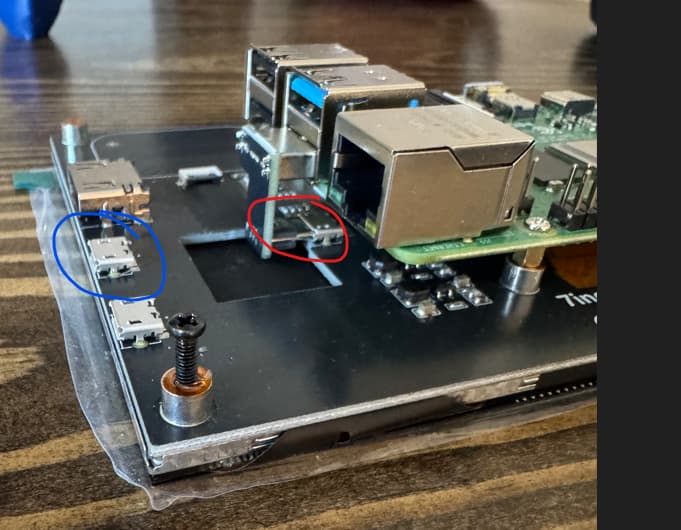
I purchased the below touchscreen for my V5 running Klipper. I have another screen on my V4 with Klipper and it is running fine, although a different screen so it is not exactly the same.
In the pictures below, you can see this screen comes with some nifty USB ports (RED) and USB jumper modules to allow the Pi to mount directly and connect easily. However, when I use this USB module, I can no longer connect to Klipper. I can use the screen and move the machine and access files that have already been uploaded to the Pi, but there is no internet connection to the Pi anymore.
So I tried to then just use a standard USB cable and plug it into the BLUE port. Now I am fine. I can connect to Klipper as normal. Why would the RED port be giving me issues? Should I just let it go and move on with a normal USB cable instead of this jumper module? I just like how clean it keeps things.
Is it possible the clip is only connecting to the power leads of the USB port and not the data pins, or does it also send the screen touch data to the pi?
Yes I have full control (touch and communication) between the screen and the Pi. I can operate the Pi with the screen to move and control the printer. I can also access files to print but they are just local files that have already been uploaded to the Pi through Klipper before.
The kernel log probably has a clue. sudo dmesg -w and then plug in the dodgy USB cable to see what the error is. If the problem only happens when the USB is plugged in at startup, you can compare the dmesg logs from a clean or bad startup.
Some other things that come to mind:
Try a differenr USB cable on the red port. That would eliminate the USB jumper or those ports.
It may be a power issue. If the screen is getting power from USB, then maybe it is drawing more on the red USB port and you’re having problems with the network adapter.
ip a shows the network status. My guess is the wireless adapter (wlan0) is missing when the red port is plugged in. If it’s still there, or there are multiple wlans, that might be a clue too.