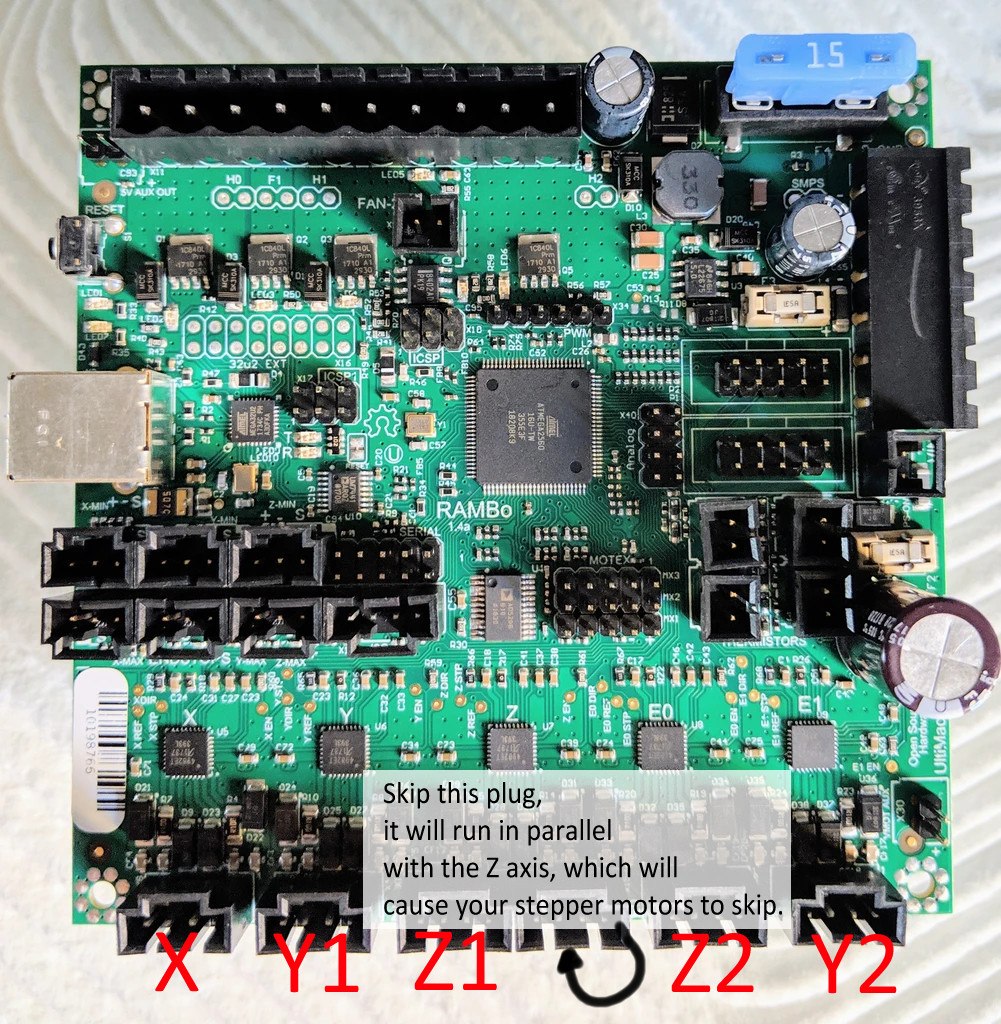
Aha. Yeah. Don’t put both Z motors on those plugs. Those are wired in parallel.
The easy fix is, wire the two Z motors in series:
The other way is to dig into the config and make it stop mirroring either the X or Y and switch it to Z. I don’t know the grbl configs very well. If you wanted to use Marlin, we do have a config for the low rider for the rambo with dual endstops.
Hahaha, but I want to make things difficult!
I’m more familiar with grbl, and would like to use it on other machines so I’m trying to get it to work. I’ll wire them in series for an easy fix, but I’d rather dig into the firmware to re-appropriate the mirrored X axis. Should I post my findings here in case someone else has this issue?
If you’re trying to use the grbl firmware for the MPCNC (found here) on the Lowrider there’s a few things you need to do.
After following the instructions in the link to install the grbl firmware navigate to the Arduino IDE libraries folder. (Usually C:\Users[username]\Documents\Arduino). Open the grbl folder and then open the config.h file using notepad/notepad++/etc.
Scroll down to line 72. You should see:
#define AXIS_4_NAME ‘X’ // Letter of axis number 4
Change the X to Z so line 72 reads:
#define AXIS_4_NAME ‘Z’ // Letter of axis number 4
Save this file, and then restart Arduino IDE. Navigate Files > Examples > grbl > grblUpload. Flash this to upload your edited firmware.
You’ll need to change the steps/mm value from 100 to 400. In UGS you do this by typing into the console: $103=400 and pressing enter.
Now you should be good to go! Make sure your motors are wired into the RAMBo correctly.