I wouldn’t think so, but you kinda have to do it now, for science!
I’m going with this. I still think the burn was from saw dust being rubbed against the bit. If you’re evacuating the saw dust better, then it would keep it from burning.
The end mills you bought are fine. I use both 2 flute and single fluted end mills. 2 fluted end mills should travel at a faster feed rate than single fluted. This is why single fluted end mills are popular with the MPCNC. The machine is designed to cut at a slower speed than what the 2 fluted end mills should really run at.
What this means is that instead of cutting ‘chips’, the 2FL end mills are producing more of a powdery saw dust. The powdery saw dust doesn’t pull heat away from the bit as well as cutting chips does, so all this adds up to a bit with black saw dust burned onto it. The bit is running hotter and the saw dust is more of a powder. Vaccuming up the saw dust will help pull it away from the bit. It also increases the air flow across the bit and can help cool it using air.
The 2FL end mills are easier to find. Ryan sells single flute bits in his store.
I’ve considered adding air assist to help keep the saw dust blown out of cuts just to help me get away with using the 2FL bits easier.
1 Like
Need is a subjective term… Simple answer is yes. The air assist helps blow the chips/dust out of the cutting zone. The vacuum sucks up all those chips/dust particles, and keeps them from getting into places they shouldn’t (gears, electronics, airflow, lungs, cat, clean laundry, etc.)
1 Like
Ok, got the holes drilled into my spoil board and I made a few 1/4 inch x 1.5 inch steel dowels to use as pins to wedge things against with shims when cutting. So far everything appears to be working great, here’s a photo of my successful attempts:
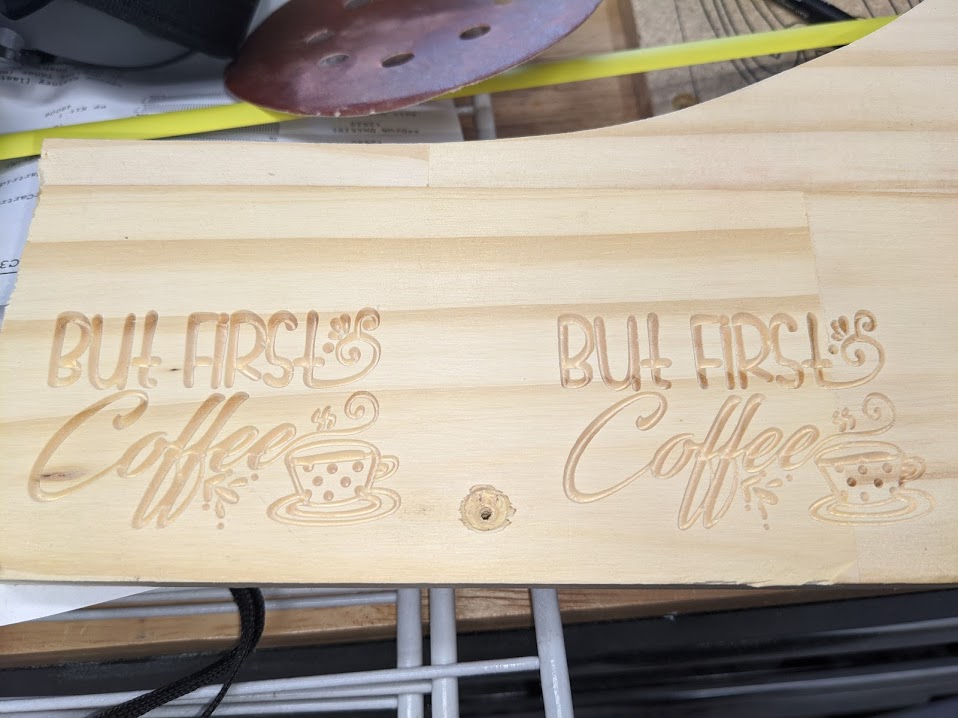
Each iteration of that sign is about 1.75 inches tall and about 2 inches wide.
The problem I’m having is, however, with CNC.js. Specifically:
- I can’t set the workpiece home. Everytime I try, I get an error in the console
- I can’t home from CNC.js. It just runs into the endstop switches and then keeps going
- Switching tools. I tried using a 1/8 inch end mill as the “carve pocketing tool” in ESTLCAM and it would pause for a tool change at the very beginning of the file but then wouldn’t go until I hit Play a couple of times and then it would just make a mess and then it appeared to be done (without asking for a tool change to the VCarve Bit).
I’m wondering if these are just things that aren’t supported by Marlin or if I have something wrong. Should I start a new thread in the Software/Firmware section or should I just accept that it doesn’t work and use work arounds?
At this point I think I’d say my build is complete and I get to just start using it regularly and get used to it.
Thanks to everyone for their help. I’ll post updates as things change.
2 Likes
This feature works in grbl, but I think it needs configuration in Marlin. There was a thread about it recently. I would also not be surprised if the gcode cnc.js sent was the wrong one, which we could fix with a PR, if we knew what to send. In the interim, you can make a macro.
Can you home otherwise? Have you checked that your endstops work with M119?
I haven’t experimented with pauses myself, but if you have the lcd, then the pause is going there. Even if you don’t have one, if it is configured for one, it is going there. There are reports that disabling the lcd makes it work, but I havent tried it. My work around is to just split the file into multiple files and run each tool in its own file.
1 Like
I do this as well. I’ve found it’s safer/easier to just create each tool as it’s own gcode. It also breaks up the project into multiple shorter steps time-wise.
2 Likes
Ok, I’ll have to take a look at that.
Yes, I can definitely home with the “home X/Y” on the LCD and that works perfectly. I haven’t tried M119, I guess I can try that later today.
I’ll have to try using this option then. I’m not in the mood to disable the the LCD just to test that.
Currently I’m using CNC.js almost like a DRO on the CNC. I have a monitor and keyboard connected to a Pi4 and am wondering if maybe using something else this way would be a better option. I read in a thread about a python based app that runs on the pi, but I can’t seem to find it at the moment (don’t have much time to search for it at the moment, should have more time this evening). Would this other software be a better choice?
I’m not sure what software you’re talking about. If you find it, let me know 
If home X/Y works on the LCD, then the button in CNC.js should work too. Except, the home all would home z too, which isn’t good, unless you have a Z endstop. It should be sending the same command, and Marlin should act the same. Not sure what could be causing that problem.