I know someone asked for yaml also, did you post it?
That’s not an issue. They were actual installed by Ryan.
Yaml is unchanged . Ive been running this machine for a few years now on first the primo, then the v3 and now the lr4. The only change (besides moving it to the LR) has been changing the lead screw settings waaaay back when i started.
I’m out of town so further investigation is on hold. I ended up ordering a new card so i can get the machine back up and running. I have a project that’s 1/2 way done and has ground to a halt when this started. I’ll mess with it further once it’s up and running again.
And you never posted the output, like everyone here asked. 
The only output I have from the terminal was posted 3 days ago. And as I keep saying, I’m trying to find how to use fluidterm.
Just download the latest release zip. It doesn’t matter if it’s the same version as you are using since FluidTerm is independent. I downloaded fluidnc-v3.9.9-win64.zip since I’m on Windows.
Release v3.9.9 · bdring/FluidNC
Connect the Jackpot to a computer via USB and run fluidterm.bat from the release (if you’re using Windows anyway).
It will prompt for a COM port:
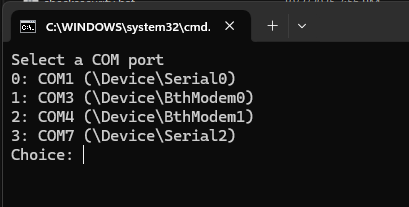
Mine is on COM7 so I enter 3.
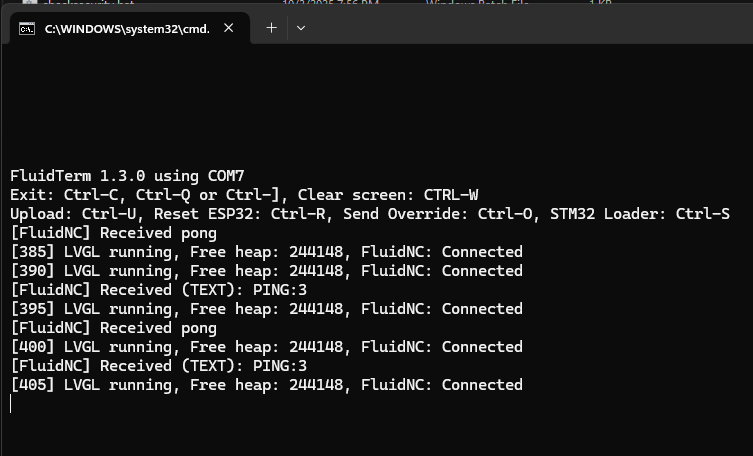
This happens to be from my pendant I’m working on but the idea is that it captures all the serial output. The WebUI may not have it all, especially if the controller is crashing.
Yeah, I’ve been beating my head against that for days and finally made a dent. In my head.
My laptop that I was running the cnc with very recently died, replaced it with my kids old school laptop. My old one, after months of trying to force me to update it, did the update behind my back and bricked itself. It OLD and it forced a massive update, and surprise surprise, it didn’'t go well.
On the new one, I’ve tried, a lot, to get it to run the batch file and it flat out won’t do it. It’s just opens a text box showing what the .bat is. So I go back and google some more, and try again, and fail again. I was trying to figure it out before I left, went cross state for the night and back, traffic was at a standstill both directions, and started on it again when I got home tonight.
So it finally clicked about an hour ago. It’s not a windows laptop, it’s a chromebook, which won’t run windows programs like batch files because it’s some version of linux. Of which I really know nothing about besides the fact it won’t work. Actually I know something else about linux, just learned it tonight. I hate it.
So I have found instructions on how to install a program called wine, which is supposed to run a series of commands to run the batch file. But I can’t find instructions on how to actually use it, except I finally found ‘open a command prompt’ and run it from there. Know what doesn’t have a command prompt? Linux. So now I have to find a way to get some kind of command prompt up, and then figure out how to navigate and find the batch file and then hope the stars align and it actually runs, because without running through that method, it won’t actually run.
Because my windows laptop, dead and stuck in a ‘whoops’ loop so I can’t use it. My windows desktop, in my office, my cnc, in my garage. So I can pull the card and run it on my desktop, but I can’t power the card up because my PS is firmly mounted inside my table, and I wouldn’t be able to run it to failure anyway because the cnc is adamant about not running by telepathy, or I can power it up in the garage and not be able to run the batch file. My computer will take an hour to pull out of my desk and I’m irritated and don’t want to do it.
I’m a little frustrated and closing in on downright bitchy at this point. I’ve probably passed that point actually.
Anyway, rant over. I ordered a jackpot 3 before I left and I’ll be switching it over once I receive it. If I can get the v1 working between now and then I’ll finish the insert (hopefully, god willing) and then switch it out anyway. I’ll either pass it on or keep it as a spare. If I can’t get it working I know a priest and I’ll see if I can talk him into an exorcism and a blessing.
But I need to step away. The skies are clear and the moon is waning, I’m going to try for a couple good photos and clear my head.
I feel your pain! I always struggle with software, hardware no problem. Clearing your head is the right thing to do. Good luck



Linux is a kernel.
Chromebooks run a funky variant of android which is an environment built on top of the Linux kernel.
Guaranteed frustration for someone who’s not a software expert.
Yeah, non-mainline linux kernel, almost none of the typical toolset available in a proper GNU/Linux distribution.
Yes, doing anything even slighlty complicated on a chromebook sucks, but that’s like saying Windows sucks because estlcam does not run on a modern xbox.
After all they are a very “funky” windows!
Linux is clearly different from windows, in some of these cases linux does things better, in some it does them worse, many just suck differently.
That can be frustrating even without the first linux expierence being a such a godawful “linux distribution” as chrome OS.
1 Like
As @MakerJim has said, Chromebooks run ChromeOS… which is built on top of Debian Linux. ChromeOS basically just provides a Chrome browser and your work is maintained in the “cloud”… natively, it’s quite locked down (you can’t install programs and malware) and that’s what makes them popular in schools.
That said, I used nicer Chromebooks almost exclusively for several years by enabling “developer mode”… which allows getting to the Debian Linux underneath. With the exception of part of your file system (specifically the “Downloads” directory) being in the cloud, it otherwise runs like a normal Debian Linux box… and I was able to install and run PrusaSlicer, Lightburn, and all non-browser-based programs I ever needed to use. Other than an extra file transfer from Downloads directory so that I could work on something locally, it worked as a normal Linux laptop. I never saw it as limited in any real way and was quite content with it. Only within the past year, I finally purchased a refurbed Acer laptop with better specs and promptly replaced the installed crapOS with Debian 13… and it runs very much the same way as the Chromebooks did.
Obviously, I do NOT recommend this for you… as you’re already frustrated and say you “hate” Linux. And, chances are, your kid’s old school Chromebook doesn’t have the specs to be a good candidate for running in developer mode anyway.
I’ve said all this to say that a decent Chromebook is not as bad as many folks seem to think… just don’t use it as a Chromebook. Enable developer mode and then use it pretty much as any other Linux laptop… just being mindful that your Downloads directory is out in the cloud and you’ll have to do an “extra” file transfer to do anything to it locally.
1 Like
There’s so much that is frustrating.
As an example, FluidTerm has a self-contained environment in the distributions of the *IX FluidNC offline installers. I bet it runs fine on Chrome OS.
But, to know that you have to know that. (sounds weird, but true)
If your experience with FluidTerm is double clicking the Windows .bat file and having it just run, then that failing on a different environment is very confusing and frustrating.
Almost certainly.
I’ve been inside the Boulder, Colorado google office complexes. There’s a room in the campus I was in with wire racks of chromebooks that get rotated out. Even Google has this issue 
It appears that Fluidterm is just a simplified serial terminal. You should be able to use PuTTY (but probably not on a Chromebook) or another serial terminal, instead, if that’s easier.
My entire linux experience up to this point has been getting klipper running on a raspberry pi, and that was 100% just following directions and copy/ pasting commands.
I’m fairly irritated with myself for taking so long to realize i wasn’t just working on a neutered version of windows.
I run vcarve on my desktop and then jumpdrive it out to the cnc computer to load and control. So for that the chrome works fine, and i had not even tried anything different with it until now.
Nice shot of the moon! Impressive!
Thank you. That one is with a 6" Dobson/newtonian. It’s me ‘good one’ which is still pretty darn basic. But I’ll show you something else in a minute…

The one in the back is the 6" mirror, up front is a 4" that I made myself. 3d printed it. Not my plans, but it works surprising well, including the mirrors <$50.
1 Like
Ok, this has been not at all painful… borrowed a laptop. And here is the much awaited for results. Top is a fresh restart and then up/down until failure, ran it again. I did this as board powered on, then connected the usb, then reset, left it connected until failure and reset again. ONLY the 2 z steppers are plugged in so any x/y info should be extraneous.
Is this everything or do I need to reconnect and do something different?
FluidTerm 1.3.0 using COM4
Exit: Ctrl-C, Ctrl-Q or Ctrl-], Clear screen: CTRL-W
Upload: Ctrl-U, Reset ESP32: Ctrl-R, Send Override: Ctrl-O, STM32 Loader: Ctrl-S
Resetting MCU
Resetting Done
ets Jul 29 2019 12:21:46
rst:0x1 (POWERON_RESET),boot:0x13 (SPI_FAST_FLASH_BOOT)
configsip: 0, SPIWP:0xee
clk_drv:0x00,q_drv:0x00,d_drv:0x00,cs0_drv:0x00,hd_drv:0x00,wp_drv:0x00
mode:DIO, clock div:1
load:0x3fff0030,len:1184
load:0x40078000,len:13260
load:0x40080400,len:3028
entry 0x400805e4
ets Jul 29 2019 12:21:46
rst:0x1 (POWERON_RESET),boot:0x13 (SPI_FAST_FLASH_BOOT)
configsip: 0, SPIWP:0xee
clk_drv:0x00,q_drv:0x00,d_drv:0x00,cs0_drv:0x00,hd_drv:0x00,wp_drv:0x00
mode:DIO, clock div:1
load:0x3fff0030,len:1184
load:0x40078000,len:13260
load:0x40080400,len:3028
entry 0x400805e4
[MSG:INFO: uart_channel0 created]
[MSG:RST]
[MSG:INFO: FluidNC v3.8.3 GitHub - bdring/FluidNC: The next generation of motion control firmware]
[MSG:INFO: Compiled with ESP32 SDK:v4.4.7-dirty]
[MSG:INFO: Local filesystem type is littlefs]
[MSG:INFO: Configuration file:config.yaml]
[MSG:ERR: Ignored key user_inputs]
[MSG:ERR: Skipping key analog0_pin indent 2 this indent 0]
[MSG:ERR: Skipping key analog1_pin indent 2 this indent 0]
[MSG:ERR: Skipping key analog2_pin indent 2 this indent 0]
[MSG:ERR: Skipping key analog3_pin indent 2 this indent 0]
[MSG:ERR: Skipping key digital0_pin indent 2 this indent 0]
[MSG:ERR: Skipping key digital1_pin indent 2 this indent 0]
[MSG:ERR: Skipping key digital2_pin indent 2 this indent 0]
[MSG:ERR: Skipping key digital3_pin indent 2 this indent 0]
[MSG:ERR: Skipping key digital4_pin indent 2 this indent 0]
[MSG:ERR: Skipping key digital5_pin indent 2 this indent 0]
[MSG:ERR: Skipping key digital6_pin indent 2 this indent 0]
[MSG:ERR: Skipping key digital7_pin indent 2 this indent 0]
[MSG:WARN: Increasing stepping/pulse_us to the IS2 minimum value 4]
[MSG:INFO: Machine LowRider]
[MSG:INFO: Board Jackpot TMC2209]
[MSG:INFO: UART1 Tx:gpio.0 Rx:gpio.4 RTS:NO_PIN Baud:115200]
[MSG:INFO: I2SO BCK:gpio.22 WS:gpio.17 DATA:gpio.21]
[MSG:INFO: SPI SCK:gpio.18 MOSI:gpio.23 MISO:gpio.19]
[MSG:INFO: SD Card cs_pin:gpio.5 detect:NO_PIN freq:20000000]
[MSG:INFO: Stepping:I2S_static Pulse:4us Dsbl Delay:0us Dir Delay:1us Idle Delay:255ms]
[MSG:INFO: User Digital Output:0 on Pin:gpio.26]
[MSG:INFO: User Digital Output:1 on Pin:gpio.27]
[MSG:INFO: Axis count 3]
[MSG:INFO: Axis X (3.000,1223.000)]
[MSG:INFO: Motor0]
[MSG:INFO: tmc_2209 UART1 Addr:0 CS:NO_PIN Step:I2SO.2 Dir:I2SO.1 Disable:I2SO.0 R:0.110]
[MSG:INFO: X Neg Limit gpio.25]
[MSG:INFO: Axis Y (3.000,2443.000)]
[MSG:INFO: Motor0]
[MSG:INFO: tmc_2209 UART1 Addr:1 CS:NO_PIN Step:I2SO.5 Dir:I2SO.4 Disable:I2SO.7 R:0.110]
[MSG:INFO: Y Neg Limit gpio.33]
[MSG:INFO: Motor1]
[MSG:INFO: tmc_2209 UART1 Addr:3 CS:I2SO.14 Step:I2SO.13 Dir:I2SO.12 Disable:I2SO.15 R:0.110]
[MSG:INFO: Y2 Neg Limit gpio.35]
[MSG:INFO: Axis Z (-297.000,3.000)]
[MSG:INFO: Motor0]
[MSG:INFO: tmc_2209 UART1 Addr:2 CS:NO_PIN Step:I2SO.10 Dir:I2SO.9 Disable:I2SO.8 R:0.110]
[MSG:INFO: Z Pos Limit gpio.32]
[MSG:INFO: Motor1]
[MSG:INFO: tmc_2209 UART1 Addr:3 CS:I2SO.22 Step:I2SO.21 Dir:I2SO.20 Disable:I2SO.23 R:0.110]
[MSG:INFO: Z2 Pos Limit gpio.34]
[MSG:INFO: X Axis driver test passed]
[MSG:INFO: Y Axis driver test passed]
[MSG:INFO: Y2 Axis driver test passed]
[MSG:INFO: Z Axis driver test passed]
[MSG:INFO: Z2 Axis driver test passed]
[MSG:INFO: Kinematic system: Cartesian]
[MSG:INFO: STA SSID is not set]
[MSG:INFO: AP SSID FluidNC IP 192.168.0.1 mask 255.255.255.0 channel 1]
[MSG:INFO: AP started]
[MSG:INFO: WiFi on]
[MSG:INFO: Captive Portal Started]
[MSG:INFO: HTTP started on port 80]
[MSG:INFO: Telnet started on port 23]
Grbl 3.8 [FluidNC v3.8.3 (wifi) ‘$’ for help]
[MSG:ERR: Configuration is invalid. Check boot messages for ERR’s.]
[MSG:INFO: WebUI: Request from 192.168.0.2]
[MSG:INFO: WebUI: Request from 192.168.0.2]
Grbl 3.8 [FluidNC v3.8.3 (wifi) ‘$’ for help]
[MSG:WARN: Active limit switch on X axis motor 0]
[MSG:WARN: Active limit switch on Y axis motor 0]
[MSG:WARN: Active limit switch on Y axis motor 1]
[MSG:WARN: Active limit switch on Z axis motor 0]
[MSG:WARN: Active limit switch on Z axis motor 1]
Resetting MCU
Resetting Done
ets Jul 29 2019 12:21:46
rst:0x1 (POWERON_RESET),boot:0x13 (SPI_FAST_FLASH_BOOT)
configsip: 0, SPIWP:0xee
clk_drv:0x00,q_drv:0x00,d_drv:0x00,cs0_drv:0x00,hd_drv:0x00,wp_drv:0x00
mode:DIO, clock div:1
load:0x3fff0030,len:1184
load:0x40078000,len:13260
load:0x40080400,len:3028
entry 0x400805e4
ets Jul 29 2019 12:21:46
rst:0x1 (POWERON_RESET),boot:0x13 (SPI_FAST_FLASH_BOOT)
configsip: 0, SPIWP:0xee
clk_drv:0x00,q_drv:0x00,d_drv:0x00,cs0_drv:0x00,hd_drv:0x00,wp_drv:0x00
mode:DIO, clock div:1
load:0x3fff0030,len:1184
load:0x40078000,len:13260
load:0x40080400,len:3028
entry 0x400805e4
[MSG:INFO: uart_channel0 created]
[MSG:RST]
[MSG:INFO: FluidNC v3.8.3 GitHub - bdring/FluidNC: The next generation of motion control firmware]
[MSG:INFO: Compiled with ESP32 SDK:v4.4.7-dirty]
[MSG:INFO: Local filesystem type is littlefs]
[MSG:INFO: Configuration file:config.yaml]
[MSG:ERR: Ignored key user_inputs]
[MSG:ERR: Skipping key analog0_pin indent 2 this indent 0]
[MSG:ERR: Skipping key analog1_pin indent 2 this indent 0]
[MSG:ERR: Skipping key analog2_pin indent 2 this indent 0]
[MSG:ERR: Skipping key analog3_pin indent 2 this indent 0]
[MSG:ERR: Skipping key digital0_pin indent 2 this indent 0]
[MSG:ERR: Skipping key digital1_pin indent 2 this indent 0]
[MSG:ERR: Skipping key digital2_pin indent 2 this indent 0]
[MSG:ERR: Skipping key digital3_pin indent 2 this indent 0]
[MSG:ERR: Skipping key digital4_pin indent 2 this indent 0]
[MSG:ERR: Skipping key digital5_pin indent 2 this indent 0]
[MSG:ERR: Skipping key digital6_pin indent 2 this indent 0]
[MSG:ERR: Skipping key digital7_pin indent 2 this indent 0]
[MSG:WARN: Increasing stepping/pulse_us to the IS2 minimum value 4]
[MSG:INFO: Machine LowRider]
[MSG:INFO: Board Jackpot TMC2209]
[MSG:INFO: UART1 Tx:gpio.0 Rx:gpio.4 RTS:NO_PIN Baud:115200]
[MSG:INFO: I2SO BCK:gpio.22 WS:gpio.17 DATA:gpio.21]
[MSG:INFO: SPI SCK:gpio.18 MOSI:gpio.23 MISO:gpio.19]
[MSG:INFO: SD Card cs_pin:gpio.5 detect:NO_PIN freq:20000000]
[MSG:INFO: Stepping:I2S_static Pulse:4us Dsbl Delay:0us Dir Delay:1us Idle Delay:255ms]
[MSG:INFO: User Digital Output:0 on Pin:gpio.26]
[MSG:INFO: User Digital Output:1 on Pin:gpio.27]
[MSG:INFO: Axis count 3]
[MSG:INFO: Axis X (3.000,1223.000)]
[MSG:INFO: Motor0]
[MSG:INFO: tmc_2209 UART1 Addr:0 CS:NO_PIN Step:I2SO.2 Dir:I2SO.1 Disable:I2SO.0 R:0.110]
[MSG:INFO: X Neg Limit gpio.25]
[MSG:INFO: Axis Y (3.000,2443.000)]
[MSG:INFO: Motor0]
[MSG:INFO: tmc_2209 UART1 Addr:1 CS:NO_PIN Step:I2SO.5 Dir:I2SO.4 Disable:I2SO.7 R:0.110]
[MSG:INFO: Y Neg Limit gpio.33]
[MSG:INFO: Motor1]
[MSG:INFO: tmc_2209 UART1 Addr:3 CS:I2SO.14 Step:I2SO.13 Dir:I2SO.12 Disable:I2SO.15 R:0.110]
[MSG:INFO: Y2 Neg Limit gpio.35]
[MSG:INFO: Axis Z (-297.000,3.000)]
[MSG:INFO: Motor0]
[MSG:INFO: tmc_2209 UART1 Addr:2 CS:NO_PIN Step:I2SO.10 Dir:I2SO.9 Disable:I2SO.8 R:0.110]
[MSG:INFO: Z Pos Limit gpio.32]
[MSG:INFO: Motor1]
[MSG:INFO: tmc_2209 UART1 Addr:3 CS:I2SO.22 Step:I2SO.21 Dir:I2SO.20 Disable:I2SO.23 R:0.110]
[MSG:INFO: Z2 Pos Limit gpio.34]
[MSG:INFO: X Axis driver test passed]
[MSG:INFO: Y Axis driver test passed]
[MSG:INFO: Y2 Axis driver test passed]
[MSG:INFO: Z Axis driver test passed]
[MSG:INFO: Z2 Axis driver test passed]
[MSG:INFO: Kinematic system: Cartesian]
[MSG:INFO: STA SSID is not set]
[MSG:INFO: AP SSID FluidNC IP 192.168.0.1 mask 255.255.255.0 channel 1]
[MSG:INFO: AP started]
[MSG:INFO: WiFi on]
[MSG:INFO: Captive Portal Started]
[MSG:INFO: HTTP started on port 80]
[MSG:INFO: Telnet started on port 23]
Grbl 3.8 [FluidNC v3.8.3 (wifi) ‘$’ for help]
[MSG:ERR: Configuration is invalid. Check boot messages for ERR’s.]